Build the thrust stand
This procedure builds the thrust stand. The reference page has the parts, the pinouts and the safety rules. Thrust stand safety design gives the reasons for the rules.
Before you start
Section titled “Before you start”- Read Thrust stand safety design before you assemble the box.
- Get Ryan’s approval of a written test plan before a motor turns at power.
- Record the AM32 settings of each ESC that you borrow from the aircraft before you change anything.
- Restore those settings before the ESC goes back into the aircraft.
Stage 1: Print and prepare the parts
Section titled “Stage 1: Print and prepare the parts”- Print the parts plate: the motor bracket, the pillar, two XT90 panel mounts and the insert coupon.
- Print the lid, top face down, with no supports.
- Print the four feet in TPU, pad face down.
- Print the tub after the insert coupon gives the correct insert hole.
- Drill the pillar’s horizontal 4.1 mm holes to 4.2 to 4.3 mm, so that M4 bolts go through.
Check:
- Push a pin or a drill shank of about 9.8 mm through the bracket’s centre hole from each face. If it binds part of the way, the printer shifted a layer. Record the height where it binds.
- Push a 3.1 mm gauge through each motor slot from each face. A slot that binds from both faces has a layer shift in it.
Stage 2: Assemble the stand
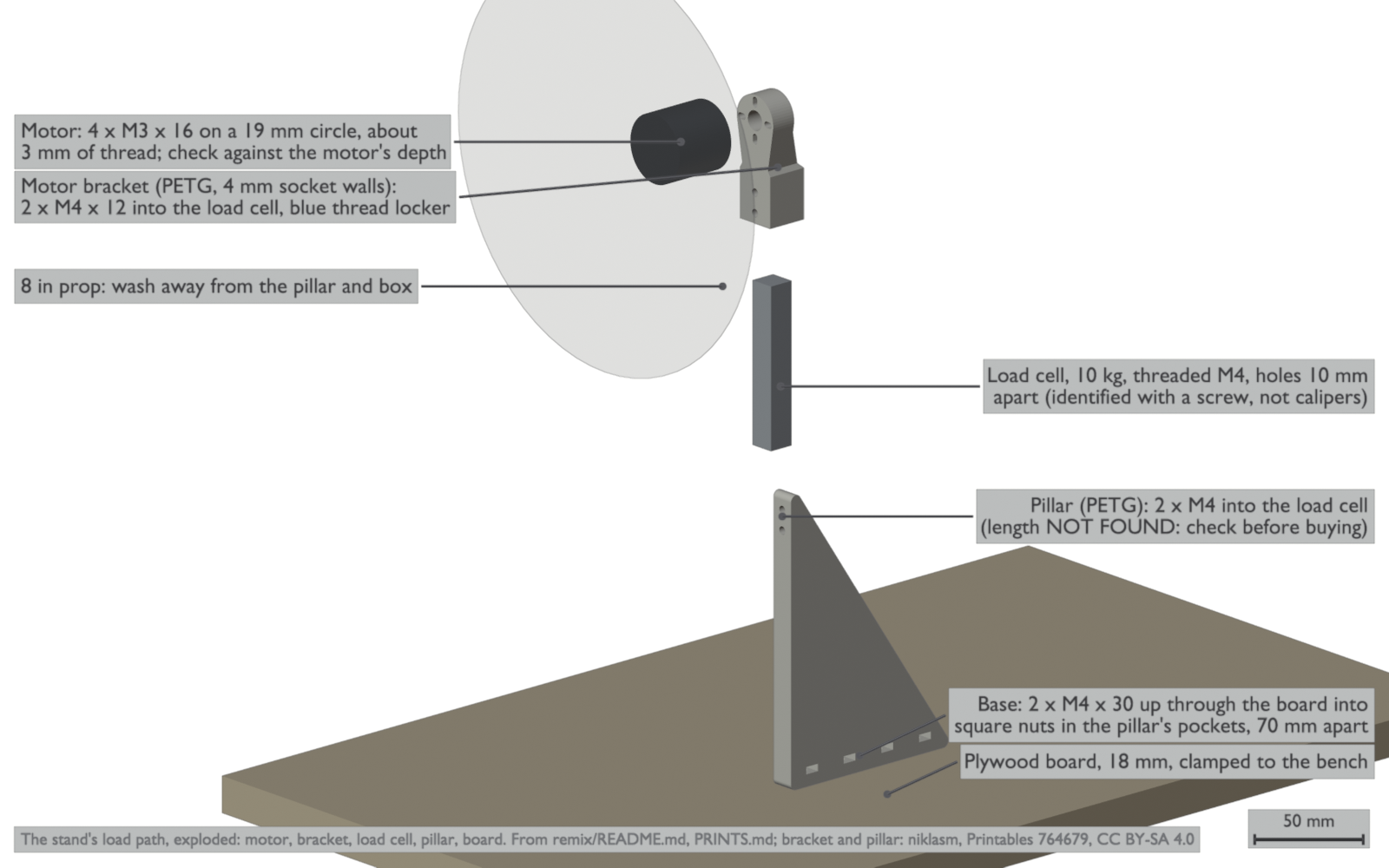
Section titled “Stage 2: Assemble the stand”- Drill two holes for M4 bolts in the 18 mm plywood board, 70 mm apart.
- Counterbore the holes from below, so that the bolt heads are below the board’s lower face.
- Put an M4 square nut into each of the pillar’s two base pockets that align with the holes.
- Attach the pillar to the board with two M4 × 30 bolts from below.
- Put a drop of medium-strength (blue) thread locker on the threads of two M4 bolts. The bolt length for this joint is not found: measure it before you buy bolts.
- Attach the load cell to the pillar with those two bolts.
- Put the load cell into the bracket’s bore.
- Put a drop of thread locker on the threads of two M4 × 12 bolts.
- Attach the bracket to the load cell with those two bolts.
- Measure the depth of the motor’s mounting threads.
- Make sure that the M3 screws are shorter than that depth, so that they do not touch the motor’s windings.
- Attach the motor to the bracket with four M3 screws on the 19 mm circle.
- Clamp the board to the bench.
Check:
- Push the motor by hand in each direction. The stand must not move on the board.
- The motor axis must be 230 mm above the board.
Stage 3: Build the box
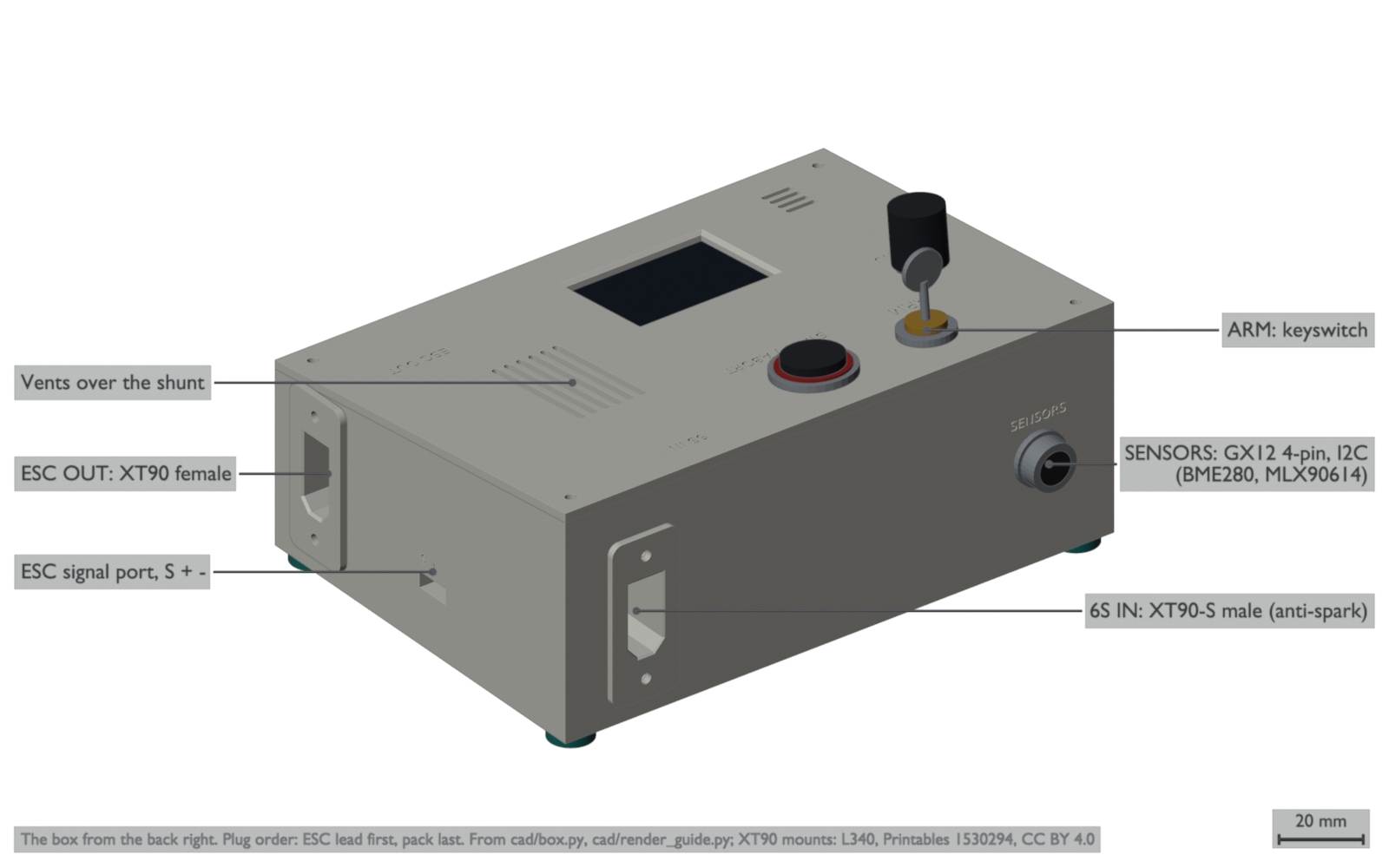
Section titled “Stage 3: Build the box”The box has no screw flanges. It stands free on its four TPU feet (Ryan, 2026-10-19).
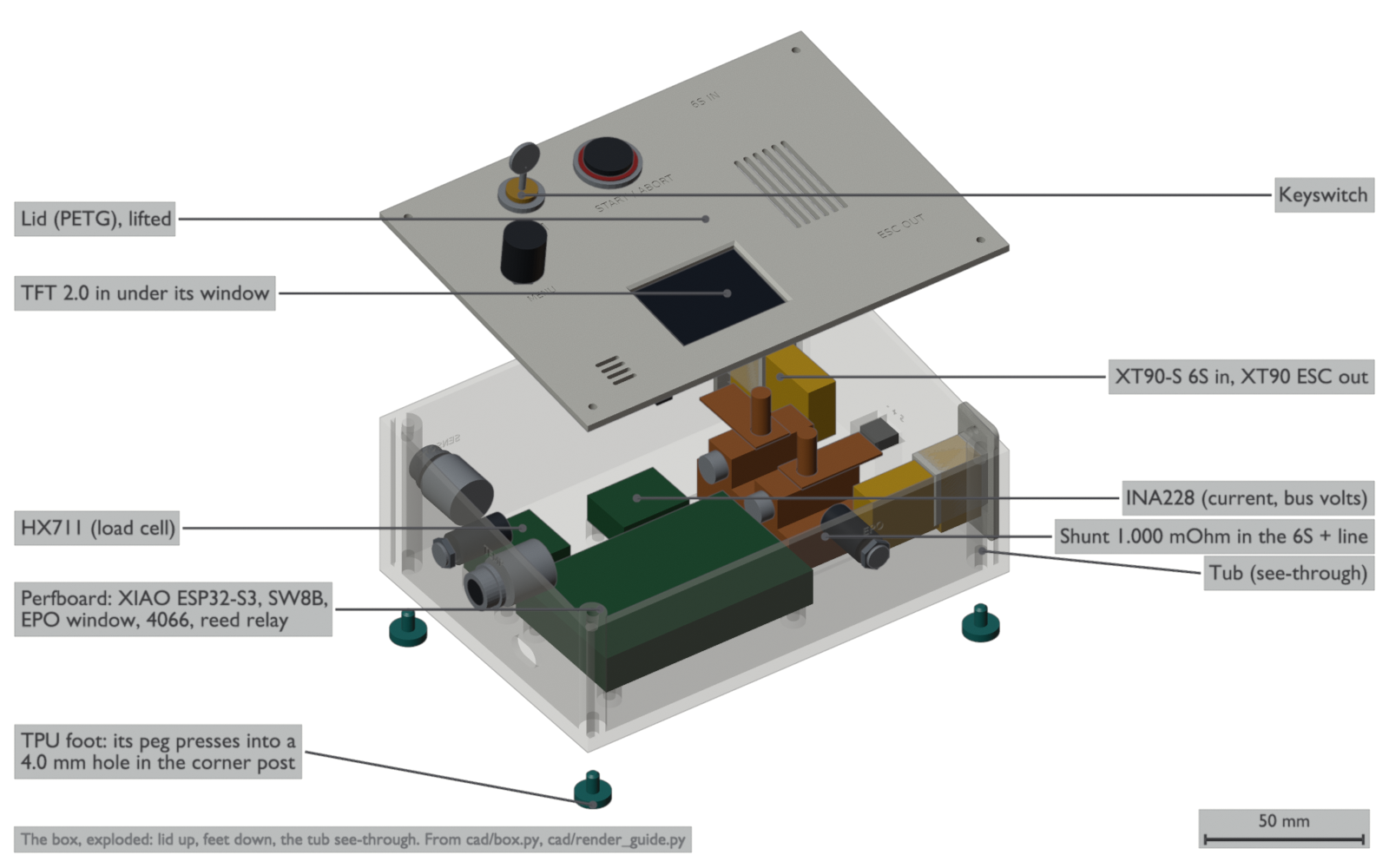
- Press the M2.5 heat-set inserts into the tub’s posts and corner bosses.
- Attach each XT90 panel mount to its wall with two M3 × 10 screws and nuts.
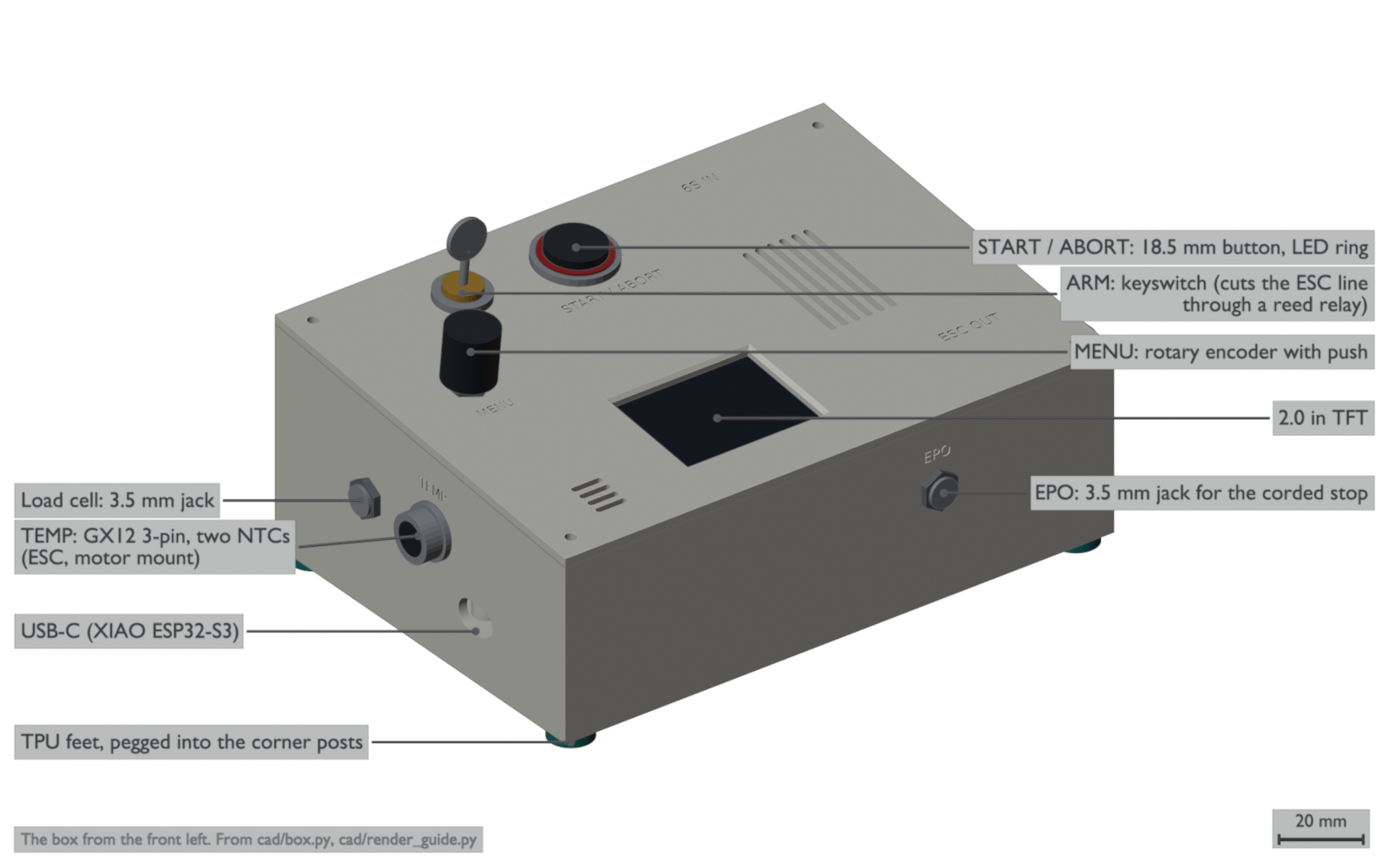
- Press each XT90 connector into its mount: the XT90-S male on the back wall, the female on the right wall.
- Attach the load-cell jack (3.5 mm) to the left wall.
- Attach the emergency stop jack (3.5 mm) to the front wall.
- Attach the TEMP connector (3-pin GX12) to the left wall.
- Attach the SENSORS connector (4-pin GX12) to the back wall.
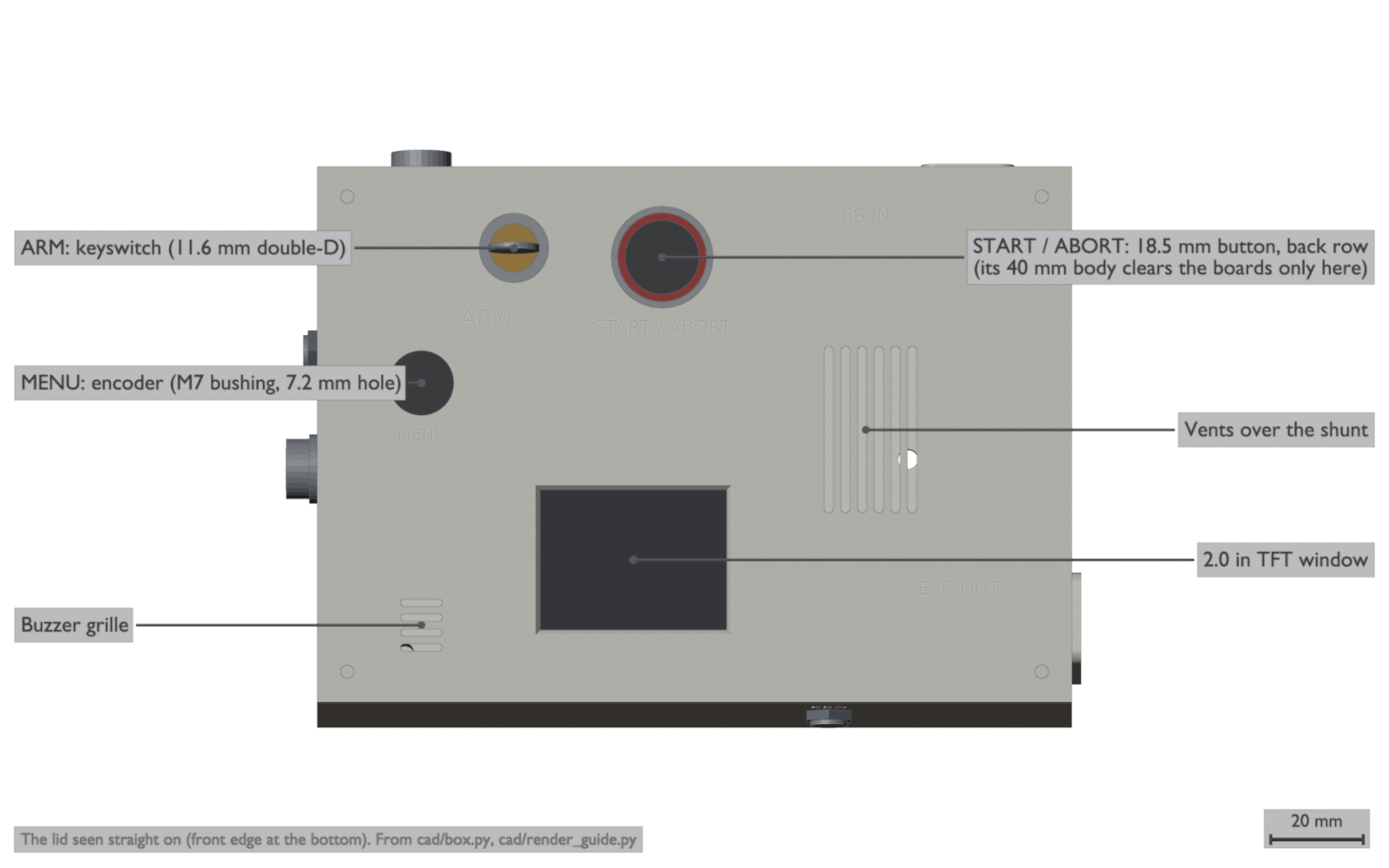
- Put the keyswitch, the start and abort button and the encoder into the lid.
- Attach the TFT to the lid’s four bosses with M2 self-tapping screws.
- Attach the perfboard, the HX711 board and the INA228 board to their posts with M2.5 screws.
- Press a TPU foot into the hole under each corner of the tub.
Check:
- Put the lid on the tub. It must sit flat on the four bosses.
- The box must stand on its four feet and must not rock.
Stage 4: Wire the box
Section titled “Stage 4: Wire the box”The safety diagram shows the ESC signal chain and the two cuts. Figures for the wiring stages follow.
- Wire the battery path in 10 AWG from the XT90-S input, through the shunt in the positive line, to the XT90 output.
- Connect the 2 A fused tap and the TVS diode to the 5 V regulator.
- Wire the ESC signal chain as the safety diagram shows: GPIO1, the 47 Ω resistor, the 4066 section, the reed contact, the ESC signal pin.
- Connect the 2.2k pull-up on the ESC side of the reed contact.
- Do not connect the ESC port’s + pin.
- Use a meter to find which plug contact touches which pin on one 3.5 mm jack.
- Wire the load-cell jack: A+ to pin 2, A− to pin 3, E+ to pin 4, E− to pin 1.
- Wire the emergency stop jack: SENSE to pin 2, GND to pin 1.
- Wire the TEMP and SENSORS connectors.
- Put the 100 Ω resistor in series with the SENSORS connector’s 3V3 pin.
Check:
- Disconnect each ESC and measure its signal pad. It must read more than 10 kΩ to GND and to its 3.3 V.
- Measure the emergency stop cord between tip and sleeve with the button released. It must read 10 kΩ.
- Push the button and measure again. It must read open.
Stage 5: Flash the box and check its sensors
Section titled “Stage 5: Flash the box and check its sensors”Connect the box to the computer with USB only. Do not connect an ESC or a pack.
- Flash the bench build of the firmware.
- Open the serial monitor.
- Make sure that the status line shows the INA228, the HX711, the Serial Wombat and each sensor.
- If the status line shows 10 samples a second, move the HX711 board’s rate link from the “10Hz” pads to the “80Hz” pads.
- Turn the encoder one detent. Record the count.
- Turn the key to ARMED and then to SAFE. Make sure that the status line follows the key.
- Push the emergency stop button. Make sure that the status line shows the emergency stop out of its window.
- Disconnect the emergency stop cord. Make sure that the status line shows the emergency stop out of its window.
- Connect the cord and turn the key to ARMED. Make sure that the chain reads closed.
Check: the status line shows no latched fault after the key goes to SAFE and back to ARMED.
Stage 6: Check the ESC signal without an ESC
Section titled “Stage 6: Check the ESC signal without an ESC”Connect a logic analyser to the ESC port. Do not connect an ESC.
- Make sure that the signal stays high with no pulses at power-up.
- Make sure that the signal stays high with no pulses with the key at SAFE.
- Turn the key to ARMED and start a test. Make sure that the DShot frames start at zero throttle.
- Push the emergency stop button during the test. Make sure that the frames stop.
- Start a new test. Turn the key to SAFE during the test. Make sure that the frames stop.
Check: each abort stops the frames, and the box does not start again until the key goes to SAFE and back to ARMED.
Stage 7: First spin
Section titled “Stage 7: First spin”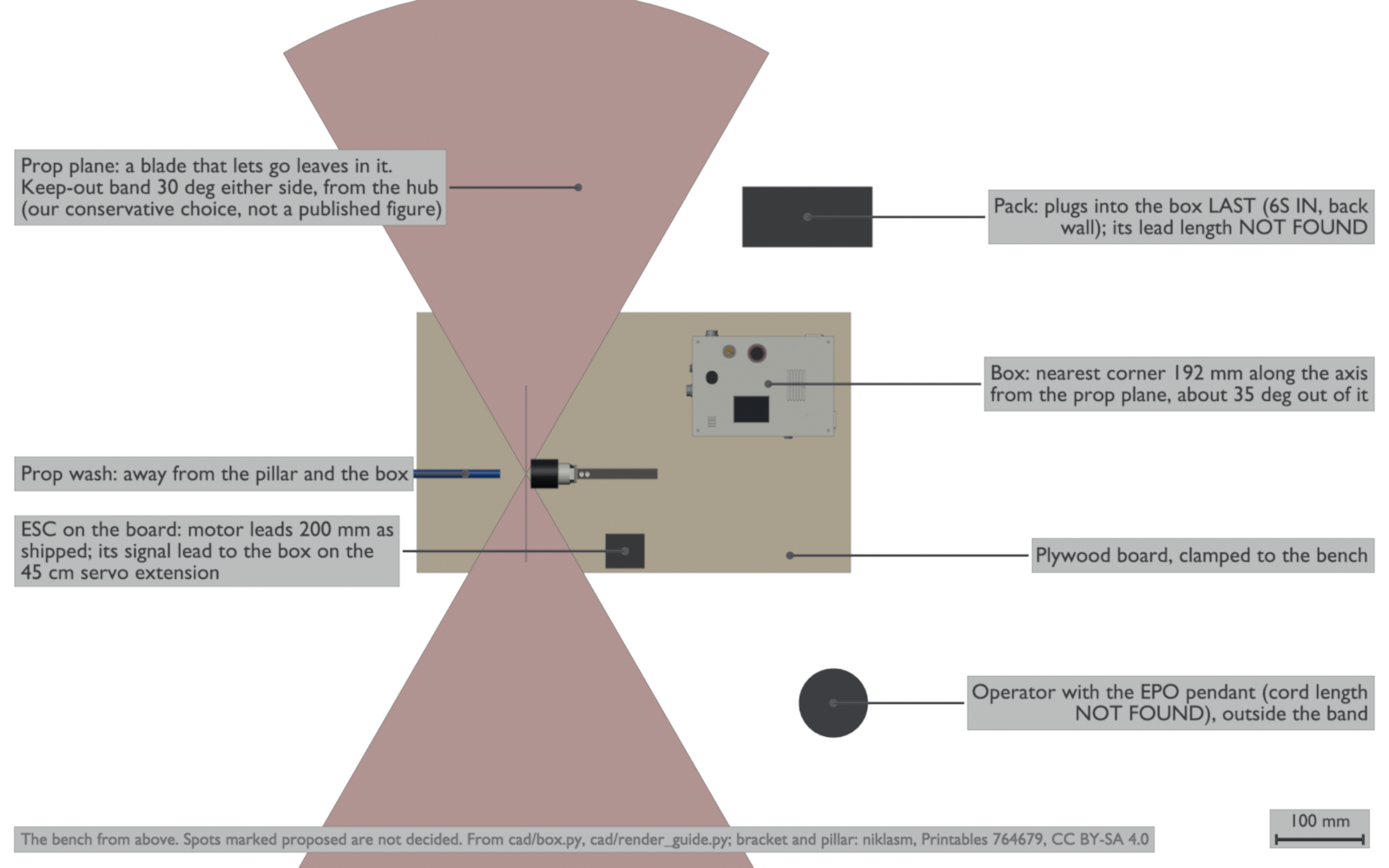
- Make sure that the box, the operator, the emergency stop pendant and the pack are outside the band 30° either side of the prop’s plane, measured from the hub.
- Install the prop so that its wash blows away from the pillar and the box.
- Connect the ESC lead to the box first.
- Connect the pack to the box last.
- Turn the key to ARMED.
- Follow the test plan. Never run the 3-blade lift prop above the 0.82 duty cap. Increase the cap in steps of 0.01 only while the current stays under 49 A.
Check: at low throttle the current must read positive. If it reads negative, the shunt is in backwards: stop the test and correct it.
Sources
Section titled “Sources”The steps come from thrust-stand’s notes: the box design (docs/esp32-box.md), the firmware and its bring-up order (docs/firmware.md), the remix notes (remix/README.md), the print notes (PRINTS.md) and the stand’s hardware facts. That repository is not public yet. The motor screw rule comes from the parts list row 1, and the duty cap from Propulsion.
Comments
Comment on the whole page here, or on one section or step with the button beside it.