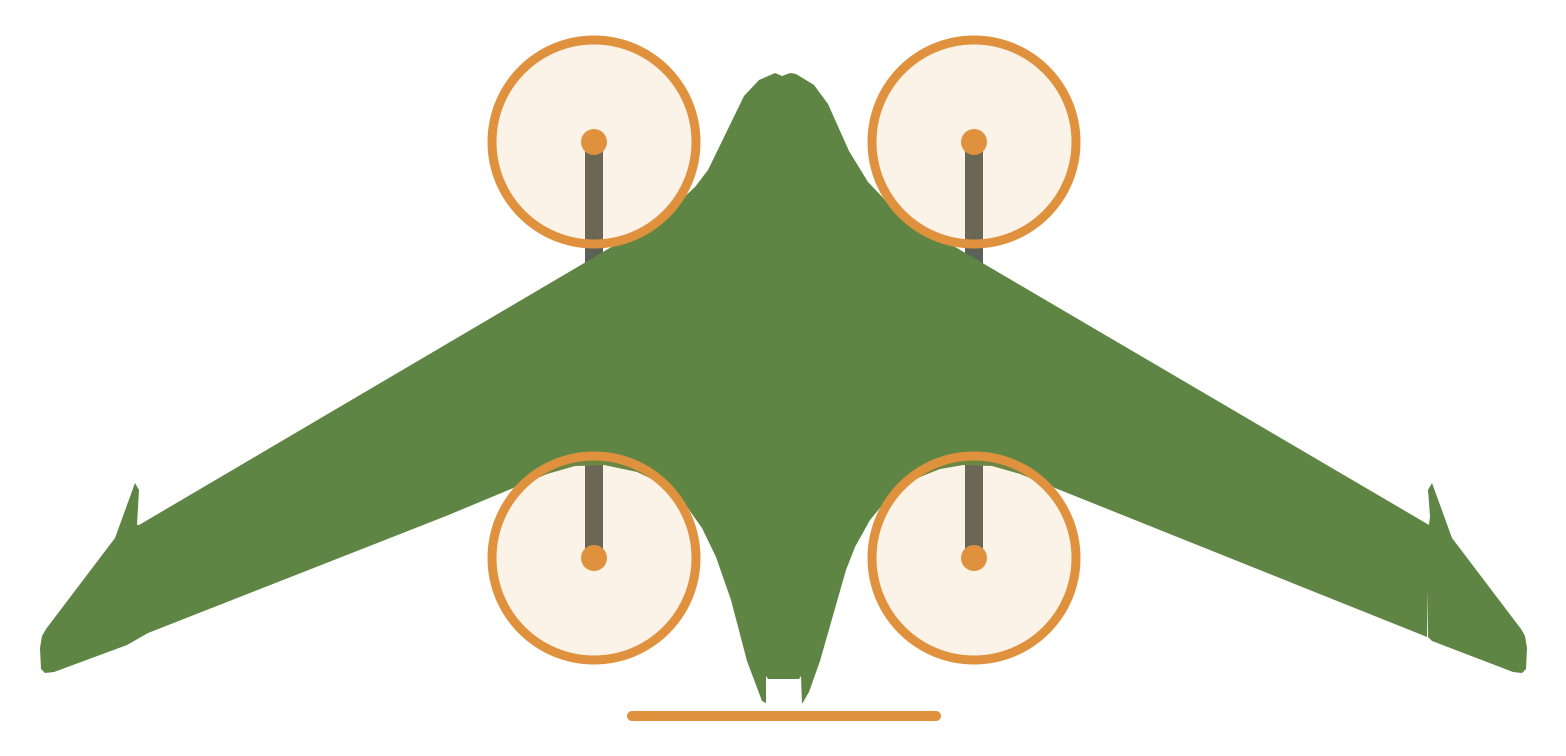
From STL pack to maiden flight
This walks the whole build, start to finish, in the order the work actually happens. Each stage points to the page with the detail and ends with something you can see or measure. Don’t start the next stage until that check passes. The assembly manual still gives the steps for the parts that it covers. This path follows it where those parts are still used, plus everything we measured, priced and decided along the way.
If you are new to the aircraft, these two videos from its makers are a good half hour before you start.
 14 minI Designed A VTOL Drone Anyone Can 3D Print & FlyThe TerraHawk, from the people who designed it.
 13 minHow do Autonomous VTOL Drones Work? QuadPlanes ExplainedHover, transition and cruise, which the later steps set up.
-
Commit to one battery voltage.
This build is 6S. The manual’s ArduPilot values assume 6S, and the pusher’s winding depends on the voltage: 640KV on 6S, 900KV on 4S. So buy the whole powertrain for one voltage. The parts list has the 6S cart and keeps the 4S swaps for reference.
Check: the pusher in your cart is a 3115 at 640KV, and the lift motors are EMAX ECO II 2807 at 1300KV.
-
Order the slow parts first.
Some parts take a lot longer to arrive than others, and the cart was changed on 2026-09-27 to get around two of them: an EMAX ECO II 3115 in stock in place of the pre-order T-Motor V3115, and a Pixhawk 6C Mini in place of the backordered TBS Lucid H7 Wing. The first flights now use a Lumenier LUX F765 NDAA (decided 2026-10-04). The lift motors fly first on a TBS Lucid 4-in-1 ESC (decided 2026-09-29), since 2026-10-04 the 60A 3-8S model. The Vimdrones S50 DroneCAN ESCs that follow it, one at each motor pod, can be ordered, but their stock is not known. The carbon also takes planning, because the 8 mm order is 1950 mm of cuts from a 2000 mm tube. Order and cut the spars covers both carts. Source the hardware covers the screws, glue and the things nobody lists, like a charger.
Check: the 14 mm tube is sold as a true 14.0 mm OD (matte finish), and the 8 mm tube is pultruded, not CST’s 8 × 7.
-
Set up the printer and print a test wing tip.
Dry the PLA Aero at 55 °C for 8 hours. Build the “PLA Aero - TerraHawk” profile from Print on a Core One+: 0.60 extrusion multiplier, pressure advance off with
M572 S0, one perimeter, and “Ensure vertical shell thickness” disabled. Then print the Dowel Coupon first (platelw-Dowel Coupon, about 47 minutes): push 1.75 mm filament into each of its five holes, and the smallest hole that takes it by hand with a light push and no wobble sets the dowel hole size for the glued joints. Then print bedg01, a single Wing Tip.Check: the preview and the part both show one perimeter, the foaming is even, and the 8.8 mm and 6.9 mm spar holes come out round. If it’s soft, stringy or over-foamed, fix the profile now, because every other LW bed inherits it.
-
Print the PETG hardware and the cutting tools.
The PETG beds,
g11tog13, are quick, and they hold the parts the next stages need. That includes the VTOL cutting tools used to drill the spars.Check: the VTOL Motor Mounts are printed at the manual’s angle, and the 14 mm bores take the spar with about 0.3 mm to spare.
-
Print the airframe on the schedule.
Follow the print timeline, which lays the grouped beds out day by day on one printer. The Survey3 camera is in the first build (decided 2026-09-28), so print the Survey3 Fuselage Mid (
g03) and belly mount (g12) in place of the stock versions.Check:
- All 51 parts are off the bed.
- Each mirrored pair has one left part and one right part.
-
Cut and drill the spars.
The spars are cut about 5 mm short, all except the VTOL and elevon spars, so the printed segments seat against each other.
- Mark all three 8 mm cuts before you make the first one.
- Cut each spar about 5 mm under the manual’s length. Do not cut the two elevon spars: use them at the full 350 mm. Our wing tip seats the spar end (th-main 0ce70375). Cut the VTOL spars to 416 mm, not the manual’s 420 mm: the keel B and front stilt B mounts stop the spar ends at Y 68 and Y 484 (order and cut the spars, th-main 436ab4f3).
- Drill the VTOL spars with a 3 mm bit on our VTOL Spar Jig. The jig locates the spar on the same end stops as the keel B and front stilt B mounts. Drill them only on this jig: a jig that stops the spar’s rear end at Y 488 puts the two horizontal mounting holes 4 mm out of place on a 416 mm spar. Ryan promoted the jig on 2026-10-16 (th-blender W62): print its three parts, the front part and the port and starboard rear parts, in PETG on their bottom faces (print job, about 3 h 22 min). Cut the wire slot against the rear part’s 45° land, Y 242 to 250.5, and file the spar’s cap flush with the land.
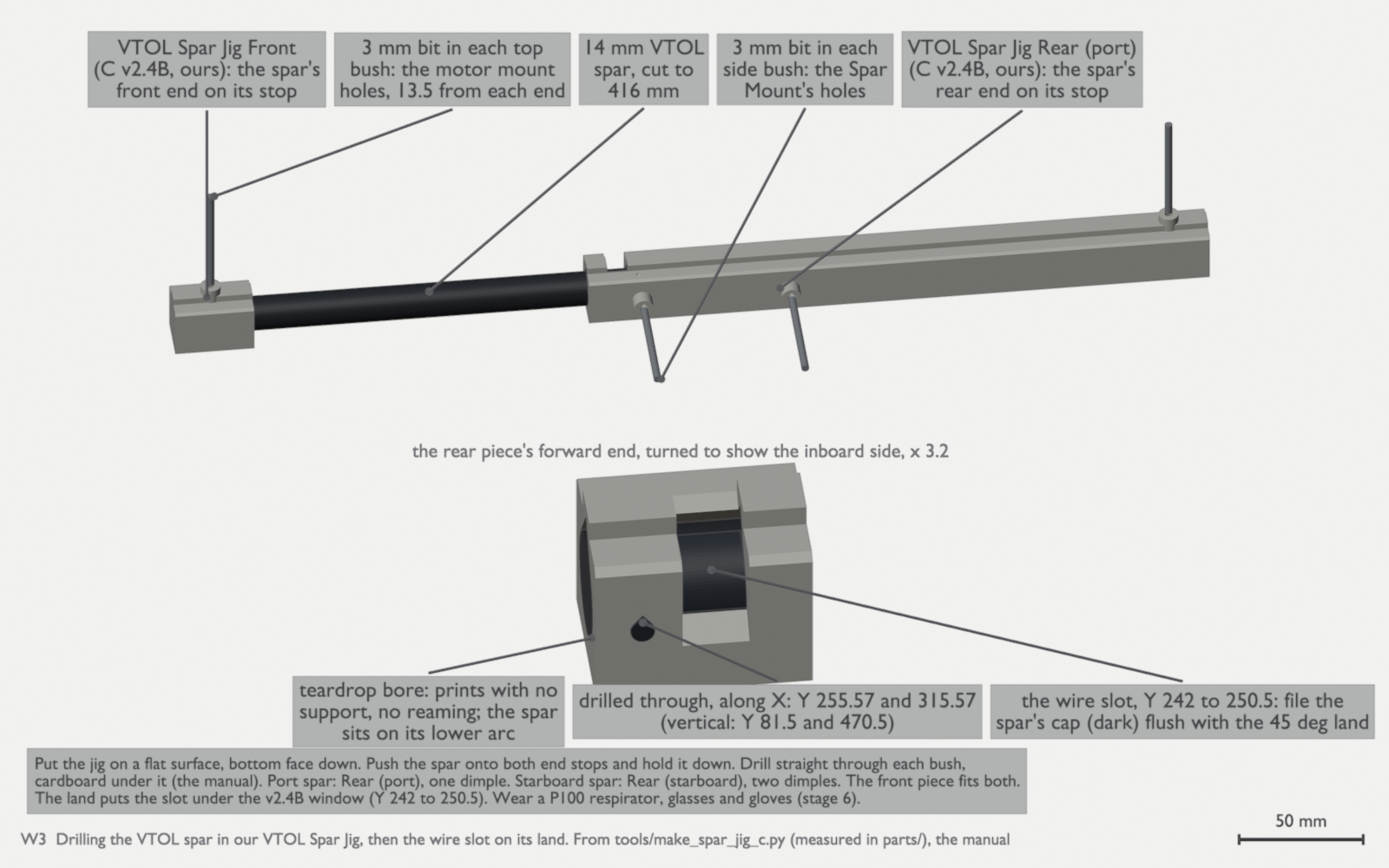
W3: drill the VTOL spar in our VTOL Spar Jig, then cut the wire slot on its land. The spar is 416 mm, held on the same end stops as the keel B and front stilt B mounts (th-blender W62, tools/make_spar_jig_c.py). Check:
- Rear fuselage spar: about 685 mm.
- Wing spars: about 625 mm.
- Elevon spars: 350 mm, uncut.
- VTOL spars: 416 mm.
-
Assemble the airframe.
Assemble the airframe in this order: the fuselage body, the VTOL Sections, the fuselage finish, the wings with their fences, the elevons, then the wing tips. Dry-fit every joint before any CA touches it. After the glue cures, seal the wing seams with thin CA, sand them flush and tape the elevon hinge lines, because the first flow separation on the wing starts at those seams (Seal the wing seams has the seams, the method and the CA warning).
The figures below show the Fuselage C v2.4B nose package and glued joints (th-blender W41, abe5ffba). Glue with medium CA, as the manual says. Dry-fit every joint first. Do not put glue on the spars or in their bores.
The nose package. Fit the five magnets in one plate first. Then put each partner on its magnet before you glue it, so that every pair attracts (hardware and consumables). The pitot is our own 4 mm brass tube, beside the camera, tipped 7° down, and it rides in the nose cone unit (Ryan, 2026-10-19; th-blender W104; parts). Cut the tube and its two collar slices from brass to the pitot-tube project’s cut list. The camera tilts 15° down on its cheek screws, in the Camera Arm’s turned pair of holes. On the bench, with the cone glued to its plate on the four dowels:
- Put the tube in tip first from the rear of the Cone Plate: through the plate’s seat and boss, the exit sleeve, and out of the cone’s skin.
- Push it until the collar seats in the plate’s aft pocket. The tip is then at Y −25.3.
- Put in the M2 × 6 clamp screw from below, onto the brass.
Then connect the lines:
- With the pack out, push the Pitot Coupler forward onto the board’s nipples.
- Push the 11 mm silicone sleeve 5 mm onto the coupler’s barbed total spigot, dry.
- Snap the radio cradle lid on first, with its outboard and antenna-end hooks under their ledges. Then connect a static line from each side port to the tee above the aft end of the airspeed sensor board, and the trunk from the tee down the starboard wall at Y 80 to the coupler’s static spigot from outboard (th-blender W111; route B, W117.1, Ryan 2026-10-20). Snap the trunk into the PETG Static Line Clip on the Front’s upper starboard wall, about 22 mm after the tee’s barb. Cut the lines to 106.7 mm (port), 106.7 mm (starboard) and 71.1 mm (trunk). The port line crosses over the top port edge of the VTX, forward of the radio cradle lid’s tab (th-blender W111.2). The spigot is too large for the line, so put the trunk’s end 3 mm into an 8 mm cut of the 3 × 5 sleeve line and push the other 5 mm over the spigot (parts list row 11f; th-blender’s fit check).
- Put the cone unit onto the ring plate’s lip and magnets. The tube’s aft end goes through the slot, and in the last 5 mm it goes into the sleeve.
- Lay the starboard u.FL lead over the sleeve with no pressure or kink, and tie it (th-telemetry).
Check:
- No static line touches the radio cradle’s lid, the board, the VTX or the pack’s front at either end of the slider’s travel. A line that rubs the lid wears through with vibration (th-avionics).
- The port static line is not trapped under the lid’s antenna-end hook (0.74 mm from it as drawn). A pinched static line gives an airspeed error (th-telemetry, th-blender W119).
- Measure the width of the real pack before the first fit. On route B the trunk stays 3.16 mm from the pack’s box over the slider’s whole travel, and the Static Line Clip’s pad is the nearest part to the pack’s starboard face, 2.58 mm as drawn on a nominal box. A 6S2P pack’s wrap and swell can take some of that.
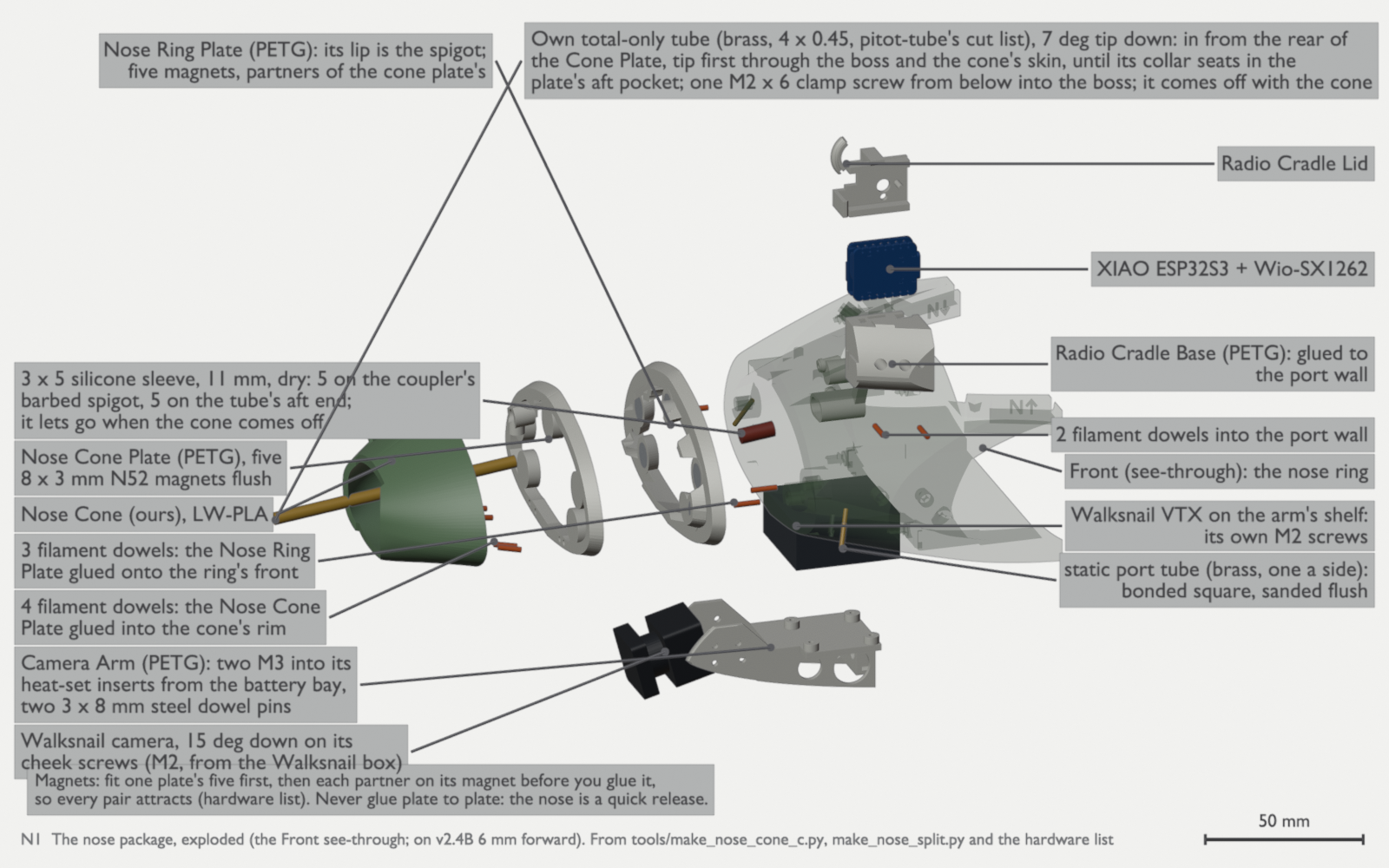
N1: the nose package, exploded, with our Nose Cone and Nose Cone Plate on five magnet pairs and four filament dowels, and our own brass pitot tube beside the camera at 7° tip down, its collar in the Cone Plate’s pocket, with the silicone sleeve and the Pitot Coupler; the camera 15° down. The Front is see-through, and the nose package’s parts are moved 6 mm forward on v2.4B (th-blender W41, W71, W93.2, W101, W104). N2: the nose cone off and on. Pull the cone forward: it slides off over the camera with the pitot in it, and the sleeve lets go of the tube’s aft end. On again, the ring plate’s lip (the spigot) goes into the cone plate, keyed by its egg-shaped section, the tube’s aft end goes back into the sleeve, and the five magnet pairs pull it home. Do the pitot check after every refit (th-blender W93.2, W101, W104). The glued joints. J1 to J3 join the body from nose to tail. J4 is the root face of each VTOL Section, and J5 is the VTOL Section Plate and the Spar Mount. The Canopy is on snap features and takes no glue.
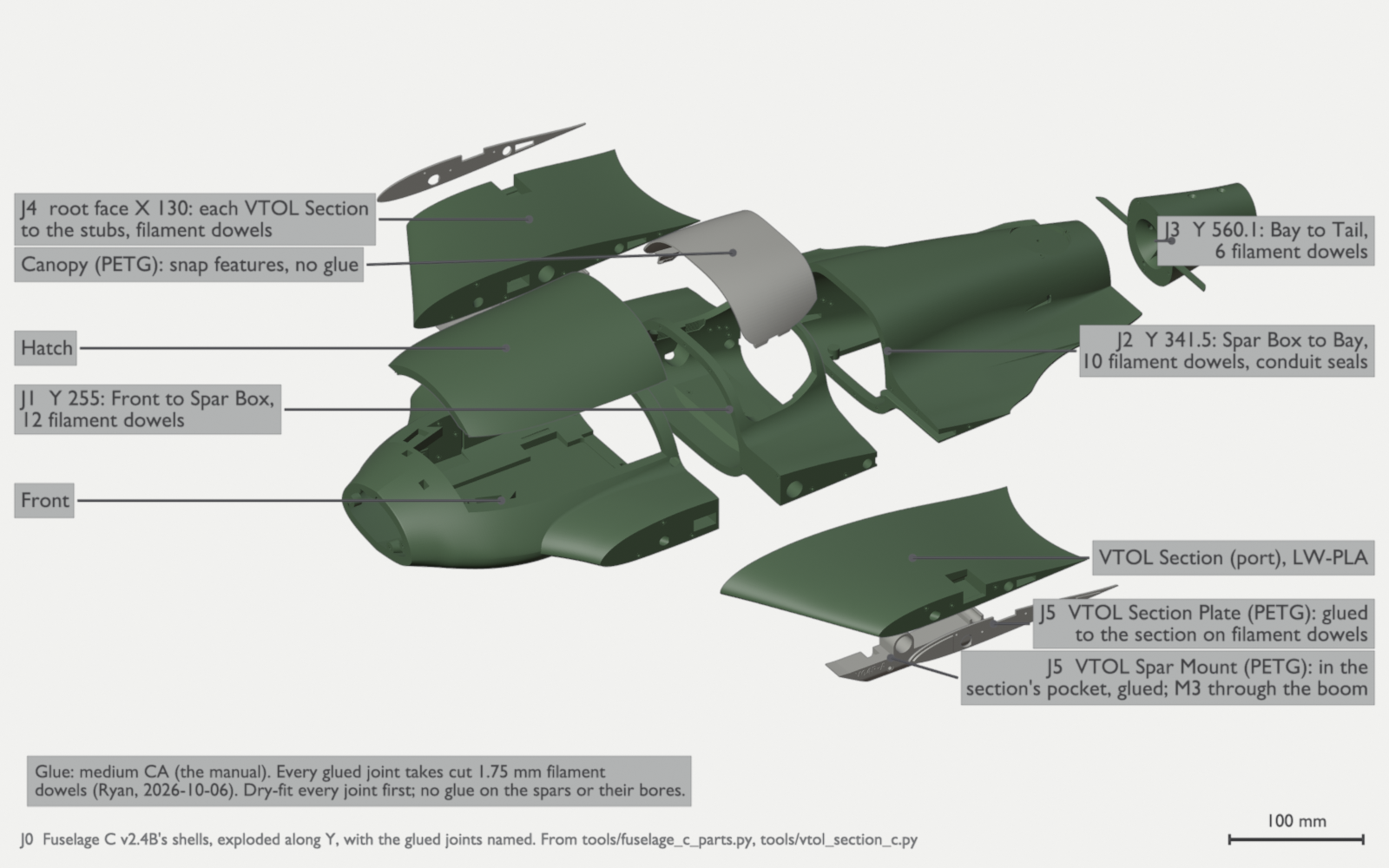
J0: Fuselage C v2.4B’s shells, exploded along Y, with the glued joints named (th-blender W41). 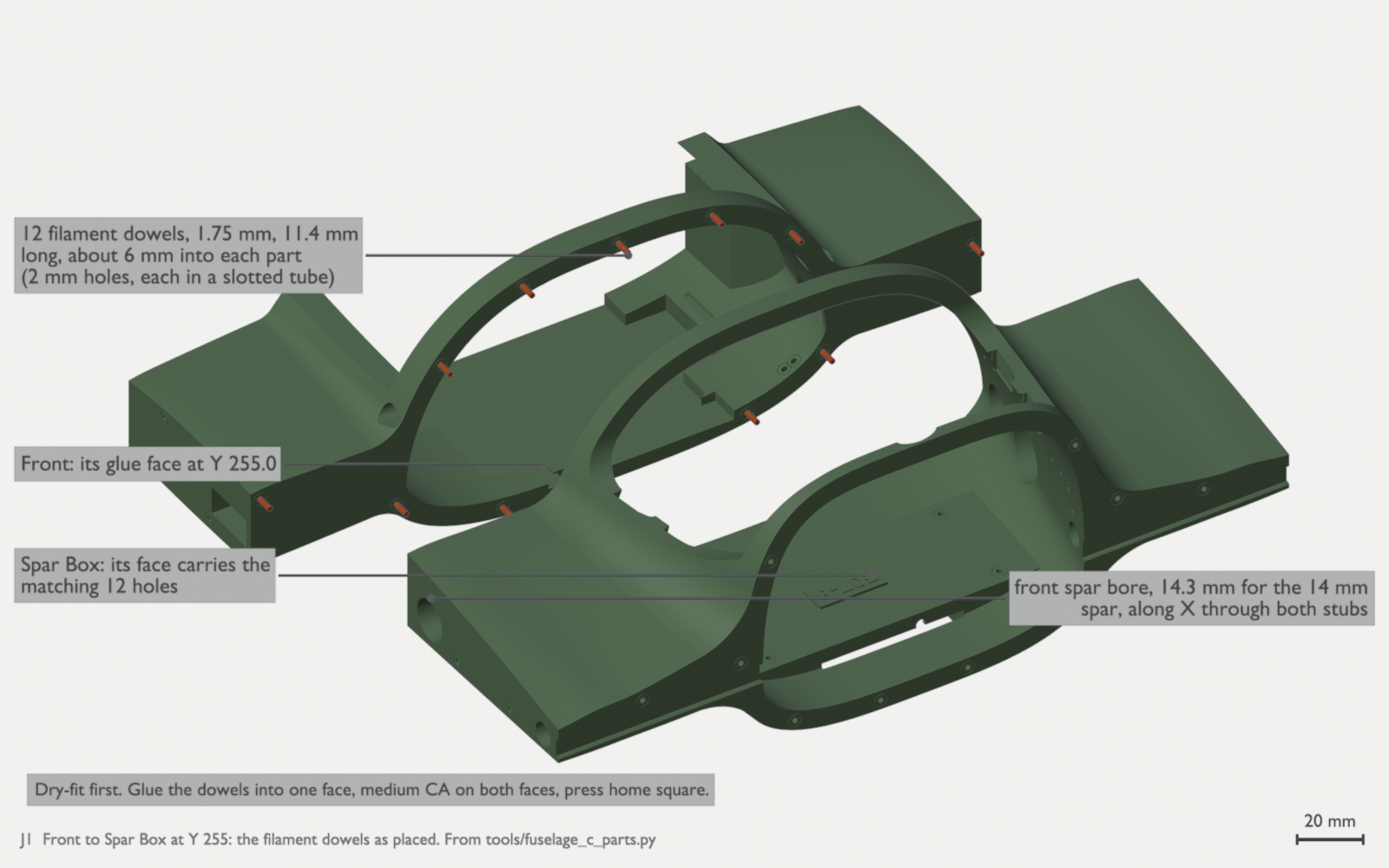
J1: Front to Spar Box at Y 255, with 12 filament dowels. The front spar bore, 14.3 mm, runs through both stubs. 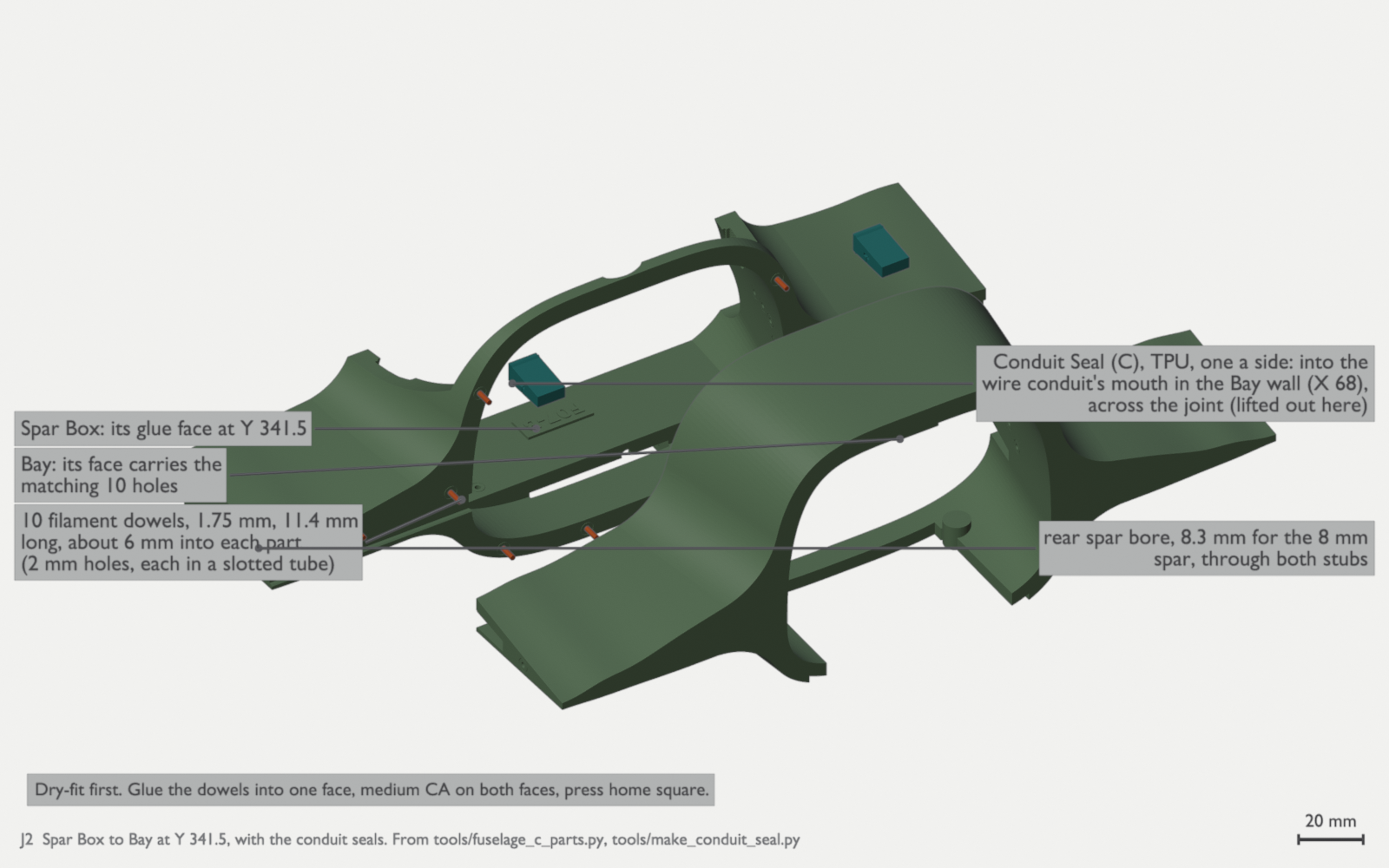
J2: Spar Box to Bay at Y 341.5, with 10 dowels and the rear spar bore, 8.3 mm. Put each TPU Conduit Seal into the wire conduit’s mouth in the Bay wall at X 68 before you join the parts: the seal crosses the joint. 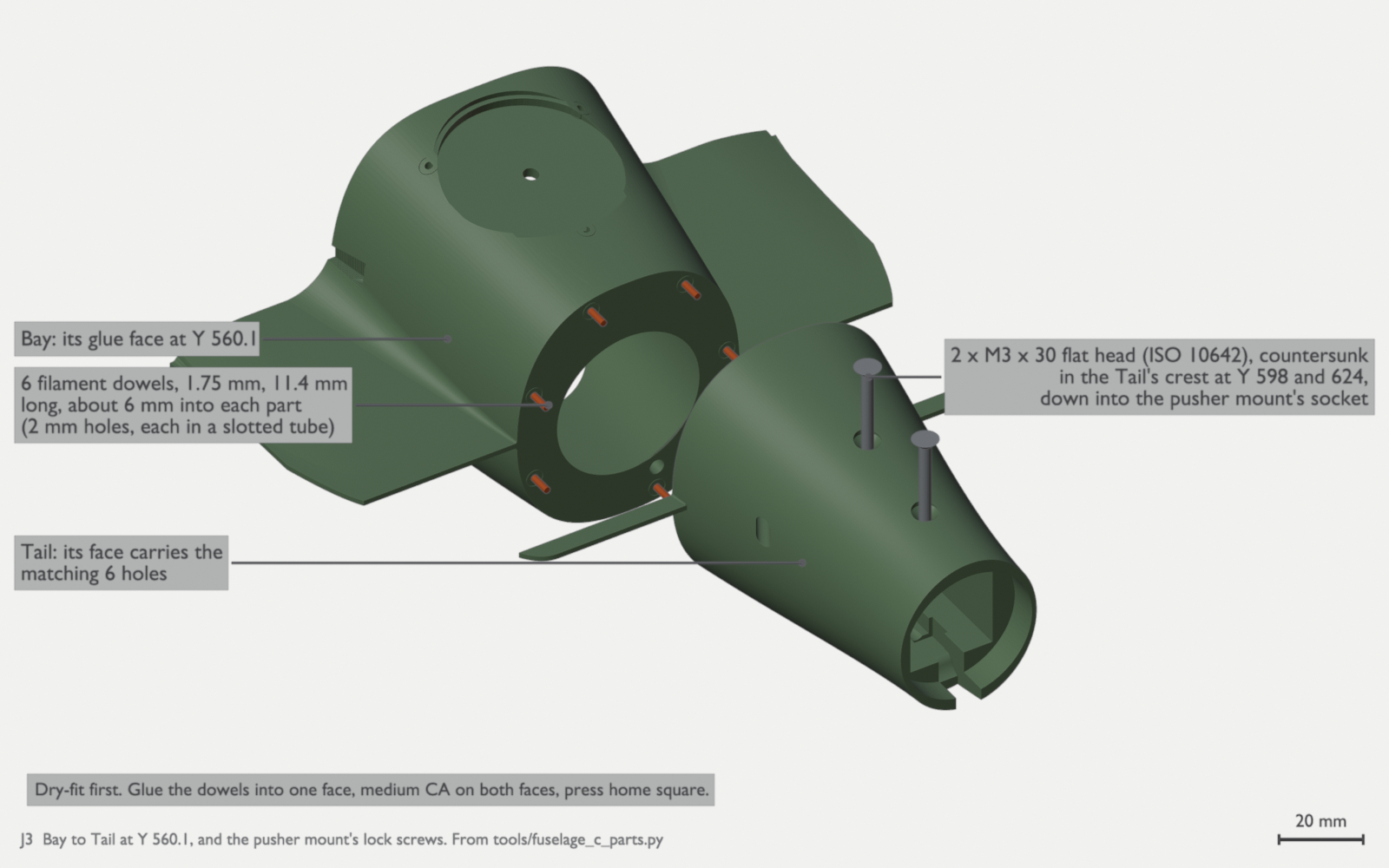
J3: Bay to Tail at Y 560.1, with 6 dowels. Two M3 × 30 flat-head screws (ISO 10642) go down through the Tail’s crest at Y 598 and 624 into the pusher mount. 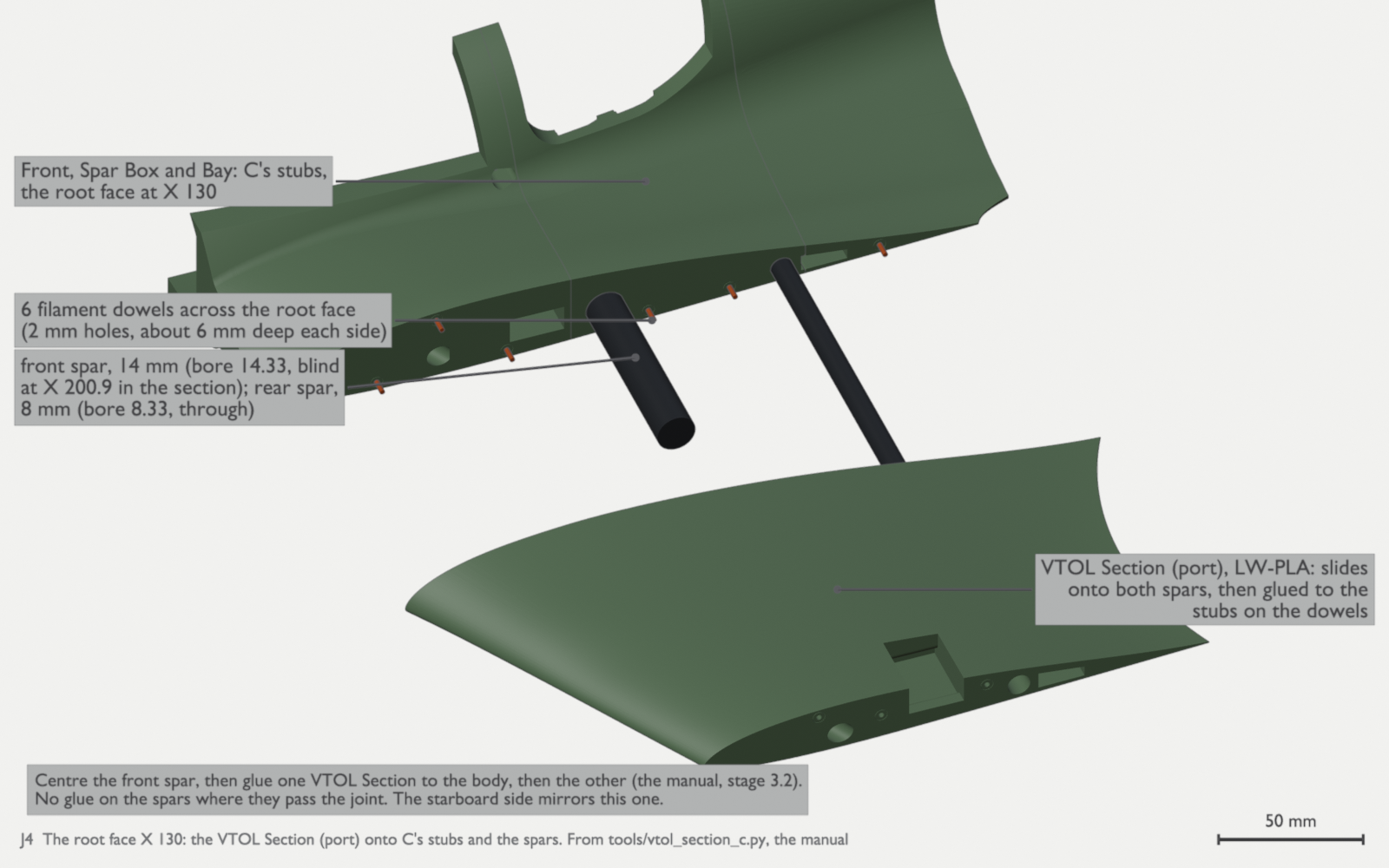
J4: the root face at X 130, with 6 dowels a side. Centre the front spar, then glue one VTOL Section, then the other (manual stage 3.2). Do not glue the spars. The starboard side is the mirror. 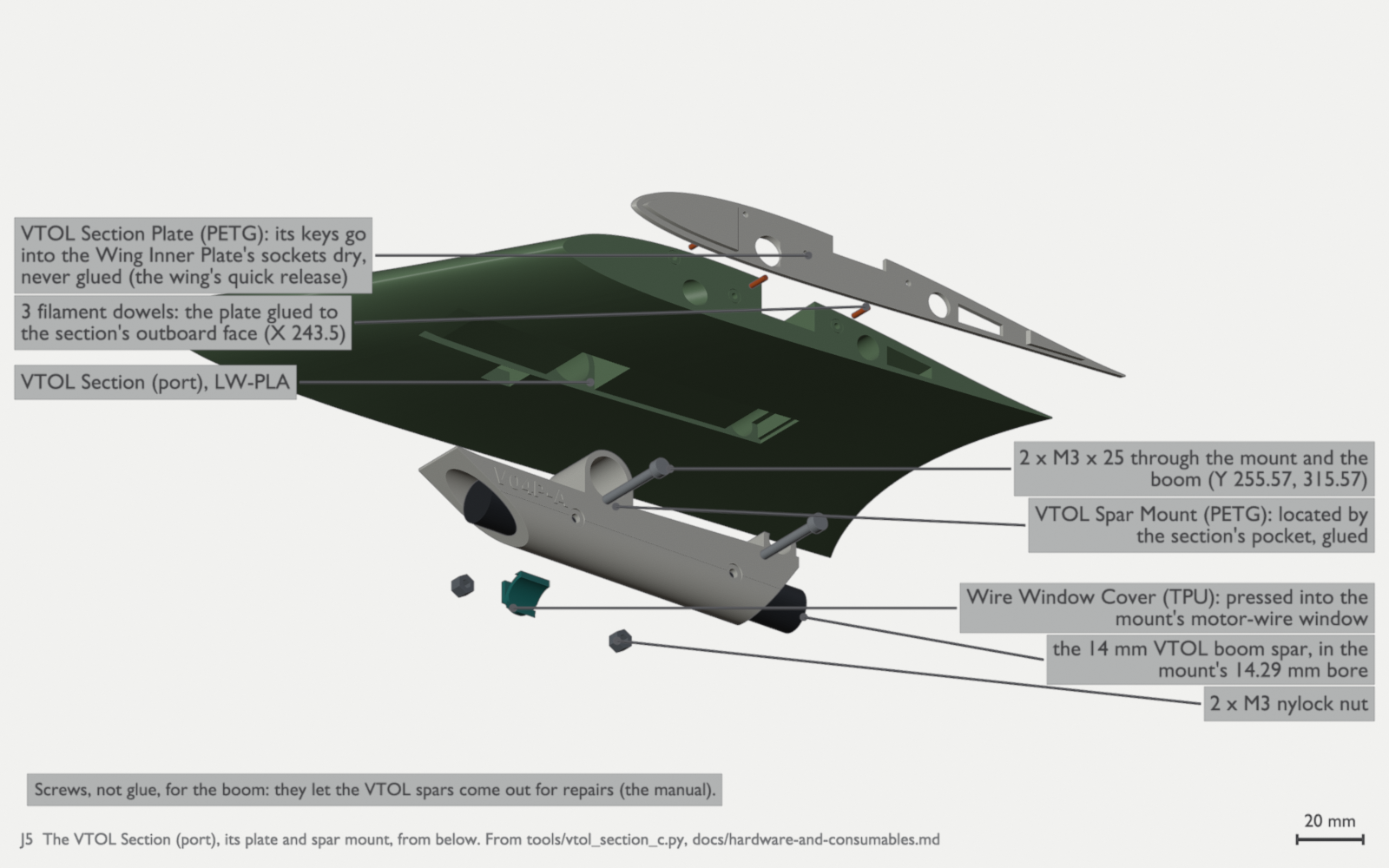
J5: the VTOL Section Plate glues to the section on 3 dowels at X 243.5. Its keys go into the Wing Inner Plate’s sockets dry: do not glue them. The Spar Mount glues into the section’s pocket, and two M3 × 25 with nylock nuts go through the mount and the VTOL spar at Y 255.57 and 315.57. Press the TPU Wire Window Cover into the mount’s motor-wire window. 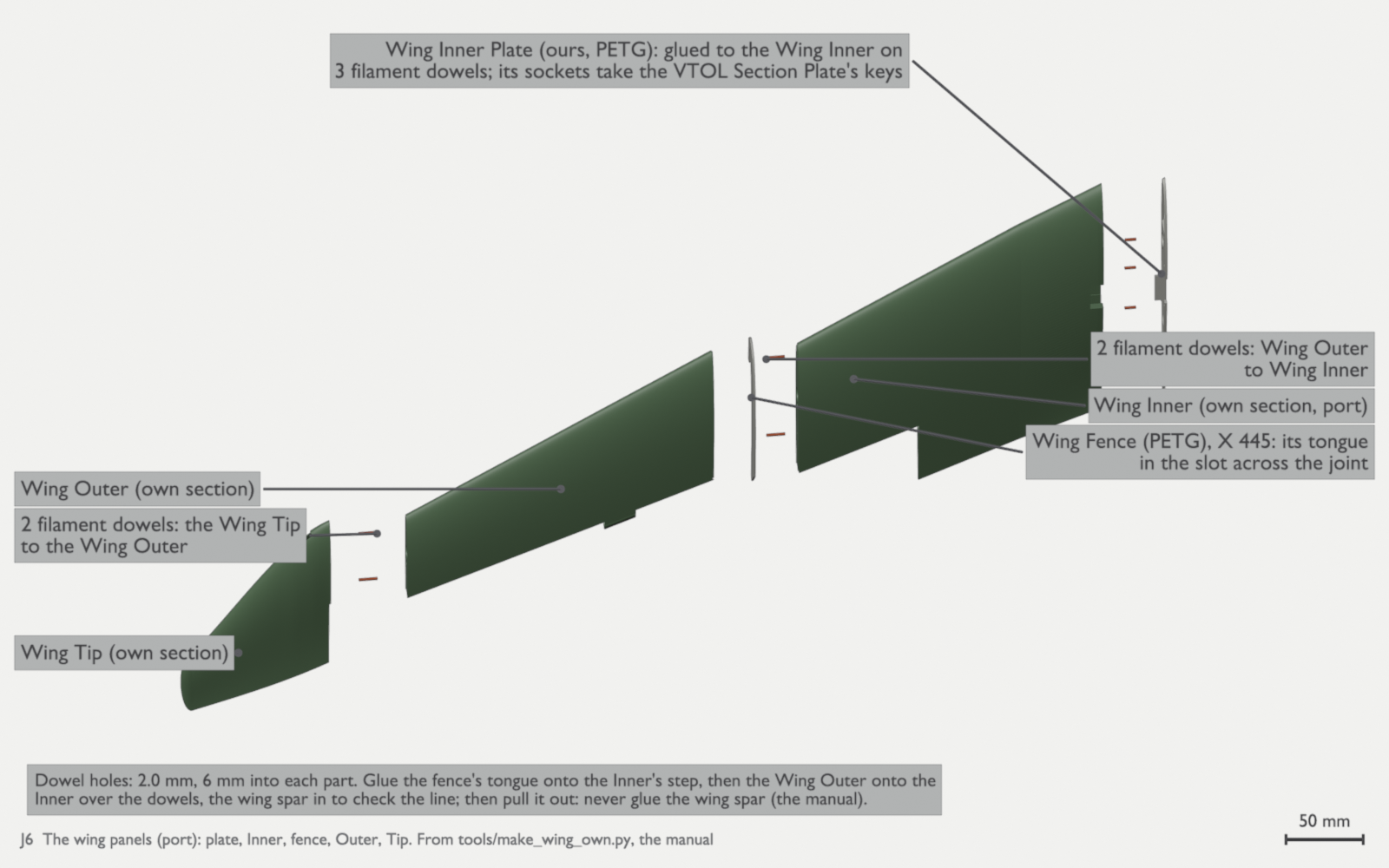
J6: the wing panels of our own wing section (port): plate, Inner, fence, Outer and Tip. Glue our Wing Inner Plate to the Wing Inner on three dowels: its sockets take the VTOL Section Plate’s keys. Glue the fence’s tongue onto the Inner’s step. Then glue the Wing Outer to the Inner on two dowels, with the wing spar in to check the line, and pull the spar out. Two dowels join the Wing Tip to the Wing Outer. The dowel holes are 2.0 mm, 6 mm into each part. Do not glue the wing spar (th-blender W73). The wings. The first build flies our own wing section, with a PETG fence on each wing at X 445 (parts). Build each wing in the order of the animation. Centre the servo at 1500 µs before you glue its mount. Do not glue the wing spar. If you will fit the night lights, pull the tip light’s pair through its bore before you glue the panels (figure L4 below).
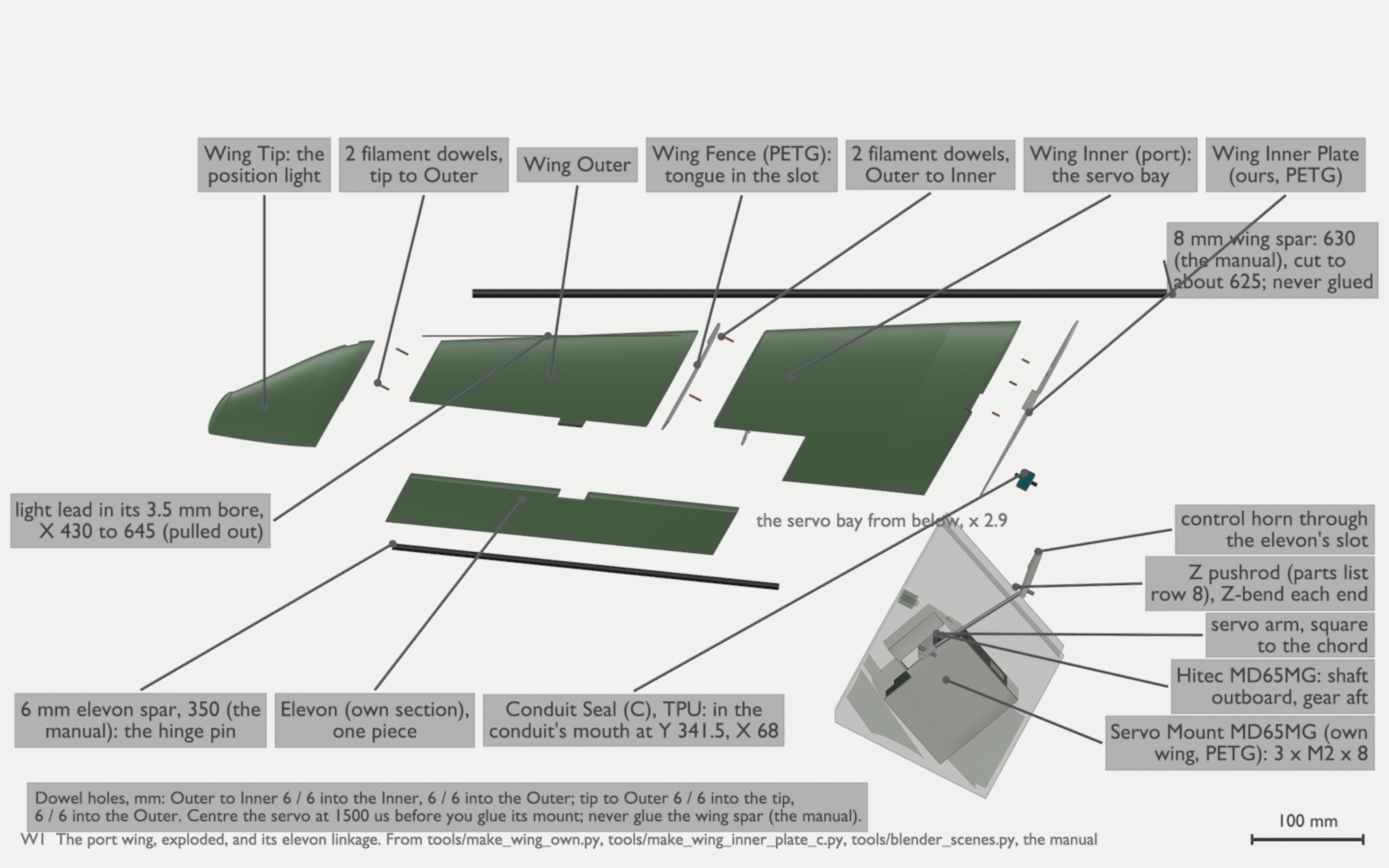
W1: the port wing of our own wing section, exploded along its spar, with the fence at X 445 and the servo bay from below at 2.9 times. The 8 mm wing spar is cut to about 625 mm and is never glued. The 6 mm elevon spar, the full 350 mm, is the hinge pin (order and cut the spars). The light lead runs in a 3.5 mm bore from X 430 to the tip. Put the TPU Conduit Seal in the conduit’s mouth at Y 341.5. The Servo Mount MD65MG (own wing) takes 3 × M2 × 8 self-tapping screws (th-blender W43, W73). W4: the port wing in order: the plate, the panels on their dowels with the fence and the wing spar as a line check, the elevon on its spar, then the tip and the wing spar (th-blender W73). CAUTION: put the elevon spar in before the tip. The full 350 mm spar fills X 331 to 658 and seats in the tip. Do not cut it to 329.9 mm, which was for the earlier flat tip (th-main 0ce70375, th-blender W73). The lift pods. Each pod is a VTOL Section on its 416 mm VTOL spar, with the front motor mount and the rear Keel B Mount at the spar ends.
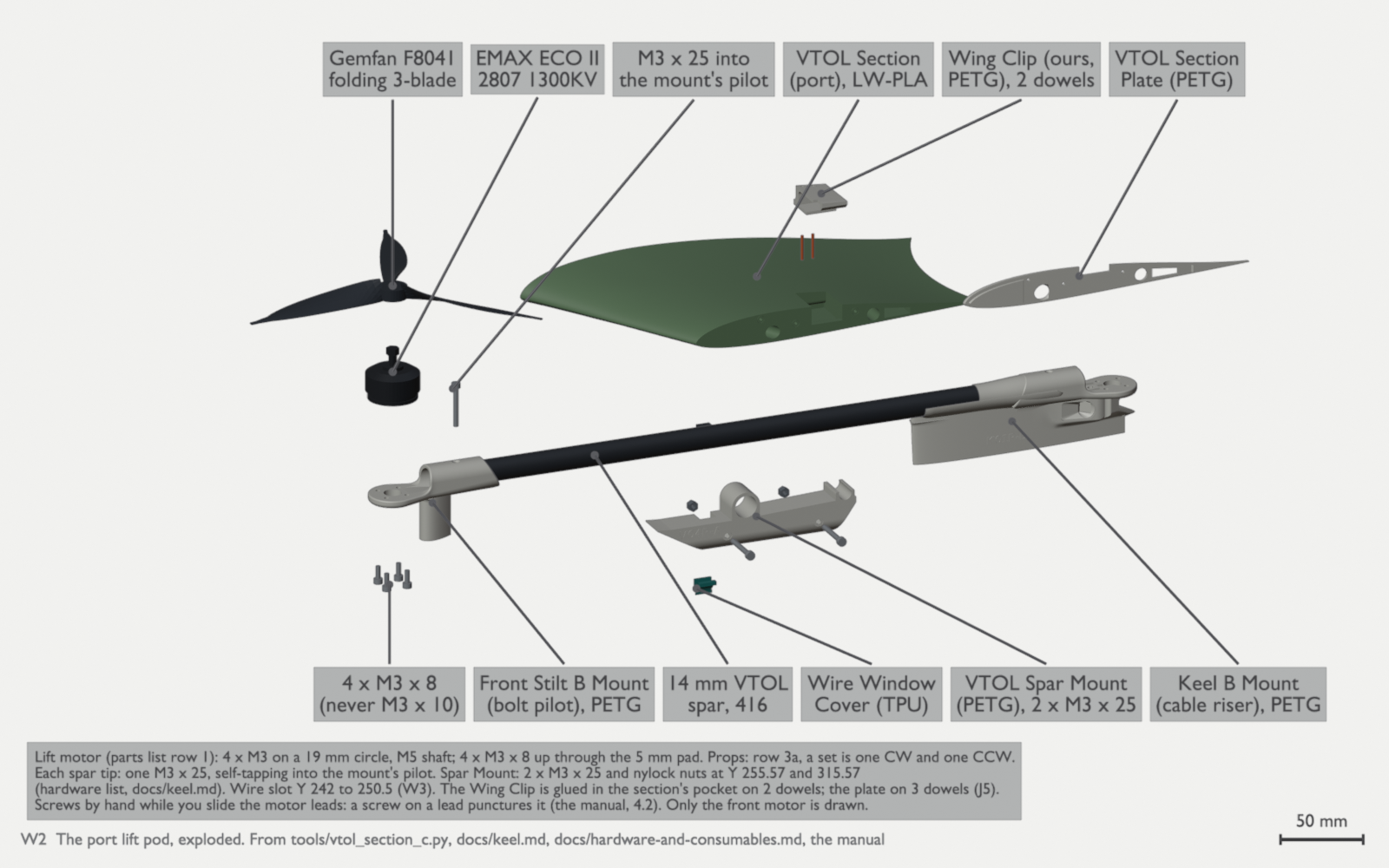
W2: the port lift pod, exploded: the VTOL Section with its plate and our Wing Clip, a single part glued into the section’s pocket on two dowels, the 14 mm VTOL spar (416 mm) in its Spar Mount, the front motor mount with the lift motor and folding prop, and the rear Keel B Mount. The lift motor takes 4 × M3 × 8, never M3 × 10. The Spar Mount takes 2 × M3 × 25 with nylock nuts at Y 255.57 and 315.57. The length of the spar-tip screw is not settled. Only the front motor is drawn (th-blender W43, W46, W73). The dowels are cut 1.75 mm filament in 2.0 mm holes (th-blender W41, from the placed and measured parts):
Joint Dowels Stations (mm) Front to Spar Box, Y 255 12, 11.4 mm long (X, Z): (-0.8, 63.0), (33.3, 60.4), (-34.3, 60.2), (62.4, 42.2), (-62.5, 42.1), (126.7, 16.9), (-89.9, 16.9), (-126.7, 11.9), (78.1, -4.7), (-73.5, -7.7), (-46.7, -20.1), (40.4, -21.1) Spar Box to Bay, Y 341.5 10, 11.4 mm (X, Z): (-54.0, 43.5), (54.3, 42.7), (-69.0, 17.2), (-99.8, 8.4), (65.0, 8.4), (100.0, 8.4), (-58.5, -11.3), (45.8, -21.2), (-15.7, -25.8), (15.3, -25.8) Bay to Tail, Y 560.1 6, 11.4 mm (X, Z): (10.4, 31.5), (-15.9, 29.0), (26.3, 12.6), (-27.6, 4.6), (26.2, -12.1), (-8.0, -28.6) VTOL Section to stubs, X ±130 6 a side, 6 mm into each part (Y, Z): (183.3, -4.9), (205.3, 16.8), (231.3, -4.8), (283.6, -2.7), (313.5, -1.3), (368.9, 1.1) VTOL Section Plate to VTOL Section, X ±243.5 3 a side, through the plate (Y, Z): (259.0, 9.5), (282.0, 3.5), (321.0, 5.5) Wing Inner Plate to Wing Inner, about X 248.6 3 a wing, 7.2 mm (Y, Z): (259.0, 9.5), (283.0, 8.6), (316.0, 8.6) Wing Outer to Wing Inner, X 445, at the fence 2 a wing, 6 mm into each part (Y, Z): (343.6, -2.0), (405.6, 0.6) Wing Tip to Wing Outer, X 645 2 a wing, 6 mm into each part (Y, Z): (463.4, -1.4), (500.0, 0.7) Wing Clip to VTOL Section, X ±220 2 a side, vertical, 15.6 mm along Z at Y 296.0 and Y 303.0 Nose Cone Plate to cone, Y 25.0 4, 8 mm (3 in the plate, 5 in the cone), leaning with the wall (X, Z): (16.6, -12.7), (-18.2, -12.5), (-13.7, -13.1), (13.7, -13.1) Nose Ring Plate to ring, Y 35.5 3, 8.4 mm (X, Z): (35.8, 5.2), (-35.8, 5.2), (18.0, -6.6) Radio Cradle Base to port wall 2, 8.4 mm along X at (Y, Z) (54.3, 4.4) and (67.3, 4.4) Radio Pigtail Clip to port wall 2, 9 mm (6 in the Front) (X, Y, Z): (68.3, 84.8, 7.5), (70.4, 88.3, 7.7), normal to the wall Static Line Clip to Front, upper starboard wall 2, 9 mm (6 in the Front) (X, Y, Z): (-45.7, 77.5, 26.0), (-42.7, 75.7, 26.2), on one axis into the wall ELRS SMA Bracket to Spar Box wall, X ±58.6 2 a side, 9 mm (3 in the bracket, 6 in the Spar Box) (Y, Z): (330.0, 18.0), (332.0, 10.5), into the wall RP4TD Pigtail Tie Bar to Bay wall 2 a side, 9 mm (3 in the bar, 6 in the Bay) port (X, Y, Z): (51.8, 368.1, 14.5), (50.9, 374.1, 9.5); starboard: (-53.6, 358.3, 14.5), (-52.7, 364.3, 9.5); into the wall The Hatch magnets and the Canopy. Glue the Hatch’s two magnet blocks first. Then put each Front block on its partner before you glue it. Each boss has an engraved N and an arrow. To remove the Canopy, put a nail in the notch, lift the Canopy 8.5 mm straight up, then turn it aft edge up. Do not turn it while it is seated.
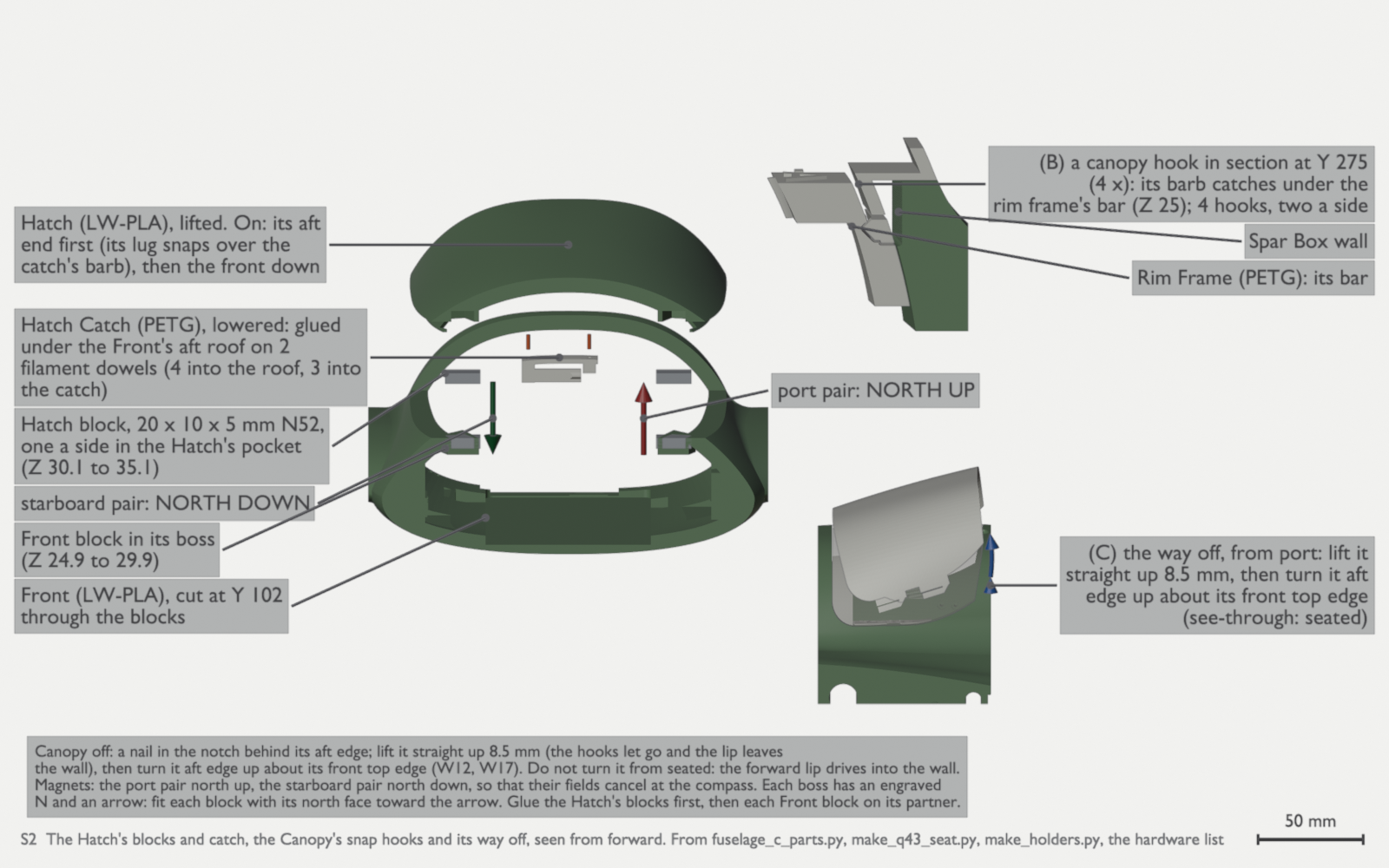
S2: the Hatch’s four 20 × 10 × 5 mm N52 blocks and its catch on 2 dowels, and the Canopy’s snap hooks, 4 in all, under the rim frames’ bars. The port pair is north up and the starboard pair north down. The turn angle in the lower view is only for the picture (th-blender W43). 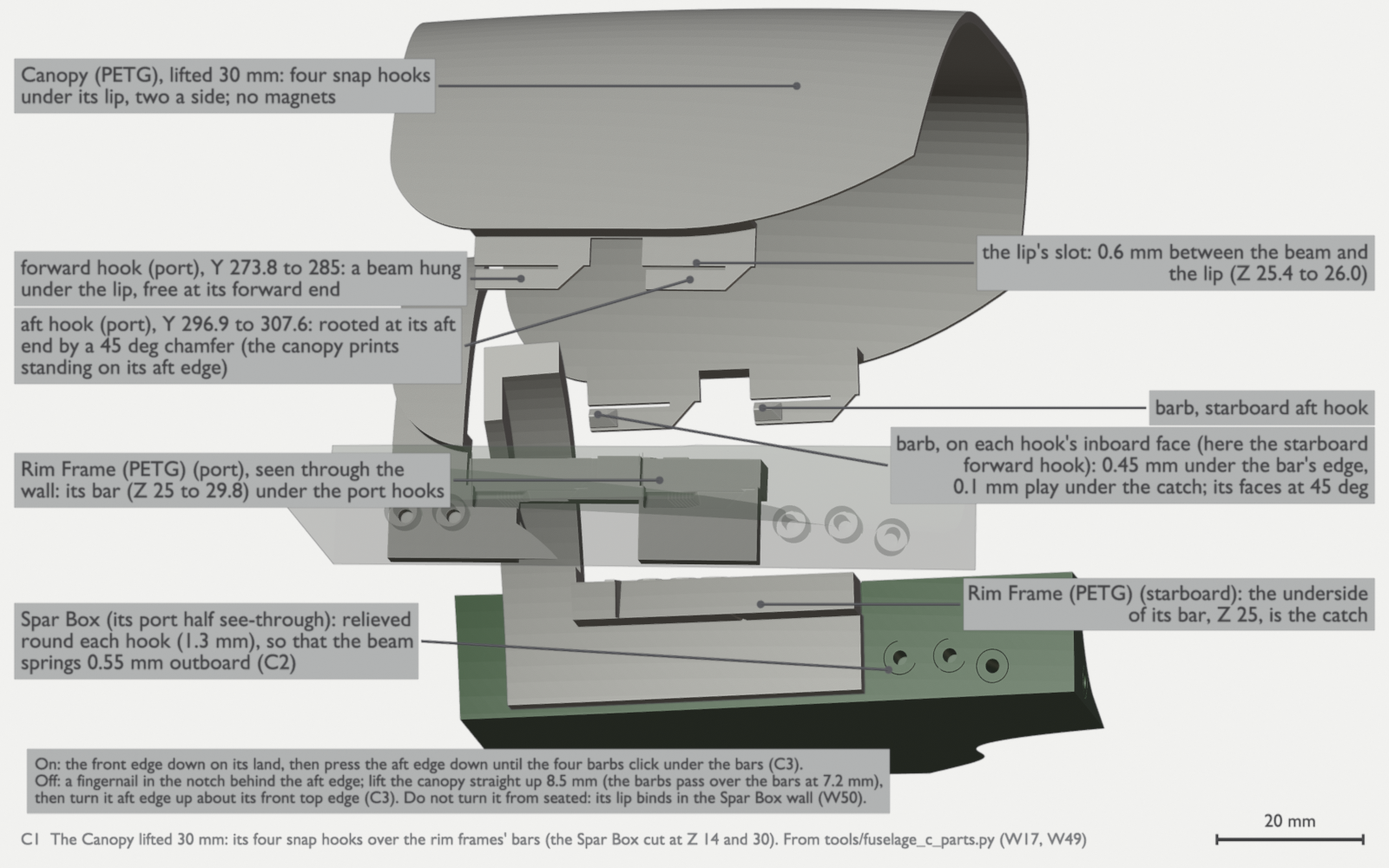
C1: the Canopy lifted 30 mm over the Spar Box, seen from port and a little below its lip. The canopy has four PETG snap hooks under its lip, two a side, and no magnets. Each hook’s barb catches under its rim frame’s bar. To remove it, put a fingernail in the notch behind the aft edge and lift the canopy straight up 8.5 mm (the barbs pass over the bars at 7.2 mm). Then turn it aft edge up about its front top edge. Do not turn it while it is seated: its lip binds in the Spar Box wall (th-blender W50, W56). 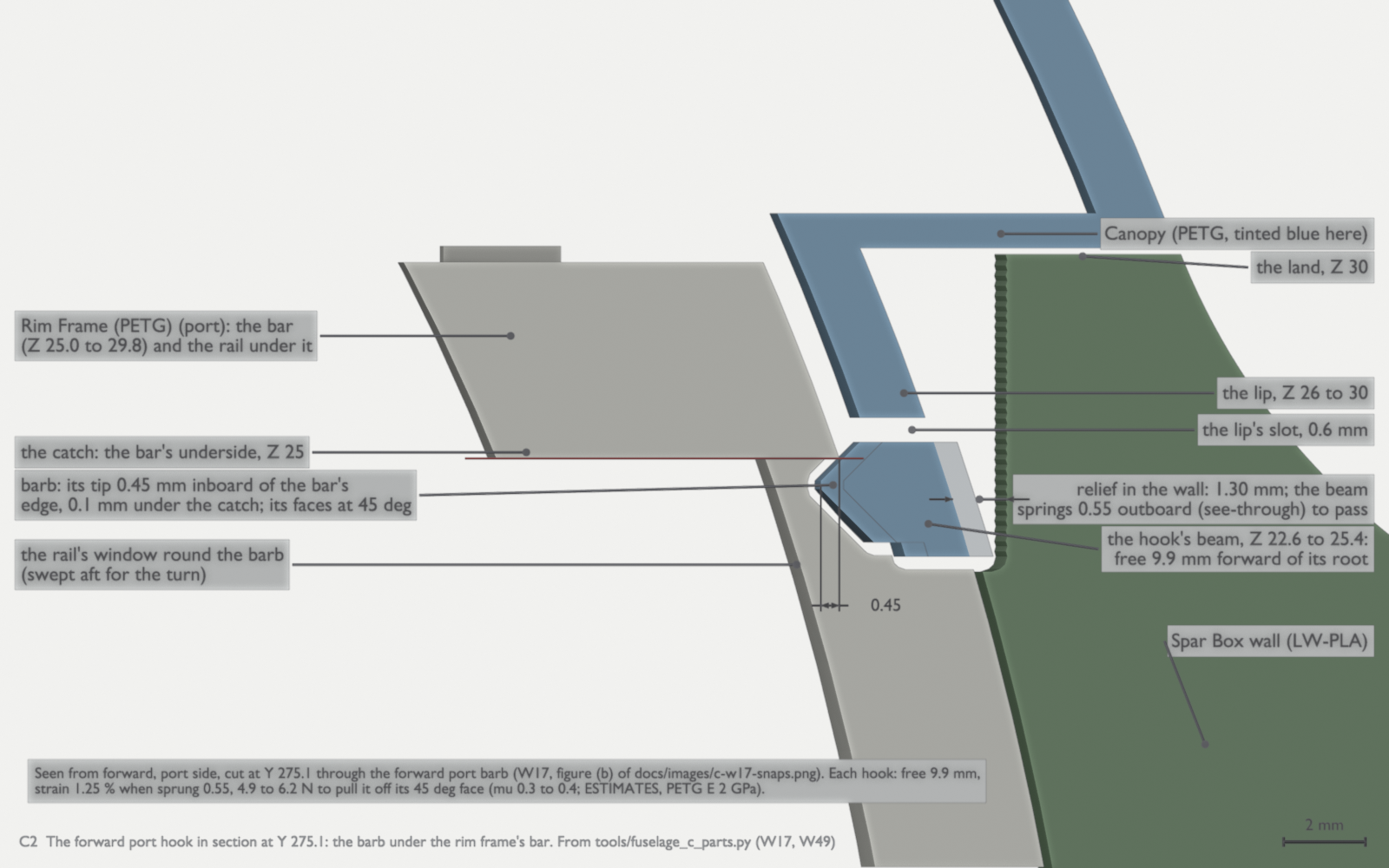
C2: the forward port hook in section at Y 275.1, seen from forward. The barb’s tip is 0.45 mm under the rim frame’s bar, with 0.1 mm play under the catch (the bar’s underside, Z 25.0). The beam springs 0.55 mm outboard into a 1.3 mm relief in the wall to pass (th-blender W50). C3: the Canopy on and off on its four snap hooks, seen from port. On: put the front edge down on its land, then push the aft edge down until the barbs click. Off: put a fingernail in the notch behind the aft edge and lift the canopy straight up 8.5 mm. All four barbs pass over the rim frames’ bars at 7.2 mm of lift. Then turn it aft edge up about its front top edge and lift it away. If you turn it while it is seated, it binds (th-blender W50, W56). 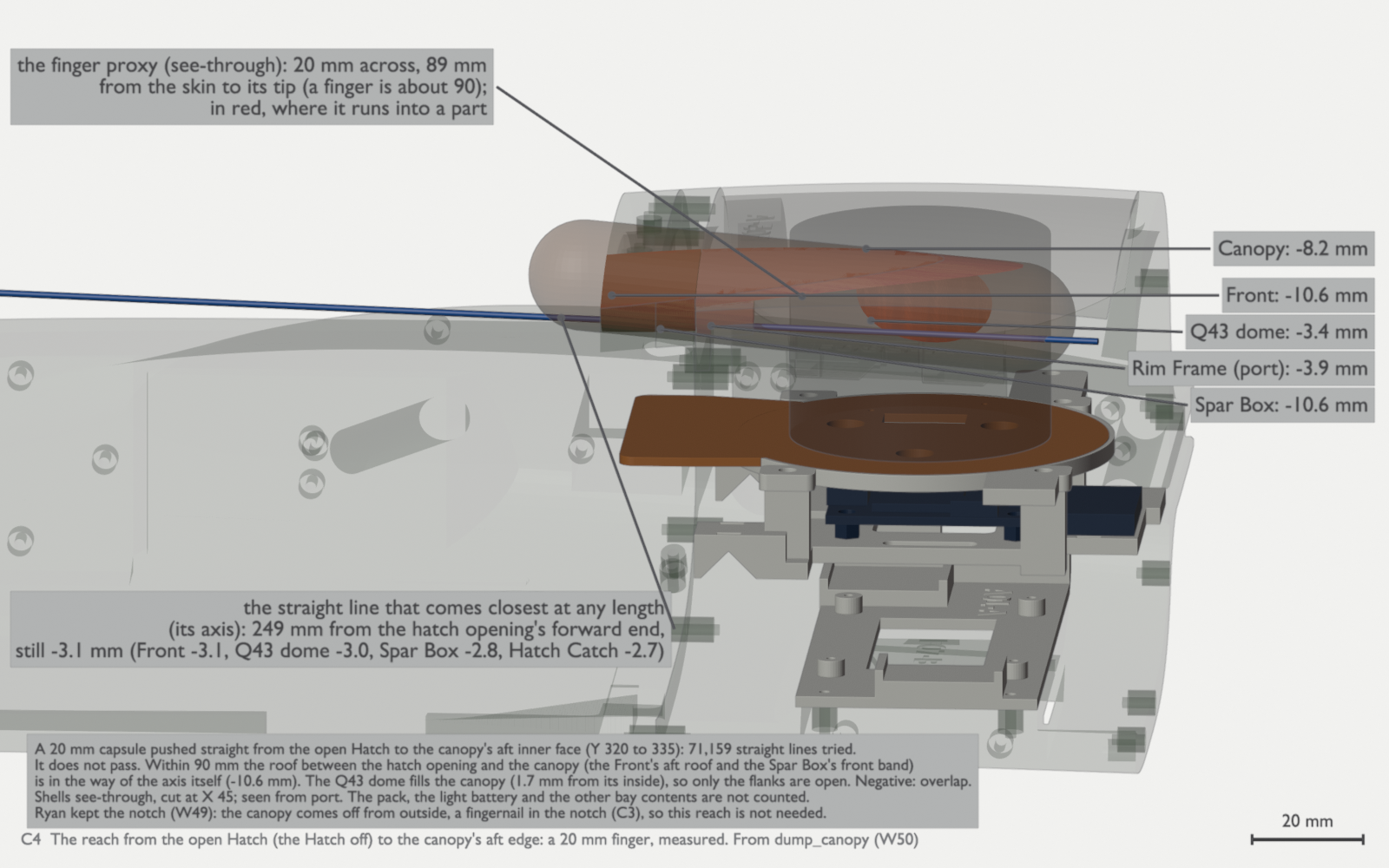
C4: why the Canopy comes off from outside, with a fingernail in its notch. A finger cannot reach its aft edge from the open Hatch. A 20 mm capsule, pushed straight on the best of 71,159 lines within 90 mm, does not pass: the Front’s roof is in its way (−10.6 mm), and the Q43 dome fills the canopy (1.7 mm from its inside). Red shows where the finger runs into a part (th-blender W50, W56). Check: the airframe spans 1484 mm from tip to tip (1,483.8 mm, th-blender), and the elevons swing freely on their 6 mm spar-hinges without reaming.
-
Fit the electronics.
Wire the flight controller as Wire the LUX F765 flight controller tells: power, the lift ESC, the servos, the GPS receivers, the radios and the checks before first power-up, in build order. Follow manual section 4, with the output map from the electronics notes and these changes from the manual:
- On the bench, connect the USB-C pigtail (parts list row 18) to the LUX F765 on its plate. Take the CG slider’s halves out of the tray: they block the Lucid’s way in by 1.5 mm. Fit the Lucid before the Avionics Plate, then put the plate in aft end down through the canopy opening, and tie the pigtail at the Lucid bracket’s bridge (th-blender W43.2, S3 below). Fit the TBS Lucid 60A 3-8S 4-in-1 lift ESC (AM32) on edge across the bay, ahead of the Spar Box, in the Lucid Edge Bracket (Ryan, 2026-10-13 and 2026-10-14; parts). Its battery tabs go to starboard. Tab 1, the lower tab, is minus: hold the polarity drawing against the board before you solder. Solder the phase leads to the motors: there are no disconnects. Leave a pull cord in each motor wire channel, for the DroneCAN pod leads that follow. Solder the three Rubycon 560 µF capacitors at the tabs, each stripe lead to tab 1. They take the place of the boxed capacitor. Their rating is 35 V, so check the tab voltage on the thrust stand first (parts list, row 2e). Connect it to the flight controller’s ESC #1 port: outputs 1 to 4 (bidirectional DShot) and its telemetry on
SERIAL5. CAN is off on the LUX for the first flights, so the CAN harness stays in the airframe with no nodes, for the DroneCAN pod ESCs that follow (electronics notes). Wire the elevons to outputs 5 and 6 and the pusher ESC to output 7 (SERVO7_FUNCTION70). The first build has no camera trigger and no cargo door, so outputs 8 and S1 stay empty (Ryan, 2026-10-19). - Set up the elevon horns and pushrods for at least 25° of travel each way. Measure it with a protractor at the elevon, not at the servo arm. The CG envelope explains why the manual’s travel is not enough.
- Mount the lift motors with M3 × 8 screws.
- Program the pusher ESC, the DYS Aria 70A (AM32), before its first run, as step 20 of Fly the first flights says: brake on stop off, so the propeller freewheels at zero throttle; low-voltage cutoff off; motor direction so that the pusher blows aft. Read every value back. The pusher prop is a fixed APC 10 × 7E pusher (2026-10-04). Fit it with its pitched face aft, and torque the nut.
- Set brake on stop and each channel’s motor direction on the 4-in-1 with the AM32 configurator, save them to the ESC, and read them back. The brake is off by default. It is an AM32 setting on the ESC, not a flight controller parameter. The electronics notes have the other AM32 settings, and the settings for the DroneCAN pod ESCs that follow. In cruise it keeps the stopped lift props folded instead of windmilling open in the airflow. Propulsion explains the brake settings.
- Do the harness checks before first power-up, then power up through the smoke stopper the first time.
The Spar Box stack. Build the stack in the order of the animation. Fit the USB-C pigtail before the Lucid goes in (step 1). Put the LUX on the Avionics Plate on the bench, because its screws come from below. Use brass and nylon fasteners only: no steel near the compass. Bend each cable at the LUX downward, below the plane of the Q43’s copper floor: the side plugs, CAN and the SH-8. The cables must stay below about Z 21.6. Keep every lead except the Q43’s own cable 50 mm or more from the dome’s rim (th-telemetry, W57.1).
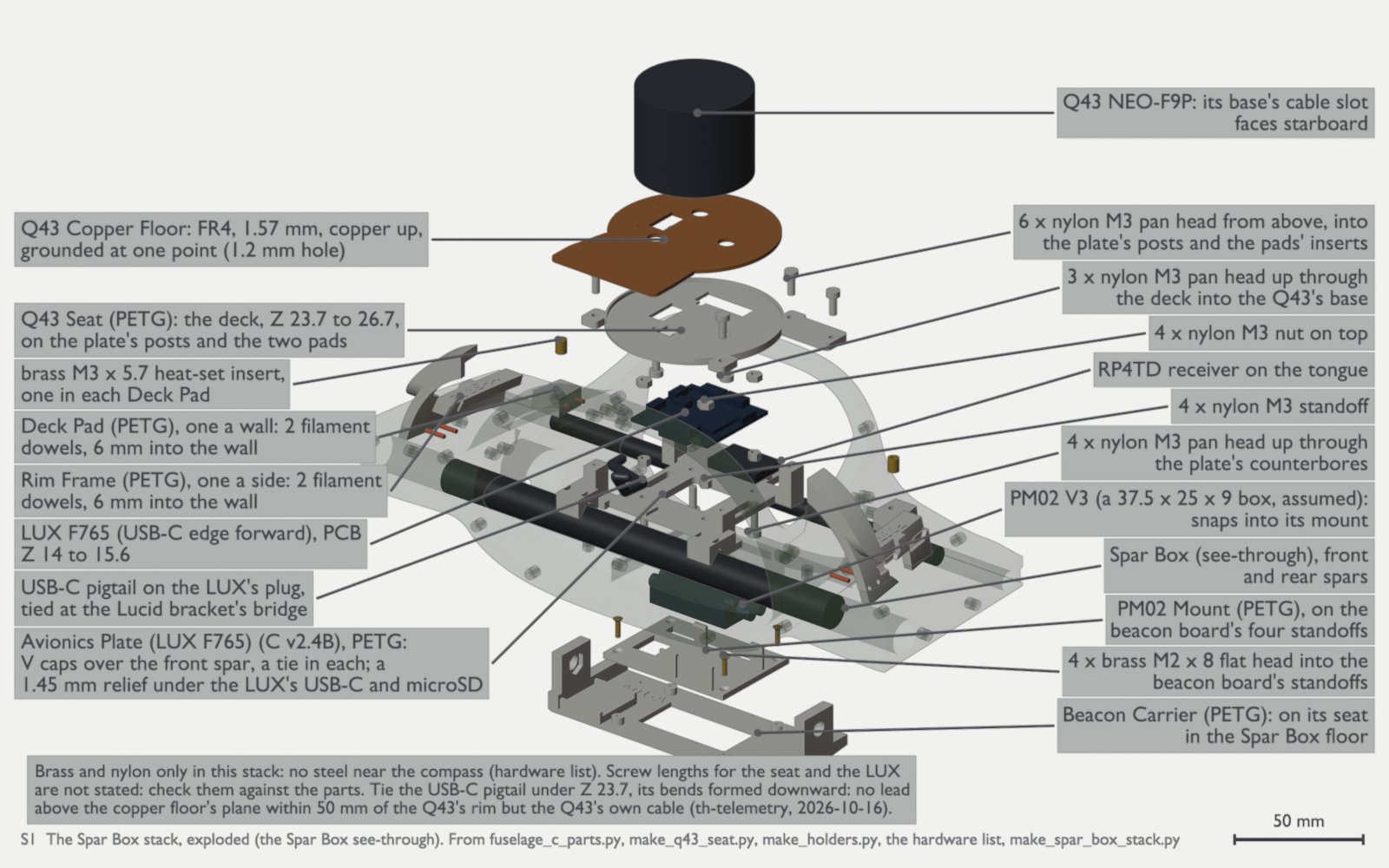
S1: the Spar Box stack, exploded: the Beacon Carrier, the PM02 Mount and the PM02, and the Avionics Plate with the LUX F765 at its true height (PCB Z 14.0 to 15.6) and a 1.45 mm relief under its USB-C and microSD. Then the RP4TD, the rim frames and deck pads, the Q43 Seat, the copper floor and the Q43. The Spar Box is see-through. The PM02 Mount takes 4 brass M2 × 8 flat heads. The LUX sits on 4 female-female nylon standoffs, 3.0 mm long, with 4 × M3 × 6 nylon pan heads up from below. The Q43 Seat takes 3 × M3 × 6 nylon up into the Q43, each head on a 1.0 mm ledge in its counterbore, and 6 × M3 × 8 nylon down into heat-set inserts. Tie the USB-C pigtail down under Z 23.7 (th-blender W43, W46, W56). S3: the Spar Box stack and the Lucid in order, twelve steps: 1 the rim frames, 2 the deck pads, 3 the Beacon Carrier, 4 the PM02 Mount and the PM02, 5 on the bench, the LUX on the plate with the USB-C pigtail on its plug and the RP4TD, 6 the Lucid sub-assembly in, down through the hatch opening, aft, onto the floor’s two dowels, 7 the plate in, aft end down through the canopy opening, then level onto the front spar with a tie in each V cap, 8 the pigtail tied at the Lucid bracket’s bridge, 9 the leads, 10 on the bench, the Q43 on its seat with the copper floor, 11 the seat in, 12 the Canopy. CAUTION: take the CG slider’s halves out of the tray before the Lucid goes in. They block its way by 1.5 mm. th-blender’s path check measured this order, with a least clearance of +1.00 mm (th-blender W43.2). Meter tab 1, the lower tab, against the pack minus before the first power-up (th-eda; loop re-rendered in th-blender W56). The Lucid on the bench. Assemble the Lucid sub-assembly on the bench in the order of the animation, then put it in the bay, before the Avionics Plate and with the CG slider’s halves out: lower it through the hatch opening about 32 mm forward of its place, move it aft about 6 mm above the floor, then lower it so that the foot goes on its two dowels and Cradle B rests on the front spar (th-blender W43.2). Fit the TPU gaskets before the board, because the phase ribbons push through the gasket frames as the board goes in. Fit the four M3 × 4 heat-set inserts before the board too: their 4.0 mm bores are 4.5 mm deep, so each insert sits flush with the boss face. Hold the board with four M3 × 6 socket-head screws in brass, or titanium Grade 5. Do not use steel, A2 stainless or nylon: the screws are about 55 mm from the Q43’s compass (th-main d204893a, th-telemetry). Use a light torque and medium threadlocker.
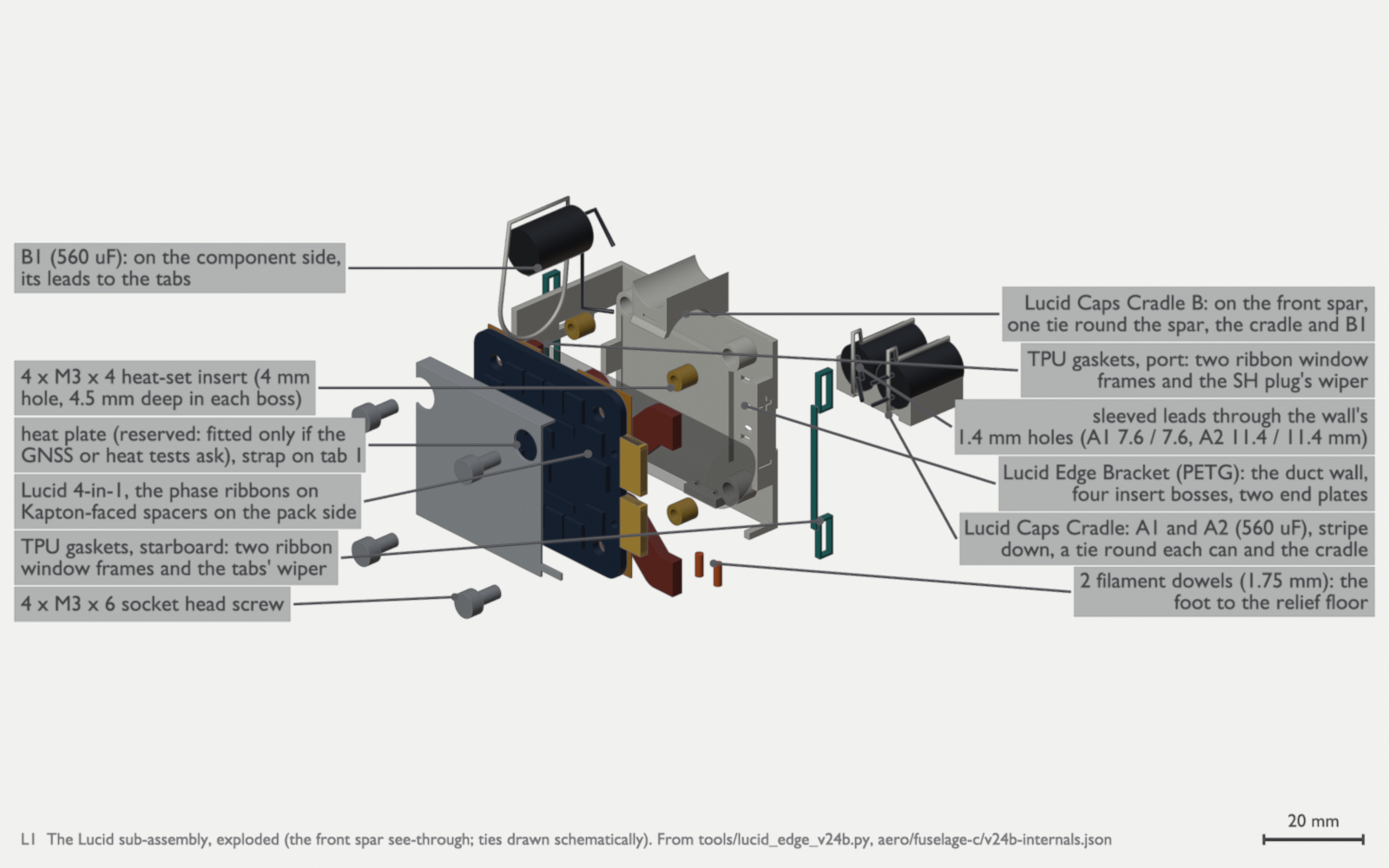
L1: the Lucid sub-assembly, exploded. The four bosses reach the PCB’s pack-side face at Y 251.33. The front spar is see-through and the ties are schematic (th-blender W41, W42). 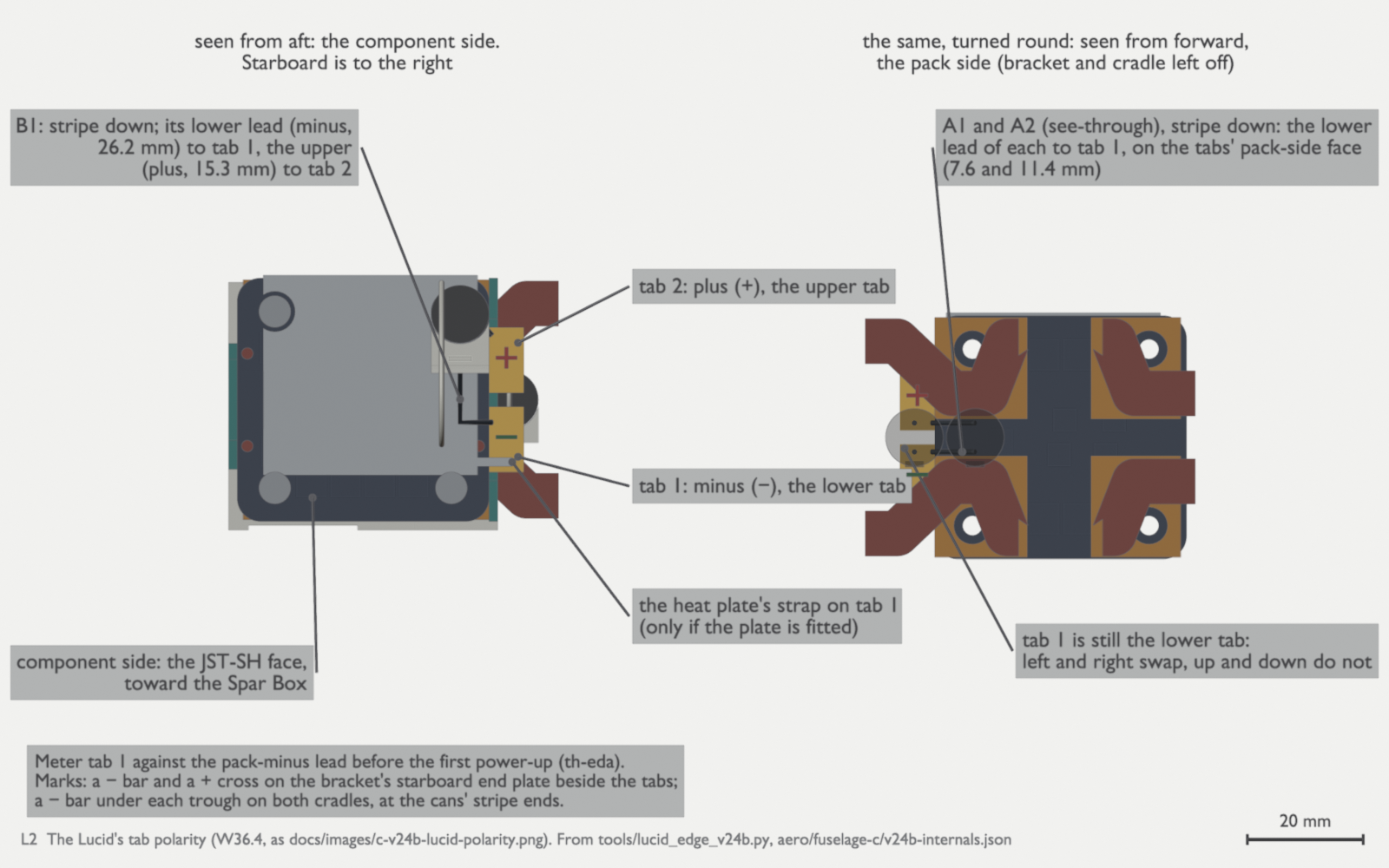
L2: the Lucid’s tab polarity (W36.4). Meter tab 1 against the pack-minus lead before the first power-up (th-eda). Seen from forward, left and right swap, but tab 1 is still the lower tab. L3: the Lucid on the bench, then into the bay. Cap leads, minus and plus, with 2 mm of solder bend included: A1 7.6 and 7.6, A2 11.4 and 11.4, B1 26.2 and 15.3 mm (th-blender W41). The power hubs and J2. Hub A and the J2 SMA bracket go on the port wall. Power hub B is out of the build, and the lights node takes the starboard slot (Ryan, 2026-10-15). In its place, two Matek Micro BECs (MBEC6S), one for each elevon servo, clip into two slots in hub A’s pad: solder their leads first, then slide each board in from aft, parts face down, until its sprung tab holds it. They take no screws (th-blender W53, W53.1). The pad’s deck covers the mouths of the 470 µF can’s rings, so slide hub A’s can into its rings along its axis from aft, before the pack goes in. It does not snap down from above. Each BEC has its own supply run, a 1000 µF 10 V can at the servo end and a ceramic bank at its input. Do not supply both servos from one Micro BEC: a stall at about 2 A trips its protection and drops both elevons (th-avionics). Connect hub A and the BECs on the pack side of the PM02 V3, and check the polarity of each can before the first power-up (parts list, rows 9h to 9k). Do not use tie wraps on the electronics or hot glue.
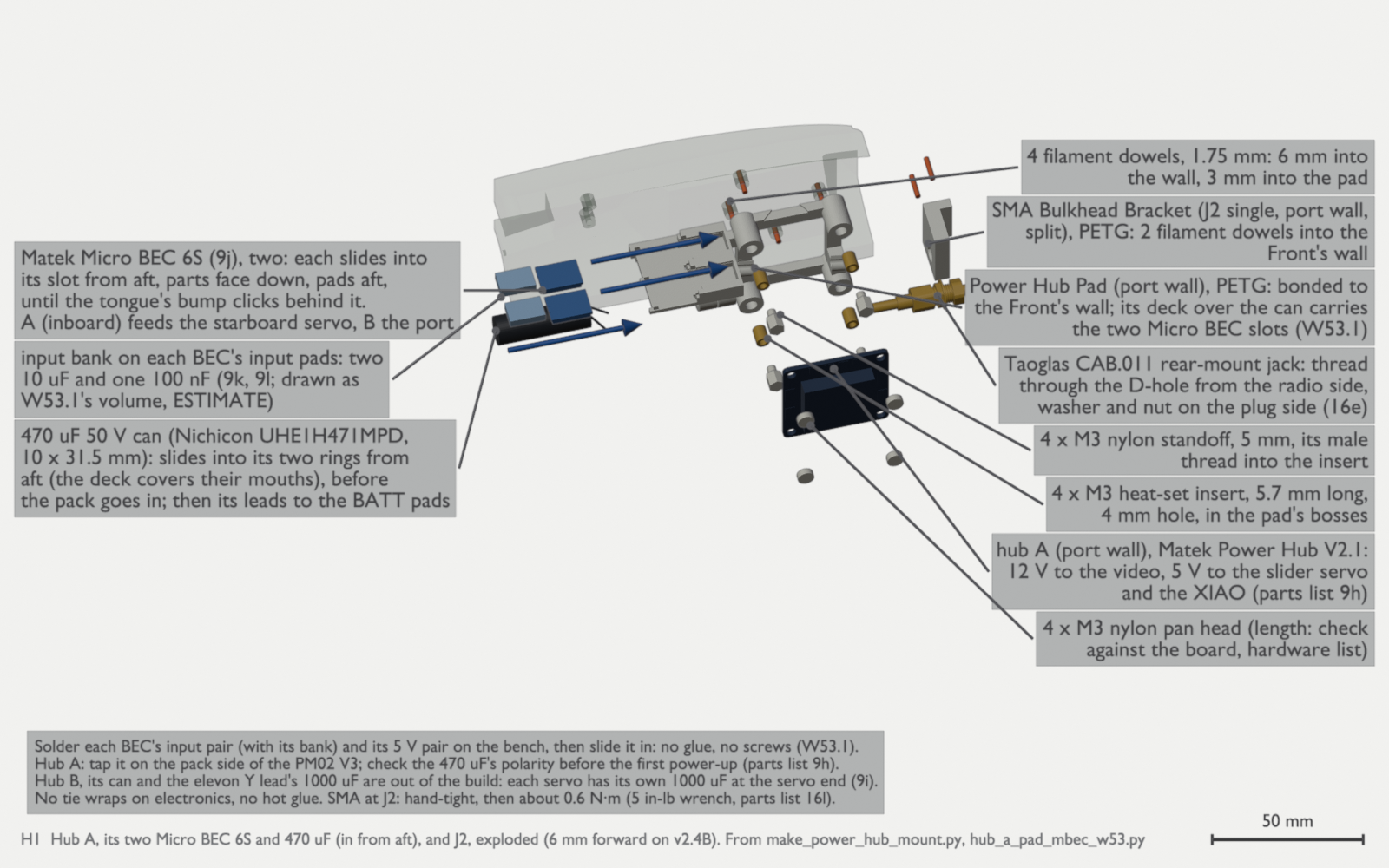
H1: hub A on the port wall, exploded inboard, with the two parts that go in from aft: its 470 µF can into the pad’s two rings (the deck covers their mouths), and the two Matek Micro BEC 6S into their slots on the deck, parts face down, until the tongue’s bump clicks behind each one. Solder each BEC’s input pair, with its bank of two 10 µF and one 100 nF, and its 5 V pair on the bench first. BEC A (inboard) feeds the starboard servo and BEC B the port servo. The J2 bracket and its jack are at the forward end. Hub B, its can and the elevon Y lead’s 1000 µF are out of the build. Hub A stands on 4 M3 nylon standoffs, 5 mm, in heat-set inserts, with 4 M3 nylon pan heads. Tighten the SMA by hand, then to about 0.6 N·m (parts list row 16l; th-blender W43, W46, W53.1, W56). The two holes in the wall aft of the pad are the dowel holes for the LoRa A Coax Clip (W65.1). The figure does not show the clip (th-blender W80a). The leads in the bay. Route the leads as the figure shows before you do the harness checks.
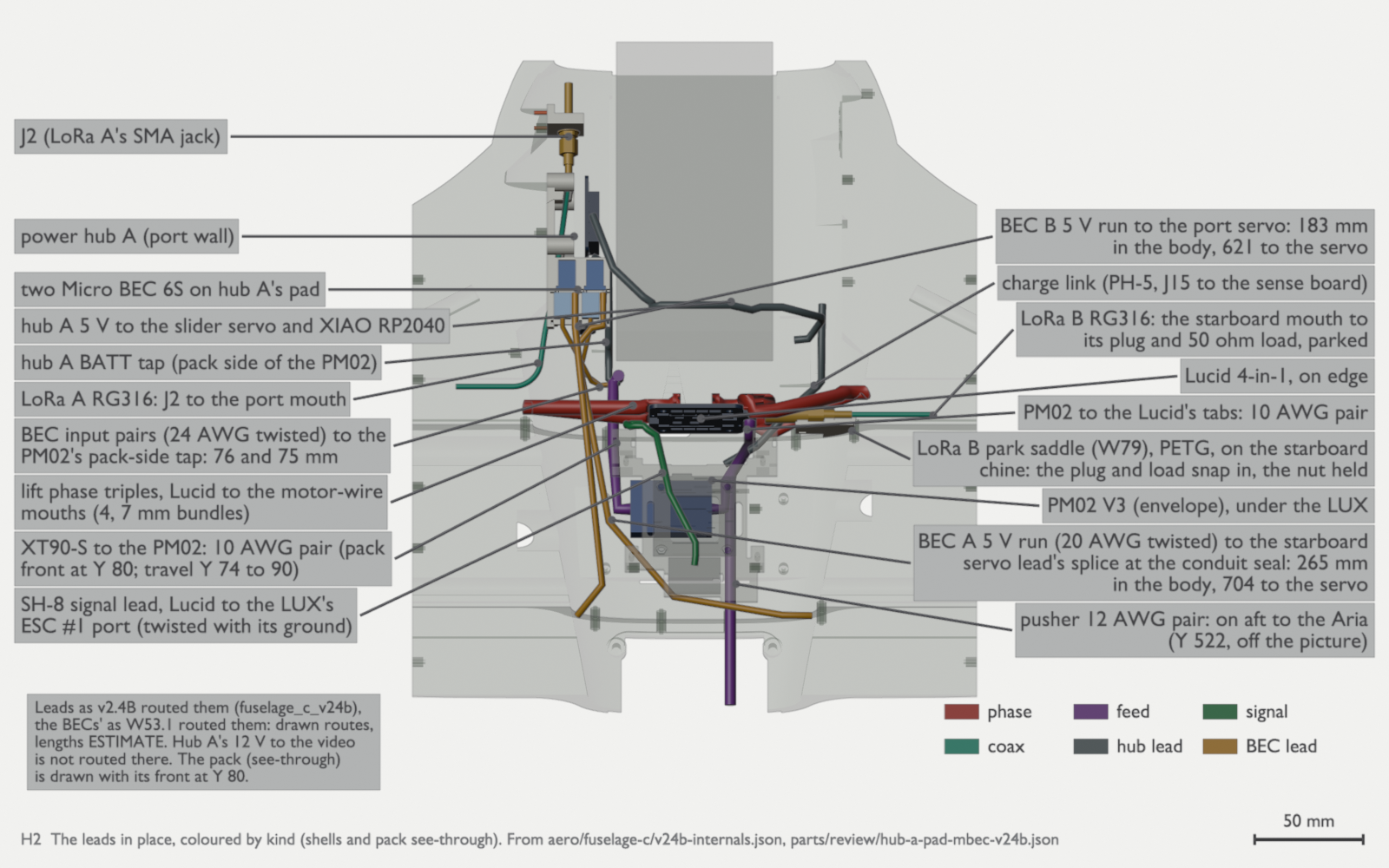
H2: the leads in place on v2.4B, seen from above and coloured by kind: phase, feed, signal, coax, hub leads, and the two Micro BECs’ leads. The BECs’ input pairs run to the PM02’s pack-side tap. Their 5 V runs go to each servo lead’s splice at the conduit seals: BEC A to the starboard servo, BEC B to the port servo. The 12 V lead from hub A to the video, the M10 lead forward of Y 377 and the USB-C pigtail’s tie are not drawn. Lengths are estimates (th-blender W43, W53.1, W56). The battery tray and the slider. The slider comes out with the tray in the Front: remove the lap screws, move each half 1.6 mm inboard, then lift it (Ryan, 2026-10-06). Use nylon screws only.
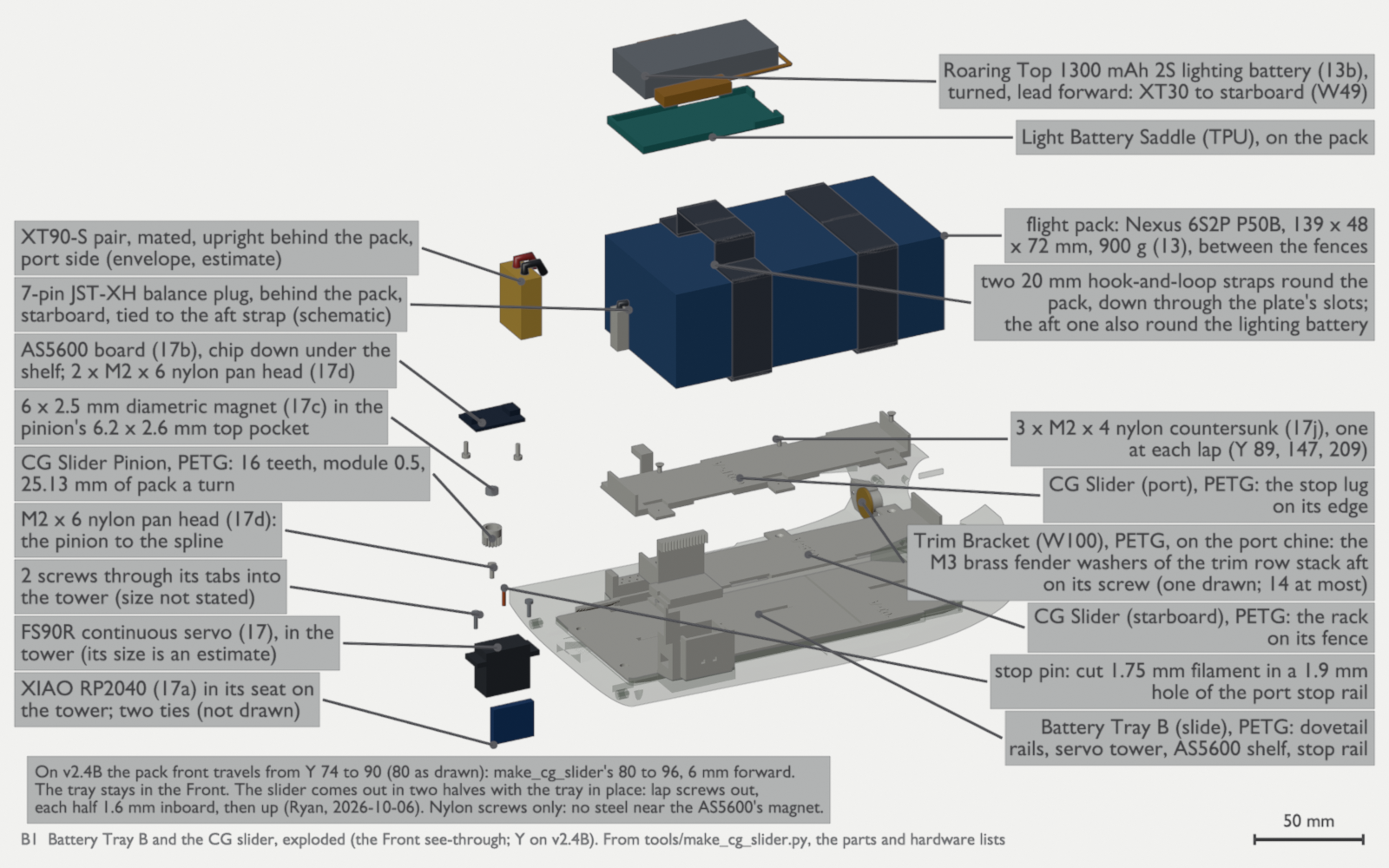
B1: Battery Tray B with the CG slider, its drive and sensor, the pack and the lighting battery, exploded. The Front is see-through. On v2.4B the pack front travels from Y 74 to 90. The slider halves join with 3 × M2 × 4 nylon countersunk screws at the laps. The pinion and the AS5600 take M2 × 6 nylon pan heads. The servo’s tab screws have no size yet (th-blender W43). B2: the pack goes onto the slider and travels from the forward stop (Y 74) to the aft stop (Y 90). The CG readout is an estimate from th-aeronautics’ reconciled build-up (day build about 3,025 g, no Survey3W, with the blank payload cover in ASA): about 267.52 mm at the forward stop and 272.44 mm at the aft stop, about 0.31 mm of CG for each millimetre of pack. 268 mm is at a pack front of about Y 75.6, 1.6 mm into the travel, with no washers on the bracket, and the 270 mm limit at about Y 82.1. The stop pin, set from the balance, holds the pack at TAKEOFF. Aim for 268 mm, and never go aft of 270 mm (th-aeronautics 6d23206a, through th-blender W127.2). The balance plug. Stand the balance plug upright behind the pack on the starboard side, with its housing above Z 9 over Caps Cradle A, and tie it to the aft strap. Do not let it lie at the slider’s deck level: at the aft stop it has 1.7 mm beside the Lucid capacitors there (Ryan, 2026-10-15; th-blender W46 item 7).
The pusher ESC and the payload cover. Put the Aria Tray’s four filament dowels into the Bay walls first, 5 mm in and 3 mm proud. Then put the tray up through the payload opening and slide it aft onto the dowels. Dry-fit it, then epoxy the edges and the slots over the last 30 mm of the slide (th-blender W46). Fit the tray before the pusher leads, the Aria and the cover.
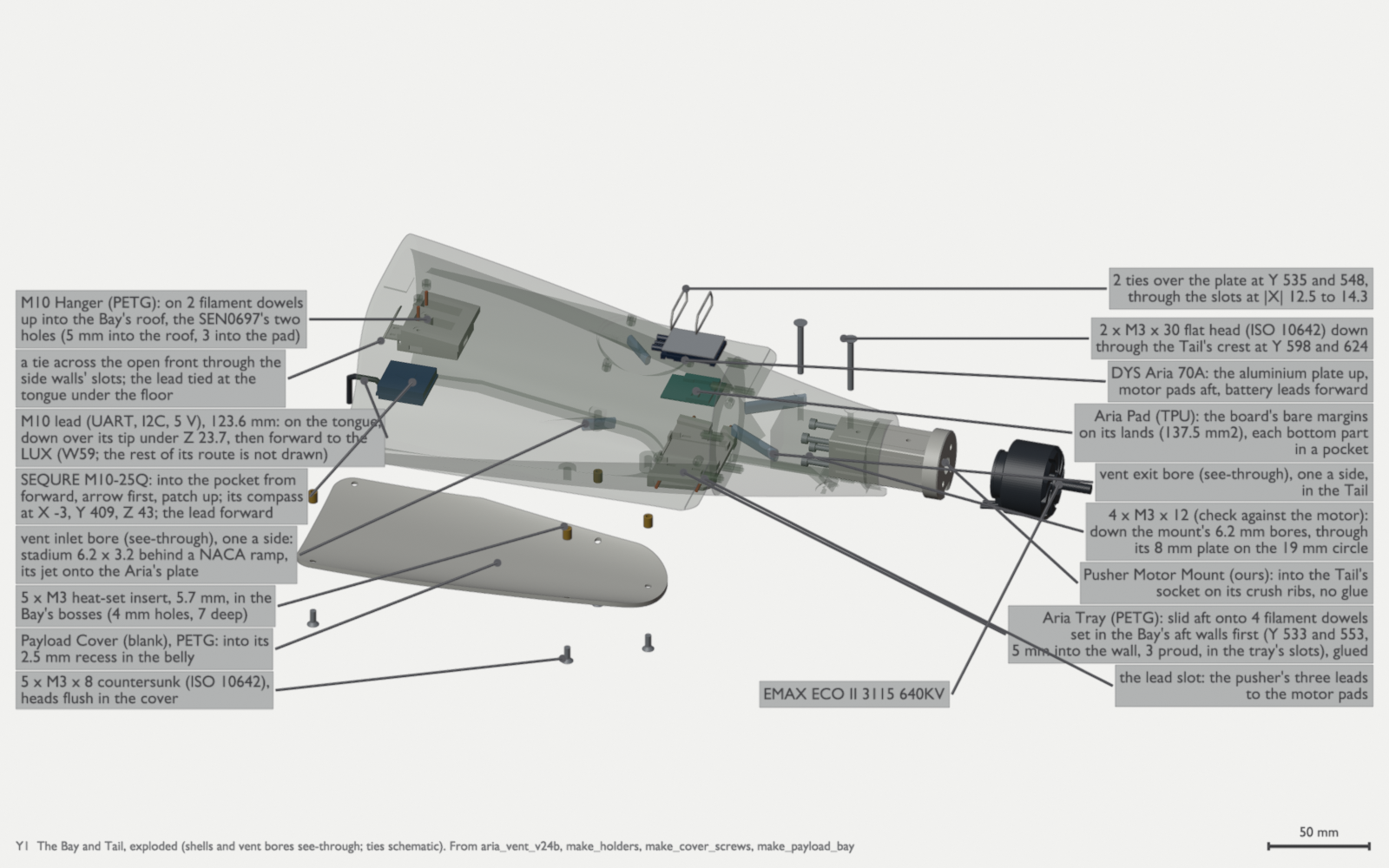
Y1: the Bay and Tail, exploded. The SEQURE M10-25Q compass and GNSS module slides arrow first into the M10 Hanger’s pocket from forward, patch up, with a tie across the open front. The hanger is on two filament dowels in the Bay roof’s two existing holes (5 mm into the roof, 3 into the pad). The module’s lead runs along the hanger’s tongue and drops under Z 23.7 before it goes forward to the LUX (th-blender W59). Also shown: the Aria on its TPU pad and tray, the vent bores, the payload cover and the pusher mount, motor and lock screws. The cover takes 5 × M3 × 8 countersunk screws (ISO 10642), brass or titanium Grade 5, into M3 heat-set inserts. The pusher motor takes 4 × M3 × 12: check them against the motor. The lock takes 2 × M3 × 30 flat heads (th-blender W43, W46, W56). Y3: the tray onto its dowels, the TPU pad into the tray with its pockets up, then the Aria, plate up and motor pads aft. Two ties go through the slots. Then the cover goes into its recess with its five screws, heads flush (th-blender W43, W46). The night lights. The first-flight build has no night lights. When you fit them, use lights for the epoxy windows, the thermal adhesive and the dome buck.
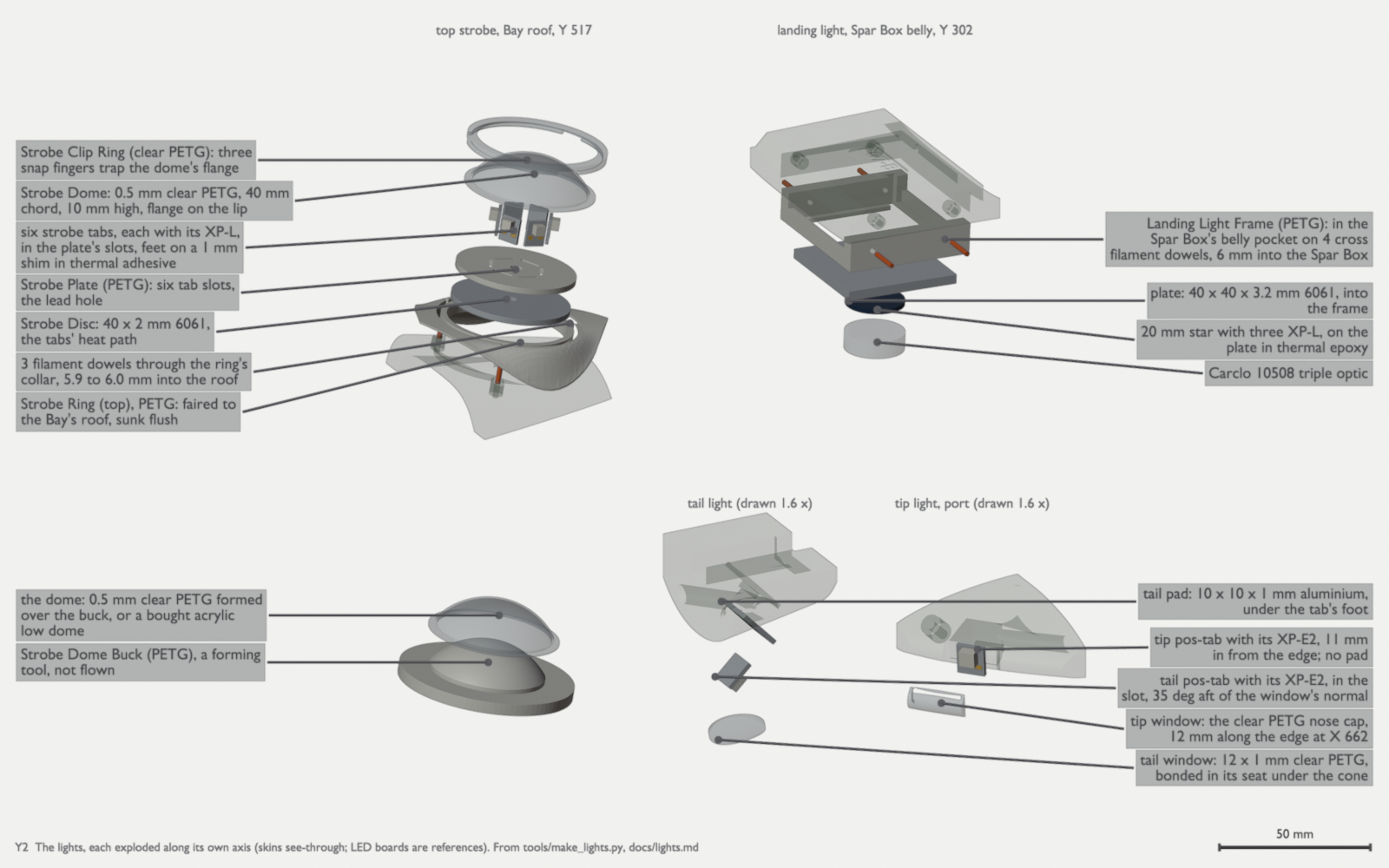
Y2: the lights, each exploded along its own axis: the top strobe with the dome buck, the landing light, the tail light and the port tip light in our own Wing Tip. The tail and tip lights are drawn at 1.6 times the scale (th-blender W43, W73.1). 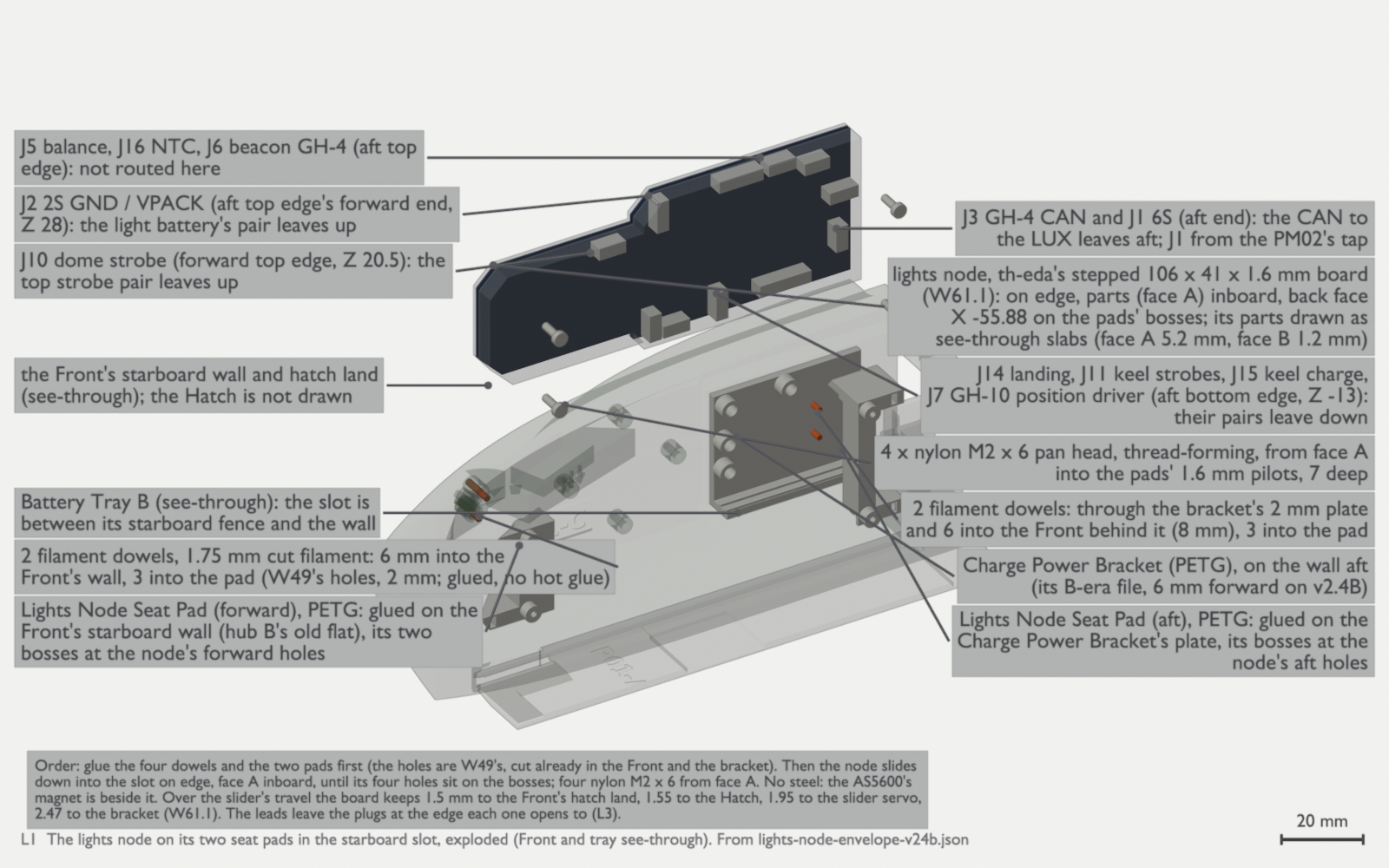
L1: the lights node on its two seat pads in the starboard slot, exploded. Glue the four filament dowels and the two PETG pads first: the forward pad on the Front’s starboard wall, the aft pad on the Charge Power Bracket’s plate. Then the node slides down into the slot on edge, parts inboard, onto the pads’ bosses; four nylon M2 × 6 from face A (th-blender W74c). 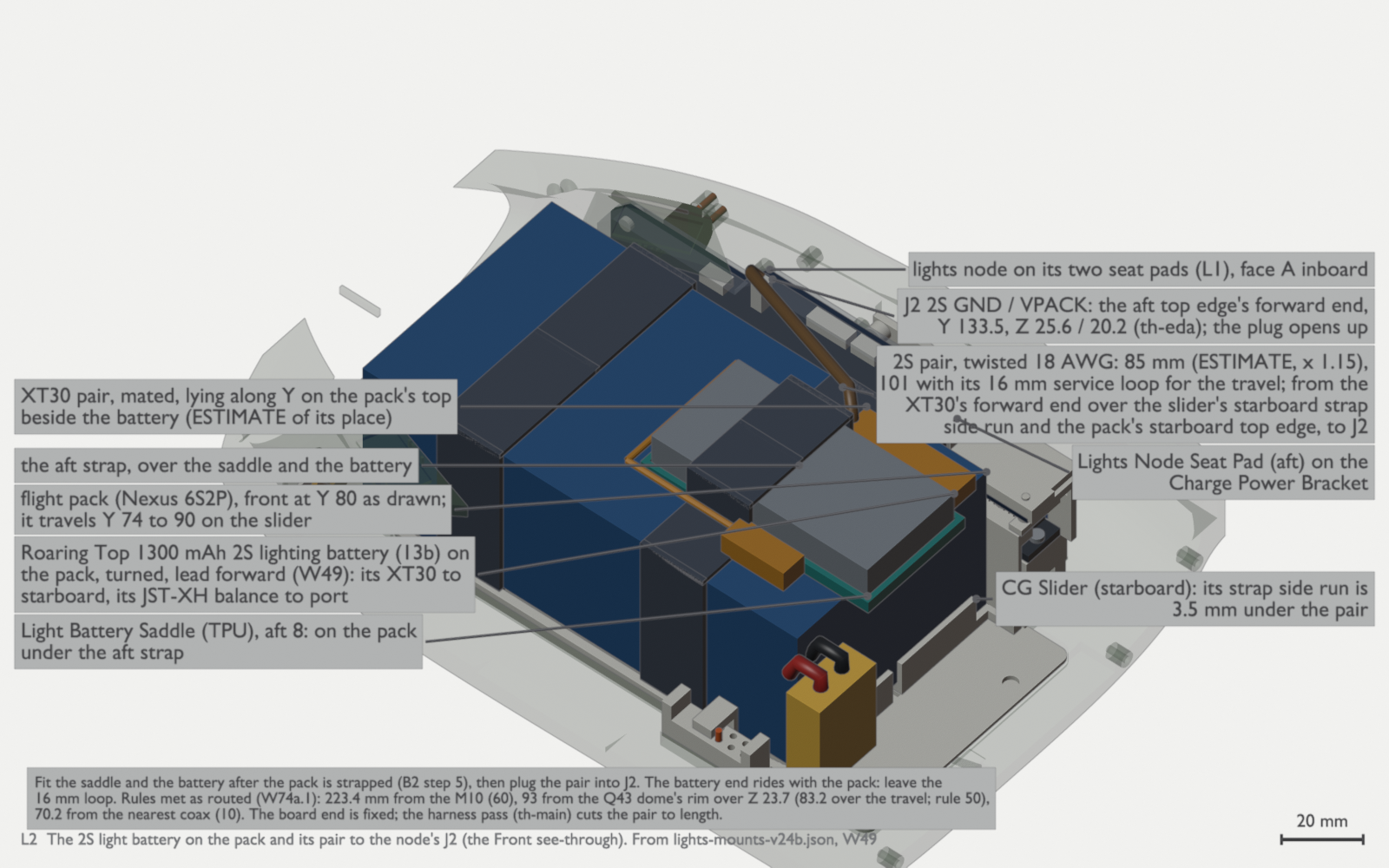
L2: the 2S light battery on the pack at aft 8, turned with its XT30 to starboard (W49), and its twisted 18 AWG pair to the node’s J2: 85 mm, 101 with the 16 mm service loop for the slider’s travel (ESTIMATE, × 1.15). Fit the saddle and the battery after the pack is strapped (B2 step 5); the harness pass cuts the pair to length (th-blender W74c). 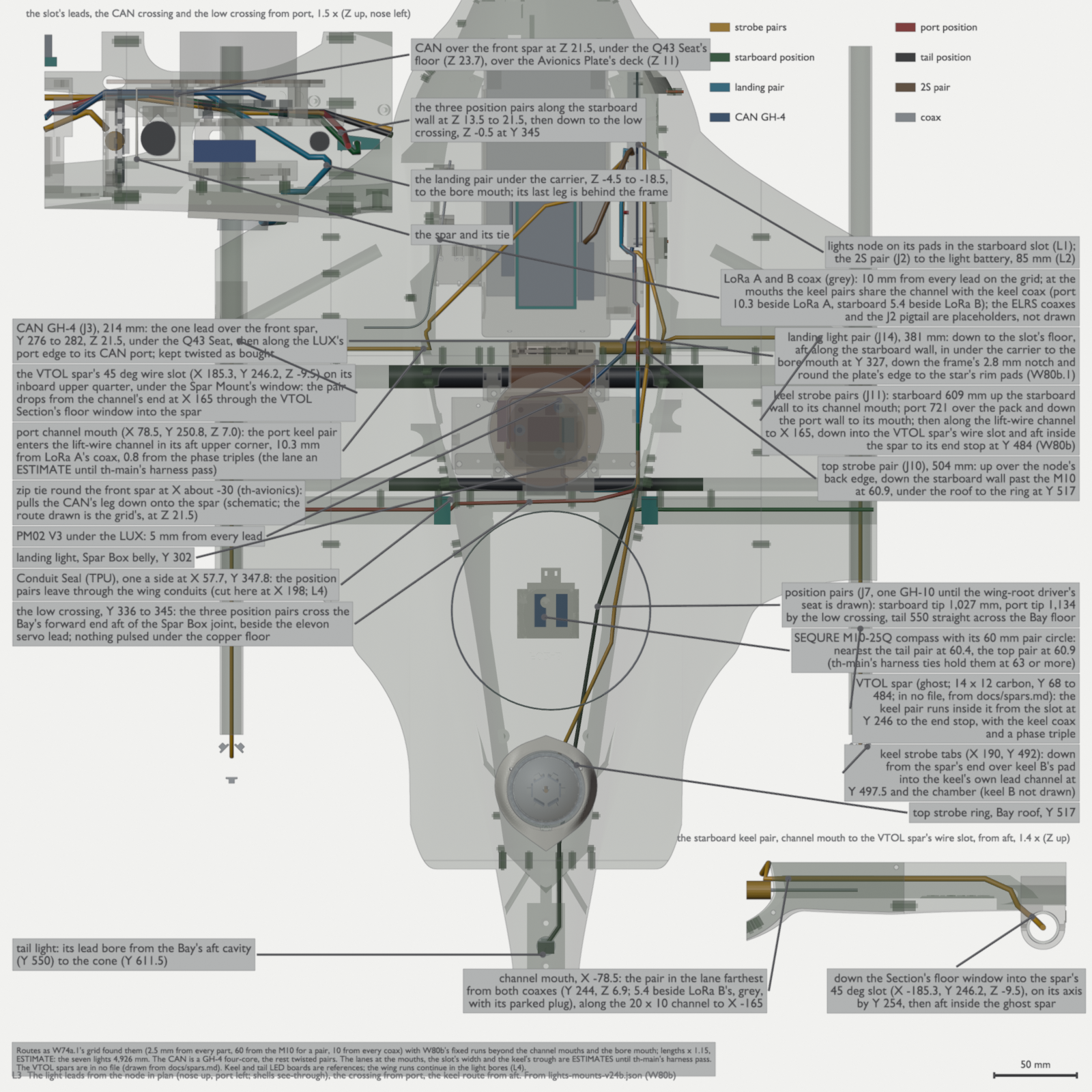
L3: every light lead from the node as W80b routed it, in plan, with the crossing seen from port and the keel route seen from aft. Only the CAN GH-4 crosses over the front spar, at Y 276 to 282, Z 21.5, under the Q43 Seat, held by a zip tie round the spar at X about -30 (th-avionics); the three position pairs cross the Bay low at Y 336 to 345. The keel strobe pairs leave by the lift-wire channel mouths (the port pair over the pack and down the port wall, the starboard pair up the starboard wall), run along the channel to X 165, drop through the VTOL Section’s floor window into the VTOL spar’s 45 deg wire slot at Y 246, and run aft inside the spar to its end stop at Y 484 and down into keel B. The landing pair passes the Landing Light Frame’s 2.8 mm notch and goes round the plate’s edge to the star’s rim pads. Lengths × 1.15, ESTIMATE: the seven lights 4,926 mm, the 2S pair 85, the CAN 214. The lanes at the mouths, the slot’s width and the keel’s trough are ESTIMATES until the harness pass; the VTOL spars are drawn from the spars page, since they are in no file (th-blender W74c, W80c). 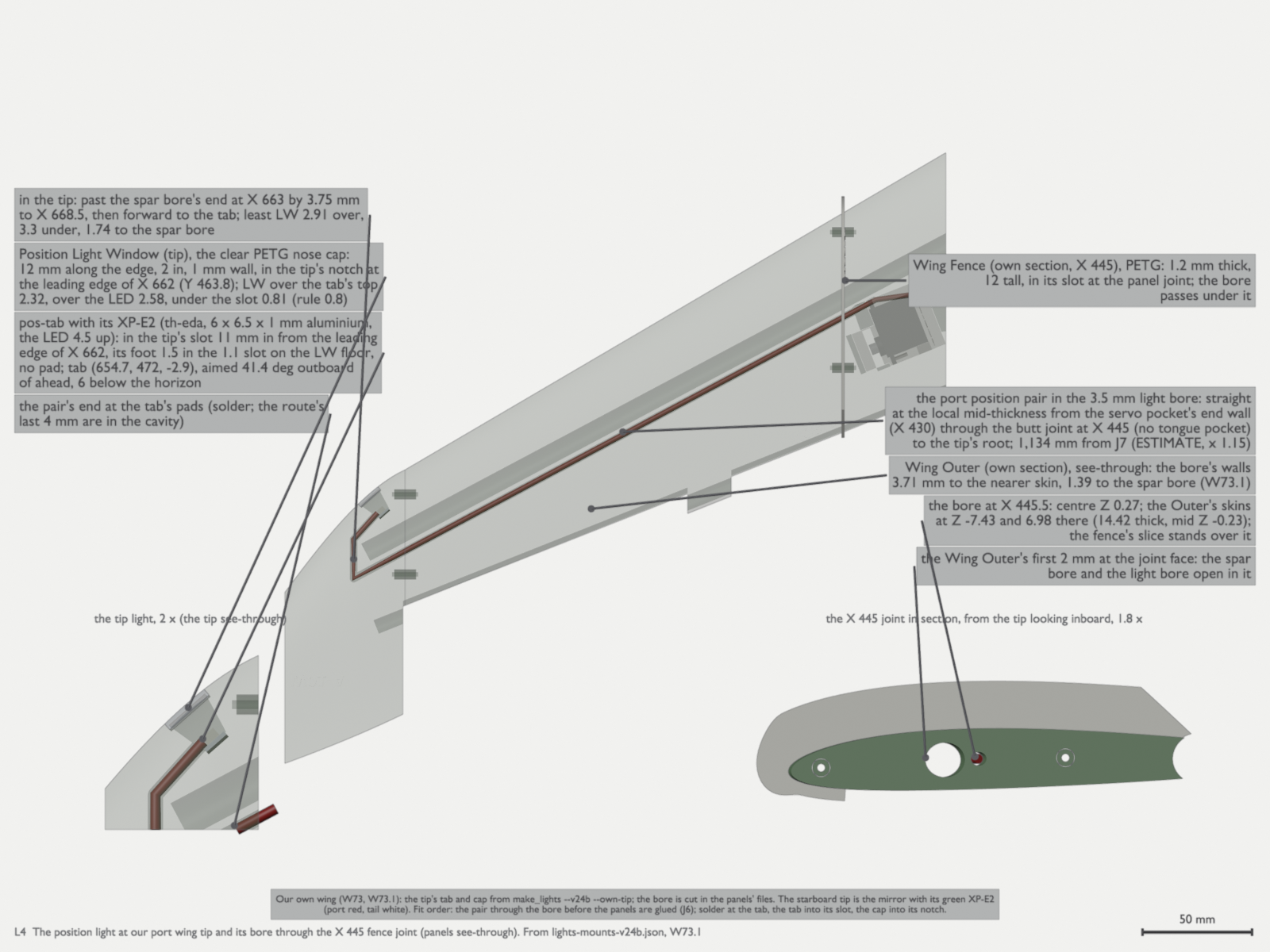
L4: the position light at our port wing tip (W73.1): the pos-tab with its XP-E2 standing in the tip’s slot 11 mm in from the leading edge of X 662, behind the clear PETG nose cap, and its pair in the 3.5 mm light bore at the local mid-thickness, straight through the butt joint at X 445 under the fence, past the spar bore’s end to the tab. The pair 1,134 mm from J7 (ESTIMATE, × 1.15). Pull the pair through the bore before the panels are glued (th-blender W74c). Check:
- The smoke stopper stays quiet.
- Each motor spins the direction the output map says.
- The CG matches the manual’s mark.
- On the bench, connect the USB-C pigtail (parts list row 18) to the LUX F765 on its plate. Take the CG slider’s halves out of the tray: they block the Lucid’s way in by 1.5 mm. Fit the Lucid before the Avionics Plate, then put the plate in aft end down through the canopy opening, and tie the pigtail at the Lucid bracket’s bridge (th-blender W43.2, S3 below). Fit the TBS Lucid 60A 3-8S 4-in-1 lift ESC (AM32) on edge across the bay, ahead of the Spar Box, in the Lucid Edge Bracket (Ryan, 2026-10-13 and 2026-10-14; parts). Its battery tabs go to starboard. Tab 1, the lower tab, is minus: hold the polarity drawing against the board before you solder. Solder the phase leads to the motors: there are no disconnects. Leave a pull cord in each motor wire channel, for the DroneCAN pod leads that follow. Solder the three Rubycon 560 µF capacitors at the tabs, each stripe lead to tab 1. They take the place of the boxed capacitor. Their rating is 35 V, so check the tab voltage on the thrust stand first (parts list, row 2e). Connect it to the flight controller’s ESC #1 port: outputs 1 to 4 (bidirectional DShot) and its telemetry on
-
Configure ArduPilot.
Fit a microSD card in the flight controller first: the LUX F765 does not boot ArduPilot without one. Then flash ArduPlane for the
LumenierLUXF765-NDAAtarget.Then load the parameter files. Each pass loads three files in this order, each with Mission Planner’s Full Parameter List, Load from file, then Write:
terrahawk-common.parm.board-luxf765.parm. It carries the 4-in-1’s settings too, so do not loadlift-4in1.parm, which is for the Pixhawk 6C Mini.- The airframe file,
airframe.parm.
Do the pass, reboot, do the pass again, and reboot again. Some parameters appear only after the parameter that enables their group is written and the board restarts: the
Q_parameters afterQ_ENABLE, the CAN parameters after the CAN drivers, and the OSD, second battery monitor and relay groups. Load from file skips a name that the board does not have yet, so one pass is not sufficient. Then save the board’s parameters to a file and compare them with the three files withtools/check_params.py --loaded(Parameter files has the command and the script). If it reports a name that is not on the board, do the second pass and the check again. The files are for the 6S2P P50B flight pack. To fly the optional Tattu LiPo, loadpack-lipo-4500.parmlast, after the airframe file, and load the common file again before the next flight on the P50B.The files set what the manual’s section 5 sets by hand, with this build’s differences. No source shows the LUX’s arrow, so set
AHRS_ORIENTATIONon the bench with the tilt test in step 9 of Fly the first flights, then do the accelerometer calibration. The elevons are on 5 and 6 (SERVO5_FUNCTION77,SERVO6_FUNCTION78) where the manual saysSERVO6/7, and the pusher isSERVO7_FUNCTION70 where the manual saysSERVO5. The return slot is RTL, not QRTL (FLTMODE511): with this build’sQ_OPTIONS, QRTL hovers home from any distance, which empties the pack. In an RTL, QRTL or battery-failsafe landing, the throttle stick does not change the descent (Q_OPTIONSbit 15 is off). To stop a descent, select QLOITER or QHOVER.MIXING_GAINis 0.75: with the default 0.5 the forward CG limit sits on the aft limit, and there is no usable envelope (CG envelope). More elevon travel also changes the loop gain, so fly an AUTOTUNE pass once the aircraft flies. This build is heavier than the guide assumes, so its speed schedule is higher (AIRSPEED_MIN18 andAIRSPEED_CRUISE22, not 16 and 20). Parameters beyond the guide gives the reason for each value, and the ArduPilot setup guide explains the rest.Four things the files cannot do:
- Use the SEQURE M10-25Q’s compass (its QMC5883L) as the only flight compass. The M10 is also GPS2, on
SERIAL4(UART8, the underside pads), and hangs under the Bay roof at X −3, Y 409 in the M10 Hanger (th-blender W52.1). Route its lead, about 124 mm, below the plane of the Q43’s copper floor: out along the hanger pocket’s floor, through the two slots in the hanger’s tongue with a tie, down over the tongue’s tip, then forward and outboard under the floor’s plane to the Q43 Seat’s starboard aft post. Tie it to the post’s outboard face at Z 19. Twist its 5 V wire with its ground from the module to where the lead turns down over the hanger’s tongue: that stretch passes 14.7 mm from the M10’s own compass (th-telemetry L2). Then take it into the LUX’s starboard edge, the GPS port, at right angles to the ELRS A coax. Keep the lead 10 mm or more from any coax, with no parallel run longer than 30 mm. Where it meets the ELRS A coax square on at the plug, 6.9 mm is acceptable (th-blender W59; th-telemetry L3 and L4). Keep the Aria’s and the Lucid’s leads twisted to within 15 mm of their pads. Use brass or titanium Grade 5 screws in the payload cover, never steel or A2: steel moves the compass calibration at each refit (th-telemetry). The SEN0697 is out, because it cannot be bought (Ryan, 2026-10-15). The Q43’s compass stays off on Fuselage C v2.4B, because the PM02 is about 32 mm from it, and the LUX F765 has no compass of its own (th-avionics f7b6ae3f, e05774a2; electronics notes). - For the first flights the airspeed sensor is the MS4525DO on I2C, through the Y lead with the Q43 (electronics notes). CAN is off, so there is no terminator to check.
RC1_TRIM,RC2_TRIMandRC4_TRIMare exactly 1500. Do not trim them again from a handset calibration; if a radio calibration changes them, set them back to 1500. The hangar’s site node holds its sticks at 1500 and refuses to fly the aircraft if a trim differs (Clear to launch).- The airframe file holds placeholders until that airframe is measured. Set its elevon reversal, endpoints and trims on the bench as its comments say, and write the airframe’s measured CG in its header.
Check: Motor Test spins each lift motor in the right corner and direction. Mission Planner tests A to D clockwise from front right, not in motor-number order. Then roll and pitch the aircraft by hand and watch the HUD horizon follow.
-
Maiden flight.
First do the bench checks and the failsafe checks in Fly the first flights, with the propellers off. Then run the maiden flight checklist. Zero the airspeed sensor before every flight, and learn the airspeed ratio once.
The pitot tube rides in the nose cone unit. Each time the cone comes off, the total line’s sleeve lets go of the tube, and it goes back on as the cone goes home. After every cone refit, and after any work on the pitot or its lines:
- Make sure both lines are on their barbs, colour to colour.
- Blow gently into the pitot tip. The airspeed in the GCS must rise and hold while you blow, and fall back near zero when you stop. This checks the total line.
- Tape one side port and apply gentle suction to the other. The airspeed must rise and hold in the same way. This checks the static line.
- Remove the tape and look at both side ports: they must be open. A side port left taped gives one-sided static pressure, which reads wrong in a sideslip with no warning.
- If a reading rises and then falls away while you still blow or suck, a line leaks. Fix it before flight. The line order does not matter (
ARSPD_TUBE_ORDRstays at 2, automatic), but a leak does. Fly the first flights, step 21, has the same check.
Check: armed in QSTABILIZE, it lifts to one metre, holds a thirty-second hover, and lands.
The maiden hop is also the first step of the card’s first hover. After it, continue the card from the QLOITER hover: the first transition and the control doublets follow. Do not fly a banked survey turn before the doublets.
Where to go after the maiden
Section titled “Where to go after the maiden”Once it flies, the next project is the hangar. The aircraft lands on a flat pad, push bars slide it onto the charge position, the roof rolls shut, and the pack charges through the brass plates on its keels. Why the build looks the way it does records the choices made along the way.
Comments
Comment on the whole page here, or on one section or step with the button beside it.