Print Plan: Prusa Core One+ / PrusaSlicer
Hold: do not print anything (Ryan, 2026-10-10). The first build is Fuselage C v2.4B (Ryan, 2026-10-13), so the beds below, which are drawn for Fuselage B, do not print. Nothing was printed on B. The Fuselage C bed plan is drafted (2026-10-14): 23 beds, about 120 h and 1,153 g as sliced (2026-10-19; g11, g22 and g24 print as one plate since that day, Ryan), from
tools/slice_all.py --fusC(slicing/summary-fusC.txt, G-code inslicing/gcode/fusC/), with the light-channel wings and wing tips, the lights, keel B and the blank payload cover. It does not print until Ryan releases the hold. Bench tools and test prints are exempt: they are not airframe parts, so they can print now (Ryan, 2026-10-11). Test prints are the calibration tests inslicing/tests/and the test coupons, for example the coil former groove coupon. Flight parts, the coil formers included, still wait for Ryan’s go.
This page gives the print profile with the PrusaSlicer setting names, and a checklist for each part. The PLA Aero settings follow the assembly manual’s profile. If a setting has no direct PrusaSlicer equivalent, this page tells you.
Build volume check
Section titled “Build volume check”The Core One+ is 250 x 220 x 270mm. The STLs are exported flat. Thus each part was turned to stand on its mating face, as the manual prints them. Every part fits. The fuselage halves are 205mm and 172mm tall. They fit the bed only when they are turned diagonally. The slicing script does this for you.
Filament profile (PrusaSlicer “Filament Settings”)
Section titled “Filament profile (PrusaSlicer “Filament Settings”)”-
Start from a generic PLA profile.
-
Save a copy as “PLA Aero - TerraHawk”.
-
Change these settings:
Manual (Bambu) PrusaSlicer PLA Aero PETG Nozzle temp Temperature, first layer / other 220 / 220 stock Flow ratio 0.60 Extrusion multiplier 0.60 stock (~0.95 to 1.0) Bed Bed temperature 55, textured PEI stock Part cooling ~30% Cooling: min / max fan speed 30 / 30 stock Flow dynamics / PA off Custom G-code: pressure advance M572 S...M572 S0stock -
In the PLA Aero profile only, replace the pressure advance line with
M572 S0.
The Prusa profiles for the Core One set pressure advance with M572 in the filament start
G-code. LW-PLA continues to expand after it leaves the nozzle. Thus pressure advance cannot
model it.
Print profile (PrusaSlicer “Print Settings”)
Section titled “Print profile (PrusaSlicer “Print Settings”)”-
Start from the 0.20mm STRUCTURAL or SPEED profile for the 0.4 nozzle.
-
Set the values in this table:
Manual (Bambu) PrusaSlicer Lightweight parts PETG parts Layer height Layer height 0.2 0.2 Walls 1 / 3 Layers and perimeters: Perimeters 1 3 (no equivalent) Ensure vertical shell thickness Disabled stock Infill cubic 4% / gyroid 10% Infill: pattern / density Cubic 4% Gyroid 10% Avoid crossing walls ON Layers and perimeters, Advanced: Avoid crossing perimeters ON off Print speed ~35 mm/s Speed: perimeters, infill, etc. 35 stock Brim outer 5mm, 0.07 gap Skirt and brim: Brim type Outer only, width 5, separation gap 0.07 wings, elevons every PETG bed, 5mm (Ryan, 2026-10-19), except g12 and the VTOL Spar Jig
The PrusaSlicer setting “Ensure vertical shell thickness” is a trap. On sloped surfaces, it adds perimeters to get a shell thickness, and it does not tell you. This breaks rule five of the manual: one wall means one wall.
- Disable “Ensure vertical shell thickness” in the profile for the lightweight parts.
- Do a check of the preview. Make sure that the wing skins show a single perimeter.
The manual setting “Slow down by height” has no PrusaSlicer equivalent. The Core One is CoreXY. Thus the tall wing parts do not move quickly back and forth, as they do on a bed-slinger. For this reason, the manual tells you that the setting is optional.
- If the wing tips are rough, add height range modifiers. Right-click the part, then select Height range modifier.
- Decrease the speed in steps: 100% below 60mm, 60% to 150mm, 35% above.
For the Wing Outer and elevon parts, the manual gives “brim count 12”. In PrusaSlicer, this is a brim width of 12mm.
Printer setup
Section titled “Printer setup”- Open the chamber vent for PLA Aero and PETG. The Core One is enclosed. A warm chamber makes PLA soft and causes heat creep when a bed takes a long time. Use a closed chamber only for ASA.
- Dry the PLA Aero at 55 °C for 8 hours before you print the first part. Store it dry.
- Multi-material kit: Load PLA Aero, PETG and TPU next to each other. Then you do not have to change a spool when you change the part type.
- Print each part as a single-material bed. The manual tells you to print one part at a time. Also, LW-PLA that stays in a hot idle nozzle continues to foam and ooze.
- Before you put the TPU for the S50 pads (pod path only) through the kit, do a check of the TPU support of the kit.
- Kobra Max, for the elevons. Our profile is
slicing/config/printer-kobra-max.ini. It is a Bowden printer: the retraction (6mm at 25 mm/s) and the speeds are starting values. Run LeviQ from the screen, then print a retraction tower in PLA Aero before bedg08. Dry the PLA Aero as for the Core One+.
Printer qualification
Section titled “Printer qualification”Do these tests on a printer before it prints flight parts. Do them again after a repair, a nozzle change, a belt
change, a crash or a firmware update, and after 30 days. Each test has a page in slicing/tests/ with its file for
each printer and how to measure it.
- Print the first-layer test. Pass: all nine squares are 0.40 mm ± 0.05 mm thick.
- Run the extruder test. Pass: 20 mm ± 2 mm remains to the mark on the Core One+, 20 mm ± 1 mm on the Kobra Max and the i3 MK2.
- Print the skew gauge. Pass: the diagonals AC and BD are within 0.25 mm of each other, and the sides AB and AD are 100.00 mm ± 0.10 mm.
- Print the Z tower. Pass: the ledges are within 0.2 mm of 50, 100 and 150 mm, and the top is within 0.2 mm of 200 mm.
- Record each value with the printer’s name and the date.
Per-part checklist
Section titled “Per-part checklist”The checklist uses these PrusaSlicer functions:
- To mirror a part, select the part. Then select Mirror along X.
- For the manual instruction “Lay on face”, use Place on Face (F key).
- For supports, use Organic. Set the Overhang threshold in degrees. The “5%” and “15%” in the manual are degrees.
Lightweight (PLA Aero, 1 perimeter, cubic 4%)
Section titled “Lightweight (PLA Aero, 1 perimeter, cubic 4%)”The glued joints that nothing else aligns carry holes for 1.75mm filament dowels (Ryan, 2026-09-28; tools/add_dowels.py): Wing Outer to Wing Inner, and Wing Tip to Wing Outer. The elevon and the front hatch are now each one printed part, with no glued seam, and Fuselage B has no rear hatch. The Fuselage Mid B to Tail B joint is a flat glued face at Y 452 with nothing to align it, so it gets two dowels too, at X ±64.5: 7mm deep in Mid B and 4.5 to 5mm in Tail B (th-blender, e30cfec). slice_all.py prints both as their dowel copies, Fuselage Mid B [spine, payload bay] (dowels) and Tail B [spine, payload bay] (dowels). The other joints align on spars, spigots or the fuselage connector rings. At each joint, push a length of filament into the holes in one part, dry-fit, then glue with CA as the manual says. A thin slot round each hole prints as extra walls, so the dowel sits in solid plastic. The hole size is 2.0mm until the Dowel Coupon sets it.
-
Dowel Coupon from
parts/, platelw-Dowel Coupon, before any airframe part: a 64 x 12 x 10mm LW-PLA bar, printed solid, with five holes of 1.85 to 2.05mm (the notches on the top edge count 1 to 5). Push 1.75mm filament into each hole. The smallest hole that takes it by hand with a light push and no wobble sets the dowel hole size for the glued joints (tools/joint_survey.py). About 47 minutes. -
Do not print the Glue Pin Coupon: every glued joint, PETG-to-LW included, takes cut 1.75mm filament dowels (Ryan, 2026-10-06), so the Dowel Coupon above sets the one hole fit.
-
Gear B root coupon from
parts/(th-blender, fbc8c23; th-aeronautics’ proof test), before any gear B print: it is keel B’s real root, the blade cut 88mm up to the seam at Z -52, on a short PETG mount stub. Platelw-Gear B Coupon Blade(2 h 19 min, PLA Aero): the blade upside down on its seam face, with a 5mm brim. Its first 15mm print with 4 walls, from the root-zone modifier in the project file, as the real blades do. Platepetg-Gear B Coupon Stub and Load Block(1 h 56 min, PETG, 3 walls and 30 %): both on their seam faces. Cut two 6 x 4mm E-glass cores to 137mm. Bond the blade to the stub with the build’s glue, with the cores in their bores (22mm into the stub), and put the load block on the core ends. Let the glue cure fully.- Do the test at room temperature, and record the temperature. Clamp the stub’s clamp block in a vice. Do not clamp the LW blade.
- Before each load, mark the load block’s position against a fixed ruler or square, or set a dial gauge on it.
- Side load first: hang 6.1kg (60 N) from a strap through the load block’s hole between the cores, pulling across the blade’s thickness (X), for one minute. Photograph the loaded coupon.
- Fore-aft load: hang 23.5kg (230 N) the same way, pulling along the chord (Y), for one minute. Photograph it. Use a bucket of sand or water on the strap, and keep hands and feet out from under it.
- Optional: a vertical pull of 35kg through the block’s other hole tests the cores’ 22mm bonds in pull-out.
- While each load hangs, try a 0.05mm feeler gauge (or a sheet of paper, about 0.1mm) along the seam. One minute after you remove the load, measure the block against your mark. The coupon passes if the feeler does not go into the seam anywhere under load, and the block comes back within 0.5mm of its mark. A crack at the bond line, where the blade parts from the PETG, is a FAIL. A crack elsewhere in the LW shell is not a fail: the shell is a fairing and may crack across its layers at 3 to 4 MPa while the cores carry the load. Record each such crack with its location and the load (th-aeronautics). If a spare is printed, load it to failure in the fore-aft case: that gives the real margin. Record the result, the measurements and the photographs in the tuning log. Gear B’s beds print only after it passes.
-
Wing Tip (flat, dowels) x2 mirrored, from
parts/, in place of the kit Winglet: our flat tip, decided with keel B (2026-09-29), with two dowel holes on the face that meets the Wing Outer (th-blender). Print it first as the test part, on its root face. Do a check for a single perimeter, even foaming, and round bores. Do not print the kit Winglet or the Winglet (dowels). -
Fuselage Front (nose ring, pack pocket) from
parts/(th-blender, 1dbefba, 7bcbbd8; Ryan approved the nose package, 2026-10-05), in place of the kit Fuselage Front and the kit Nose 15mm aft of the new joint. It runs from the nose joint at Y 40 to Y 279.7: the fixed nose ring, the pack pocket (the pack’s front at Y 86), the seat for Battery Tray B’s riser, the radio cradle’s spot, the belly louvre under the battery bay (six 45° slots), the two-row inlet under the pusher ESC (th-blender, 51c7b3d) and four bosses for the front hatch magnets. Stand it on its aft (mating) face, 239.7mm tall. Use no supports. Turn it diagonally on the bed. The ring’s pin bosses face down as 5mm discs and print as short bridges. The magnet pocket ceilings print as 8.15mm holes; if a magnet is tight, ream the pocket. The two 1.7mm static port holes, one on each side at Y 40.0, Z -10 on Fuselage C v2.4B (th-blender W77, de8f23b8; Y 46 on the v2.3 nose ring) (Ryan, th-blender e1f6bdc), print horizontally through the 7mm wall: do not drill them larger, because the bond gap to the 1.59mm tube is 0.11mm. Do not print the Fuselage Front (no louvres): it is for CFD only. -
Fuselage Mid B [spine, payload bay] from
parts/, in place of the kit Fuselage Mid and both rear hatch halves (Ryan, 2026-10-03). It carries the spine and the crowned radome over the Q43, and the belly payload bay, which is the only way into the rear fuselage. Put the mating face down. Use no supports. Turn it diagonally on the bed. Its eight insert bosses print at 100 % infill through a modifier in the project file (Payload Bay Insert Modifier); bedg03-lw-Fuselage Mid B. The ESC vents (th-blender, a36d190, 51c7b3d) print with it: two louvre rows in the belly under the 4-in-1, and a hood with a 2.3mm roof over the exhaust slots on each upper flank. Use no supports in the hoods, because supports in a 4.5mm gap cannot come out. The exhaust slots lean 45° (th-blender, 353003a), so they print with no bridges. -
Tail B [spine, payload bay] from
parts/, in place of the kit Tail Pusher, with the kit Pusher Motor Mount’s square pocket, three lock holes and a wire channel under the mount (th-blender, f4ec9aa). Use no supports. Its three insert bosses print at 100 % infill, as on Mid B. It is on bedg10with the Nose and Winglet B. -
Nose Cone (short) from
parts/(th-blender, 1dbefba), in place of the kit Nose 15mm: forward of the nose joint, with the kit’s 21mm cone at the front for the Walksnail Moonlight’s camera (nose rev C, th-blender d73a90b). Stand it on its aft face, no supports, on bedg10. It comes off forward with its plate, over the camera and the pitot, and disconnects nothing. -
VTOL Section x2 mirrored. Use Cubic 6% as a part override. This VTOL section does most of the work.
-
Wing Inner x2 mirrored. Use Organic supports with overhang threshold 5°. Use an outer brim of 5mm. This is Wing Inner (dowels), with two dowel holes on the face that meets the Wing Outer.
-
Wing Outer x2 mirrored. Use Organic supports with threshold 15°. Use a 12mm brim. If the tips are rough, add height modifiers. This is Wing Outer (dowels), with two dowel holes at each end, toward the Wing Inner and the Winglet.
-
Elevon (one piece)x2 mirrored, fromparts/, in place of Elevon Inner and Elevon Outer (Ryan, 2026-10-03). It is 315.6mm long, so it prints on the Kobra Max, bedg08-lw-Elevons(.gcode, not.bgcode). Stand each on its root edge with a 12mm brim and a 0.07 gap. As on the kit’s Elevon Outer, add a support enforcer sphere at the halfway point of the outer trailing edge (right-click, Add support enforcer, Sphere). Before this bed, run LeviQ and print a retraction tower on the Kobra Max. -
Hatch Front (one piece)x1, fromparts/, in place of both kit Hatch Front halves and the Hatch Lock Front (Ryan, 2026-10-03). It fits on the nose tongue and four pairs of 8 x 3mm N52 magnets hold it. Stand it on its aft end with Organic supports at 15° (th-blender checked this face): it prints at 20g on its end, against 43g flat. A support blocker in each magnet pocket keeps supports out of the magnet seats; the project file carries them. Bedg09-lw-Hatch Front. Press each magnet into its pocket with a drop of medium CA. Fit the hatch’s four magnets first. Then put each fuselage magnet on its partner before you glue it, so that each pair attracts. Fuselage B has no rear hatch, so do not print the Hatch Rear halves. -
Keel Shell (antenna bay) x2, one mirrored, in place of the plain Keel Shell, and Front Stilt Fairing x2 from
parts/, for the hangar landing gear (keel A). Stand each on its sole face, no supports, 5mm brim. They are tall and thin: slow down by height. They are bedg18-lw-Keel Shells and Stilt Fairings; the CLI cannot set the slow-down, so set it in PrusaSlicer on the saved project before you print. Seedocs/keel.md.
PETG (3 perimeters, gyroid 10%)
Section titled “PETG (3 perimeters, gyroid 10%)”- VTOL Spar Mount x2 mirrored. Use Place on Face exactly as the manual shows. The part prints at an angle for layer adhesion. Use Organic supports ~5°.
- VTOL Motor Mount x4: do not print. The keel A mounts below replace them (bed
g17). - Pusher Motor Mount (ribbed) from
parts/(th-blender, ea863d9), in place of the kit Pusher Motor Mount (Ryan, 2026-10-06, on th-aeronautics’ check): eight crush ribs press it into Tail B’s square pocket, and two M3 x 25 flat-head lock screws (ISO 10642), countersunk flush in Tail B’s crest at Y 558 and 584, hold it, with no glue (th-blender e58e56a). Thrust seats it in the pocket, and the square pocket takes the torque. Use 2 perimeters, gyroid 10%, and Bottom solid layers 8 for heat. LW-PLA can creep under the ribs’ preload: check the mount for play after the first flights and after hot days. - VTOL Section Plate x2 mirrored.
- Wing Inner Plate x2 mirrored.
- Fuselage Connector Ring x2 mirrored.
- Battery Tray B (slide) from
parts/(th-blender, c3bbe21, a4aca09; the CG trim slider, Ryan 2026-10-06), in place of Battery Tray B and of the kit Fuselage Nose Plate, Nose Plate and the Battery Tray (velcro): rev C’s tray with the slider’s dovetail rails, the servo tower, the AS5600 shelf, the XIAO RP2040 seat, the stop rail with the stop pin’s holes, three 3mm channels that clear the slider’s joint screws, and the riser and foot for the Camera Arm. Print it flat on its underside, rails and riser up, on bedg13. The riser sits in its seat in the Fuselage Front’s floor. Press two 3 x 8mm steel dowel pins into the riser’s two 2.95mm front holes. Do not print Battery Tray B: the slide tray replaces it. - CG Slider (port) and CG Slider (starboard) from
parts/, PETG, on bedg16(th-blender, b86402b, a4aca09): the plate under the pack, in two halves split on the centreline so that it lifts out with the tray bonded in. Print each half on its dovetail face, no supports (the bevel is a 45° overhang). Join the halves with three M2 x 4 countersunk nylon screws (parts list row 17j) at the laps at Y 95, 153 and 215; the heads sit flush in the 4.2mm countersinks. The two pack straps go through the slots at X ±33.6 to 35.6. To remove the slider: take the pack off, drive the slider to the forward stop (pack front at Y 80), remove the three screws, move the port half 1.6mm inboard and lift it out, then move the starboard half 1.6mm inboard, lift it 3mm, move it about 4mm more inboard to clear the sensor shelf, and lift it out. - CG Slider Pinion from
parts/, PETG, on bedg16: it goes on the FS90R’s spline with one M2 x 6 nylon screw (row 17d), and the 6 x 2.5mm diametric magnet (row 17c) goes in its top pocket. Cut the slider’s stop pin from 1.75mm filament; the balance sets its hole (cg.md). The FS90R’s sizes in the tower are estimates until a servo is measured (th-blender). - Nose Cone Plate and Nose Ring Plate from
parts/(th-blender, 1dbefba, 7bcbbd8), PETG, on bedg12: the two halves of the nose joint, 4mm thick, each with five 8 x 3mm magnets flush in its mating face (nose rev C, d73a90b). Print the Ring Plate flat on its back face (Y 40), lip and magnet pockets up; the Cone Plate flat. Glue the Cone Plate into the short cone’s rim on four 1.75mm filament dowels, and the Ring Plate onto the ring’s front on three. Fit the magnets as the hatch’s: one plate’s five first, then each partner on its magnet before you glue it, so every pair attracts. - Nose dowels: cut eleven pieces of 1.75mm filament, each about 8.4mm long (3mm into the PETG, 6mm into the LW, less clearance): four for the Nose Cone Plate, three for the Nose Ring Plate two for the radio cradle’s bracket (th-blender, d73a90b) and two for the single J2 bracket (a89d83b). Do not print the Glue Dowel (PETG): it is gone.
- Battery Stop (P50B, pack forward) and Battery Stop (P50B): do not print. The CG Slider’s aft fence holds the pack (th-blender, c3bbe21).
- No nose ballast cups: they leave the first build with the nose package (th-blender, 1dbefba). The slider sets the CG: with the pack on the slider no trim weight is necessary for 268mm on either gear (pack front at about Y 87.3 on keel A, Y 81.9 on keel B, with the Survey3W), and the balance sets the stop pin’s hole (th-aeronautics,
cg.md5856776, ESTIMATE until the balance). Only the 265mm stall test with the Survey3W needs trim weight: the pack at the forward stop (Y 80) and about 9g on keel A or about 32g on keel B, attached inside the nose to the Camera Arm at about Y 55. Write its mass and position on the build sheet. Do not print the Nose Ballast Cups or the Nose Ballast Stack (reference). - TPU seals from
parts/, bedg14-tpu-Seals, each on its flat face (th-blender): Wire Window Cover starboard and port (press into the outer face of each VTOL Spar Mount’s motor-wire cutout), Antenna Slot Grommet (port) and Antenna Slot Plug (starboard), Conduit Seal starboard and port (each plugs the wing wire conduit’s mouth in the Fuselage Mid’s bay wall, with a slit for the servo lead; th-blender, 319499b), the Survey3W Lens Seal, a ring between the camera’s lens and the payload cover, the Light Battery Saddle, flat on its base, which seats the lighting battery (row 13b) on top of the flight pack under the aft strap (th-blender, a8bf553), and the Pusher Lead Grommet for Tail B (th-blender, 8da8e22), which stands on its forward face with the bore vertical. Put the three twisted pusher leads through the grommet’s 4.4mm bore, push the grommet into its pocket in Tail B from above, then slide the Pusher Motor Mount in over it. Keep the twist through the grommet. Do not print the Conduit Lead (reference) or the Pusher Lead Triplet (reference). The press fits are 0.1 to 0.15mm: if a test print is loose or tight, change the press-fit value in the part’s generator. On Fuselage C, bedg14has an Antenna Slot Grommet on each side, port and starboard, and no plug: each nose-ring notch takes one Walksnail antenna (th-telemetry, 2026-10-17). Each grommet has a 3mm brim, because it stands 8.4mm tall on 13mm2 of TPU. Remove the brim before you fit it. - Hatch Lock Front, Hatch Lock Rear: do not print. The magnets replace the front lock, and Fuselage B has no rear hatch.
- Clip Base x2, Clip x2. These are the wing clips, glued into each VTOL Section’s cutout. On Fuselage C, do not print them. Print the Wing Clip (C v2.4B, ours), port and starboard, on bed
g11on its flat side: one PETG part in place of each Clip and Clip Base (th-blender W73). Bedg12has our Wing Inner Plate port and starboard and the two Wing Fence parts, each fence on its outboard face. - Servo Mount x2: do not print. The Servo Mount MD65MG below replaces it for the Hitec servos.
- VTOL Cutting Tool Main and Tip. Print these early. You need them to drill the VTOL spars. On Fuselage C, do not print them: the VTOL Spar Jig replaces them (Ryan, 2026-10-16; th-blender W62, efd19305). Its three parts, VTOL Spar Jig Front (C v2.4B, ours) and VTOL Spar Jig Rear (C v2.4B, ours) port and starboard, print in PETG on plate
petg-VTOL Spar Jig(3 h 22 min, 117.1 g), each on its bottom face with no supports. The two rear parts are 252 mm long, so they lie diagonally on the Core One+. The jig is a bench tool, so the print hold does not apply to it. The spar bore has a pointed crown, so the spar seats on the lower arc and you do not ream the bore. - FC Mount. The Avionics Plate below snaps onto its deck.
- FC Mount Dampener Front and Rear, in PETG, not TPU, on bed
g12. They stay rigid: the flight controller’s own rubber grommets (in its box) are the one soft stage, and you must fit them. Two soft stages in series give a low, weakly damped mode that can sit near the lift motors’ rotation rate (th-avionics, 2026-10-04). - Survey3 Belly Mount: do not print. It fits only the kit Fuselage Mid’s belly cutout. The Survey3W rides in the sleeve of the Payload Cover (Survey3W) below.
- Payload Cover (Survey3W) from
parts/, PETG, on bedg15: stand it on its aft end, with supports only there (th-blender). It closes the payload bay and holds the Survey3W. Five M3 x 8 countersunk screws hold the covers (th-blender b4b7c69) in the bay’s heat-set inserts (docs/hardware-and-consumables.md). - Payload Cover (TFmini-S) from
parts/, PETG, optional (th-blender, 0900ef8): print it only for flights with the rangefinder, alone aspetg-Payload Cover TFmini-S, standing on its aft end as the other covers. The TFmini-S sits lens-down at Y 375 in a seat pad on the cover, held by a clip-on lid (six clips under ridges on catch blocks on the seat pad), with a TPU bezel round the lenses (th-blender, e446ad8). The cover fits with the same M3 x 8 countersunk screws into the bay’s inserts. - TFmini-S Lid from
parts/, PETG, optional, alone aspetg-TFmini-S Lid: print it upside down, the plate on the bed and the clips up, no supports. - TFmini-S Bezel (TPU) from
parts/, TPU 95A, optional, alone astpu-TFmini-S Bezel: print it flange-down, the flange’s flat top on the bed. Its outer face is curved to follow the belly skin, flush with the cover (th-blender, 25bbb59). To fit the sensor: put the bezel into the cover’s window from inside, put the sensor in, then press the lid down until its clips click. - Keel A from
parts/, for the hangar landing gear: VTOL Motor Mount Rear (keel) x2 and VTOL Motor Mount Front (stilt) x2 in place of the kit’s four VTOL Motor Mounts (3 walls, 30 % gyroid), Keel Spar Saddle x2 (stand it on its bottom face, no supports); Keel Sole x2, Front Stilt Sole x2 (plate recess down on the bed; the recess ceiling bridges; give the front stilt soles a 3mm brim, because only a narrow rim touches the bed). PETG-CF if you have it. The soles and the spar saddles are bedg19-petg-Keel Soles and Saddles. Seedocs/keel.md. The four new motor mounts are bedg17-petg-Keel and Stilt Motor Mounts: 30 % gyroid, each standing on its root’s flat bottom, with tree supports under the sleeve and the pad overhang. - Our charge node parts from
parts/, on bedg15-petg-Charge Avionics ESC Cradle and Survey3W Cover: Charge Power Bracket. The bed’s supports at 45 degrees serve the Avionics Plate’s radio wing and the lift ESC cradle. Do not print the TFmini-S Belly Mount: the rangefinder is off the first build (Ryan, 2026-10-05); its part stays inparts/for a later optional mount. Do not print the Charge Sense Floor Tray: the lift 4-in-1 now lies in its place in the belly (Ryan, 2026-10-05), and the charge node is not in the first flights. Do not print the Charge Sense Hatch Mount or the Charge Sense Fence either. Do not print the Channel Drill Guide port or starboard, and do not drill the motor-wire exits at Y 208 (th-blender, 2026-10-10): the bore that the guides aim at is the seat of the 8mm wing spar, not a wire channel, and a drill removes the spar’s inboard stop. The lift motor wires use the kit’s own 25 x 10mm channel through the Fuselage Mid B stub (Y 283 to 308), which is open into the bay. Seedocs/charge-node.md. - Lift ESC Cradle (belly) from
parts/, PETG, on bedg15(th-blender, 0131caa): it stands on its forward face (the capacitor cage’s front bar), on the bed’s 45 degree supports. Bond it to the floor across the Fuselage Front to Mid B joint with its underside, which follows the floor’s curve. The 4-in-1 sits on its four standoffs, component side up, on four M3 x 6 self-tapping screws. Its two posts and front bar hold th-eda’s three capacitors. Do not print the old Lift ESC Cradle (4in1) for the battery bay wall. - ESC Pod Cradle S50 x4 from
parts/, only for the DroneCAN pod path: the 4-in-1 lift ESC flies first (Ryan, 2026-09-29), so these are not on the first build’s beds. Print them alone aspetg-ESC Pod Cradles S50: two as they are for the port pods, two mirrored for starboard. Turn them round at the rear pods. Stand each on its flat motor-end wall, not the tapered end. Use no supports and a 5mm brim, because each part is 118mm tall on a 16 x 20mm face. For each S50 you also need two zip ties 2.5 to 3.5mm wide through the grooves behind the board, with the tie heads turned to the bottom of the duct (a head on top comes within 8.4mm of a folded lift blade at the front pods), and one S50 Pad (TPU, below) between the board’s back and the cradle face. Each S50 cradle also holds the CAN joiner in its tail: slide the joiner down between the ribs with its J1 end nearest the spar’s lead slot, then attach it with one 2.5mm zip tie through the wall slots. The plugs go in from below. At the rear pods, J1 takes the harness leg from the FC, J2 the leg to the front pod and J3 the S50 lead. At the front pods, J1 takes the harness leg from the rear pod, J2 the S50 lead and J3 the terminator plug. Print this bed again for the second airframe. Seedocs/agent-threads/lift-esc/. - Servo Mount MD65MG x2 from
parts/, on the same bedg16, for the Hitec MD65MG elevon servos. It replaces the kit’s Servo Mount, which is too tight for this servo. Stand each on its floor (flush with the wing’s underside, with a 4 x 19mm slot for the servo arm; th-blender, 6e7a3b6), with no supports. One part fits both wings: turn it over for the starboard wing. Before you glue it in: file 0.25 mm off each ear tip of the servo (32.3 mm to 31.8 mm across the ears), check the hole spacing against the real servo (far-ear centre hole 27.8 mm from the near-ear pair, near-ear holes 5.94 mm apart), then screw the servo in with 3 x M2 x 8 self-tapping screws into the 1.6 mm pilots. Glue the mount into the bay with the servo fitted and centred, as the manual says. - Avionics Plate (LUX F765) from
parts/, on bedg15(th-blender, 8ecb409): one plate carries the Lumenier LUX F765, the SiK radio and the ELRS receiver, and snaps onto the FC Mount deck with side lips and four hooks, no tools. Print it top face down; the bed’s 45 degree supports go under the SiK wing only. The board sits on its 30.5 x 30.5mm square: four M3 nylon pan-head screws from below through 3.3mm holes (counterbored 6.4 x 1.6mm), four M3 nylon standoffs of about 5mm (ESTIMATE: check them against the board’s own rubber grommets, in its box), and four M3 nylon nuts on top. The USB-C and microSD edge faces forward, so you can reach the card through the front hatch opening; the board does not boot ArduPilot without it. The telemetry radio, the Seeed XIAO ESP32-S3 + Wio-SX1262, moves to the nose with the nose package (th-blender, 1dbefba, 285337d): it sits in the Radio Cradle Base (XIAO, nose) (on bedg15, on its floor, on the bed’s supports), bonded to the nose ring’s port inner wall, with the Radio Cradle Lid (XIAO) (on bedg16, flat) snapped onto it. The radio wing of the plate stays as printed and carries nothing. Do not print the Radio Cradle Base (XIAO) for the wing or the Radio Cradle Snap Pins. Solder the radio’s 28 AWG leads from underneath, and fit the 100 uF capacitor (cart row 16i) in the base’s trough by the USB end. Its IPEX pigtail goes to the in-line MMCX in the base’s clip; the RG316 runs from there to the port keel. Zip ties: one round the rear spar at the radio wing’s foot, one round the receiver. The 6C Mini, NxtPX4v2 and H7 plates stay inparts/. - GPS Saddle: do not print. It fits only the kit rear hatch, which Fuselage B does not have. The Q43 Seat replaces it under the radome: PETG, on bed
g15, on its large flat face with no supports, counterbores up, fixed with five nylon M3 x 6 pan-head screws and two brass M3 heat-set inserts in Mid B’s corbels (th-blender, e30cfec; Ryan approved it 2026-10-04). Mid B’s corbels print at 100 % infill through the project file’s modifier. - Airspeed Nose Bracket from
parts/, on bedg16(th-blender, 6bdee70): it carries the MS4525DO board flat beside the O4 unit in the 15mm nose cone (X -34 to -19, Y 42 to 64). It prints standing on its flat end face with no supports: the board face is not flat, because the four screw bosses stand 2mm proud of it. Bond it to the cone’s inner wall with CA or epoxy. Four M2 thread-forming screws hold the board in its bosses. The 17 x 10mm hole pattern is an ESTIMATE from the vendor photo: check it against the real board before you print. The pitot tube goes through the kit’s own bore in the cone. It replaces the DLVR’s Airspeed Module Bracket and the Airspeed Joiner Seat, which the first flights do not need (I2C sensor, no CAN). - Pusher ESC Tray (belly) from
parts/, PETG, on bedg15(th-blender, 734d59e): it stands on its inboard wall, on the bed’s 45 degree supports. Bond it to the floor on the starboard side, beside the lift ESC cradle, with 5-minute epoxy; its underside follows the floor’s curve. The DYS Aria snaps in cover up, with no ties: a tongue in each wall holds the bare edge of the board. Its leads leave forward, and its motor pads face aft. Do not print the old Pusher ESC Tray (Aria) for the tail. - Camera Arm from
parts/(th-blender, 1dbefba, d73a90b, 12ee883), PETG, on bedg15. The Moonlight’s M2 hole pair is in each cheek at Y 26.5, 18mm behind the lens front and 6mm apart, from Ryan’s measurement (th-blender 0682959); the kit O4 pair at Y 18 stays. Stand it on its aft (+Y) end, on the bed’s 45 degree supports. It carries the Walksnail Moonlight’s camera in its 20mm cradle and the VTX on four standoffs, with a port wing, on Battery Tray B’s riser, its tongue aft through the Fuselage Front’s nose opening. Press two M3 heat-set inserts into its 4.0 x 5.0mm holes, then fix it to the riser with two M3 screws over the riser’s two steel dowel pins. - Antenna Cassette Lid x2, one mirrored, from
parts/, LW-PLA, platelw-Antenna Cassette Lid(1 h 42 min, 11.6 g): both keels carry the full cassette for the two-radio LoRa diversity (Ryan, 2026-10-06), port ELRS B and starboard ELRS A, each with its LoRa coil and two jacks. Do not print the Antenna Cassette Lid (ELRS only). Print each on its flat parting face, with no supports: the groove roofs are short arches and a 5.4mm bridge, and supports inside the grooves could not come out. Each lid is the inboard half of its keel over the antenna area and holds the elements and the MMCX jacks. Three brass or nylon M2 x 6 countersunk screws hold each lid; no tape. Fit the ferrite beads on the pigtails (five at each ELRS feed, two on each LoRa coil’s, th-telemetry) before you tune: tune each cassette’s coil on the VNA with the cassette, the pigtail and its bead fitted, because the pigtail pulls it 10 to 28 MHz low. Seedocs/keel.md, section “Antenna cassette”. - LoRa coil formers and tools from
parts/, PETG (th-blender, 6dc7468; Ryan, via th-telemetry), in place of the plain SiK Coil Former, which is not printed. Print the two Antenna Groove Coupons first, platepetg-Antenna Groove Coupons(16 min, 2.4 g, 0.1 mm layers; th-blender 68bc62c8): wind the 20 AWG wire (row 16n) into each band and report to th-telemetry which depth and width it seats in best (antennas bench step 8). They replace the single Coil Former Groove Coupon, whose 0.95 mm groove printed too narrow for the wire (th-telemetry, 2026-10-12). th-blender then sets the formers’ groove to the winning band, and the formers are sliced again. Then print LoRa Coil Former (grooved) and LoRa Coil Former (grooved, starboard), platepetg-LoRa Coil Formers (grooved)(26 min, 3.9 g), each on its flat at 0.1mm layers. Do not print them before the groove is set from the coupons. The Coil Winding Cradle Base, two Coil Winding Thumbwheels, the Coil Winding Wire Guide and the ELRS Dipole Gauge are bench tools, platepla-Coil Winding Tools(57 min, 24.1 g), on normal layers in plain PLA, sliced for the second Core One+ (Gen 2) with its HF0.4 nozzle (Ryan, via th-telemetry, 2026-10-11). Any material will do. The coupons and the two formers stay PETG. Coil winder Mk2 (th-blender 3d4565d9; Ryan approved it on 2026-10-12, and its beam frame on 2026-10-14, 83b37cec): before assembly, cut the two frame rods to 128 mm (7 mm off a 135 mm steel rod) and have four M3 x 16 socket-head screws for the Base Beam; thirteen PLA parts with two Spool Cones, the Base Beam (4 perimeters) and the Spool Collar, platepla-Coil Winder Mk2(3 h 22 min, 93.4 g; branded: TERRAHAWK and COIL WINDER Mk2 on the cheeks, engraved 0.7 mm on faces that print up) for the Gen 2, a bench tool exempt from the hold, and its TPU feet (six: four plus two spares) and snap-on brake pads (standard and +0.4 mm, two each) on platetpu-Coil Winder Mk2 Feet and Brake Pads(21 min, 3.5 g; a 3 mm brim on the brake pads only, which stand 6.5 mm on about 17 mm2; th-blender W28, in place of the rubber feet and the felt, which stays an optional fallback). The feet snap into 3.5 mm holes in the cheeks; cheeks printed before 2026-10-12 are drilled 3.5 mm through the foot flange, 3.5 mm in from the cheek’s outer face, 7.0 mm from the flange’s front end and 8.0 mm from its back end, with the bottom edge lightly chamfered. Set the printer up for TPU before the TPU plate. The Turns Scale prints alone, platepla-Coil Winder Mk2 Turns Scale (2 colour)(8 min, 3.3 g; th-blender b7d6d0b3): its raised FEED GAP and TURNS print in a second colour, so the file pauses with M600 before layer 16 (Z 3.2). Stay at the printer to change the filament, then let it finish the three letter layers. It replaces the Mk1 Coil Winding Cradle Base, Thumbwheels and Wire Guide, which printed as job 22; the ELRS Dipole Gauge from that job stays. The Carriage prints on its head end face, the cheeks on their large flat faces, the hubs on their square drive ends and the brake pads on their cheek-side end faces. Its bought parts are in the parts list’s Bench tools section. - SMA Bulkhead Bracket (J2 single, port wall, split) from
parts/, PETG, on bedg16(the J2 split, Ryan approved 2026-10-09; th-blender a89d83b, 1becacf, 68392f1): the bracket holds joint J2’s one SMA female bulkhead jack (the Taoglas CAB.011 rear-mount pigtail, row 16e) for the port LoRa run on the port bay wall, axis along Y at X 58, Z -2.0. Put the jack in from the radio (forward) side, its 8mm hex in the 8.3mm pocket in the panel’s forward face and its thread aft through the 6.5mm D-hole in the 3.0mm web, the D-flat on the hole’s flat; then put the star washer and the one 8mm nut on the plug (aft) side. Hold the hex with an 8mm wrench while you tighten the RG316’s SMA plug, so the pigtail does not twist. Print the bracket on its panel’s aft face, with no supports. Bond its foot to the port wall at Y 110 to 119.2 on two filament dowels in the Fuselage Front’s holes. Do not print the twin SMA Bulkhead Bracket (J2, port wall) or either SMA Tie Pad: the J2 split removes them. The starboard LoRa run does not cross the bay: until th-eda’s two-radio beacon board flies, its SMA plug (row 16k) on its 50 Ω load (row 16j) lies on the Fuselage Front’s starboard wall in the LoRa B Plug Cradle (below). - LoRa A Coax Clip (rise, port wall), LoRa A Coax Clip (mouth, port wall), LoRa B Coax Clip (mouth, starboard wall, split) and LoRa B Plug Cradle (starboard wall, split) from
parts/, PETG, on bedg16(th-blender, d7906f8, 63fa640): both LoRa RG316 runs enter the kit’s 25 x 10mm motor-wire channel at its mouth in the Fuselage Mid B stub (Y 283 to 308, Z -1.6 to 8.4), in the port mouth’s forward upper corner and the starboard mouth’s aft upper corner, above the lift phase leads. The port run (LoRa A) goes from the single J2 aft along the port wall in hub A’s pad clips, through the rise clip (on the Fuselage Front at Y 240 to 252), over the front spar and down into the mouth clip (on Mid B’s port wall). The starboard run (LoRa B) goes from the starboard mouth clip (on Mid B’s starboard wall) up and forward to its SMA plug and 50 Ω load, which lie in the plug cradle along the Fuselage Front’s starboard wall over the front spar (Y 239 to 279), the plug pointing forward. Print the rise clip on its wall face, the port mouth clip on its top, the starboard mouth clip on its forward end and the cradle on its underside, all with no supports. Bond each part on two filament dowels in its wall’s holes. Snap the coax into the clips. Put the plug and load in the cradle, the lip behind the coupling nut and the stop ahead of the load, and hold them with two 2.5mm cable ties in the grooves: snug, not tight (RG316 dielectric). Cut the runs to row 16a: the port run 602mm, the starboard run 435mm. On Fuselage C v2.4B, only the LoRa A Coax Clip (rise, port wall) prints, on bedg16(th-blender W65, 4db6f753). The LoRa A coax runs straight along the port wall from hub A’s pad clips into the Front’s wire mouth at Y 238. The clip holds it at Y 220 and bonds to the Front on two filament dowels. Print the clip on its forward face, with no supports. Do not print the LoRa A mouth clip on C: its old mouth is solid wall on v2.4B (Ryan, 2026-10-17). The LoRa B mouth clip and plug cradle do not print on C either, because LoRa B parks on the beacon carrier. - Power Hub Pad (port wall) and Power Hub Pad (starboard wall) from
parts/, PETG, on bedg16(Ryan approved the hubs 2026-10-09; th-blender 2bb9e1c, 363f399, 794fdde): each pad holds one Matek Power Hub V2.1 on edge on a bay wall beside the pack: hub A on the port wall (board Y 147 to 183) for the video and the CG slider, hub B on the starboard wall (board Y 124 to 160) for the elevon servos. Print each pad on its wall face, with no supports. Before you print, check the board’s parts height and edge pads against th-blender’s reference model: they are ESTIMATES from retail photos. Press an M3 heat-set insert into each of the four bosses, then bond the pad to the wall on four filament dowels in the Fuselage Front’s holes. Attach the board on four 5mm nylon M3 standoffs with nylon pan heads (docs/hardware-and-consumables.md). Clip each hub’s 470 µF 50 V can (row 2g) into the two snap rings on the pad’s arm and solder its leads across the hub’s BATT pads, positive to positive. On pad A, the port LoRa RG316 runs behind the board in the pad’s two snap clips. - Y Lead Cap Saddle (avionics plate) from
parts/, PETG, on bedg16(th-blender, 794fdde): it holds the servo Y lead’s 1000 µF 10 V can (row 9i) on the Avionics Plate (LUX F765)’s deck beside the LUX’s ESC plugs. Print it on its aft end, with no supports: the can’s snap-ring bores then print round. Bond it to the deck on two filament dowels in the plate’s blind holes (2.2mm deep: cut those dowels short). No tie wraps on electronics and no hot glue. - Pitot Coupler (PETG), plate
petg-Pitot Coupler(10 min, 1.4 g; inner turns rounded, th-blender b8d30c8), and Pitot Coupler Seal, spigot, Pitot Coupler Seal, nipples and Pitot Static Cap, TPU, platetpu-Pitot Coupler Seals and Cap(3 min, 0.5 g), fromparts/(th-blender, 12ee883). Do not print them yet: the ports come from photos, so Ryan measures the pitot and the MS4525DO board first and th-blender corrects the parts. The coupler slides forward onto the pitot’s total spigot and both MS4525DO nipples, with the TPU seals in its counterbores; its static spigot takes the static ports’ line (row 11f), and the TPU cap closes the pitot’s own static spigot. The coupler prints on its flat aft face with no supports, because supports would fill its inner channels: the static spigot prints horizontally, so ream its bore to the drawn size with a hand-held drill bit (ask th-blender for the bore). The seals print on an end and the cap on its closed end. Do not print the Pitot Coupler Seals (placed, reference). - Control horns x2, if you print them (thingiverse.com/thing:1999689).
- S50 Pad x4 from
parts/, only for the DroneCAN pod path, alone astpu-S50 Pads, flat: one behind each S50 lift ESC in its cradle, in place of foam tape.
Seal the wing seams
Section titled “Seal the wing seams”The first flow separation on the wing starts at the printed seams (th-aeronautics’ fine-mesh CFD,
aero.md, “Where the stall starts”). Seal these seams after the glue cures.
WARNING: Wear safety goggles and a respiratory mask when you use CA. CA vapour can cause irritation of the eyes, nose and throat.
| Seam | Where | Method |
|---|---|---|
| Wing Inner to Wing Outer | X 445 | Fill the seam with thin CA on both skins, then sand it flush. The dowels are already in this joint |
| Wing Outer to Winglet | X 645 | As the Wing Inner to Wing Outer seam |
| Elevon hinge line | full elevon span | Put one strip of hinge-seal tape on the upper surface, across the gap |
- Use a small quantity of thin CA. It flows into the foamed LW-PLA and adds mass.
- Sand lightly. The LW-PLA parts have one perimeter. Do not sand through it into the foam.
- Put the hinge-seal tape on with the elevon at neutral. Then move the elevon through its full travel, 25 degrees each way, and make sure that the tape does not stop it.
- The hinge-seal tape seals a gap. It does not hold a part (Ryan, 2026-09-28). It is the only tape in this build.
Suggested order
Section titled “Suggested order”- Print the PETG parts first. The plates, mounts and cutting tools print quickly. The dry-fit and the spar drilling need them.
- Print the Wing Tip as the PLA Aero test part.
- Print the VTOL Sections, the fuselage, the wings and the elevons.
- Print the fuselage halves when you can monitor the first layers. They are the longest beds, at 10 to 12 hours each.
Sliced files
Section titled “Sliced files”All plates are already sliced. If you change a setting, run tools/slice_all.py to make
the files again. For the full airframe, this takes about 30 seconds on this machine.
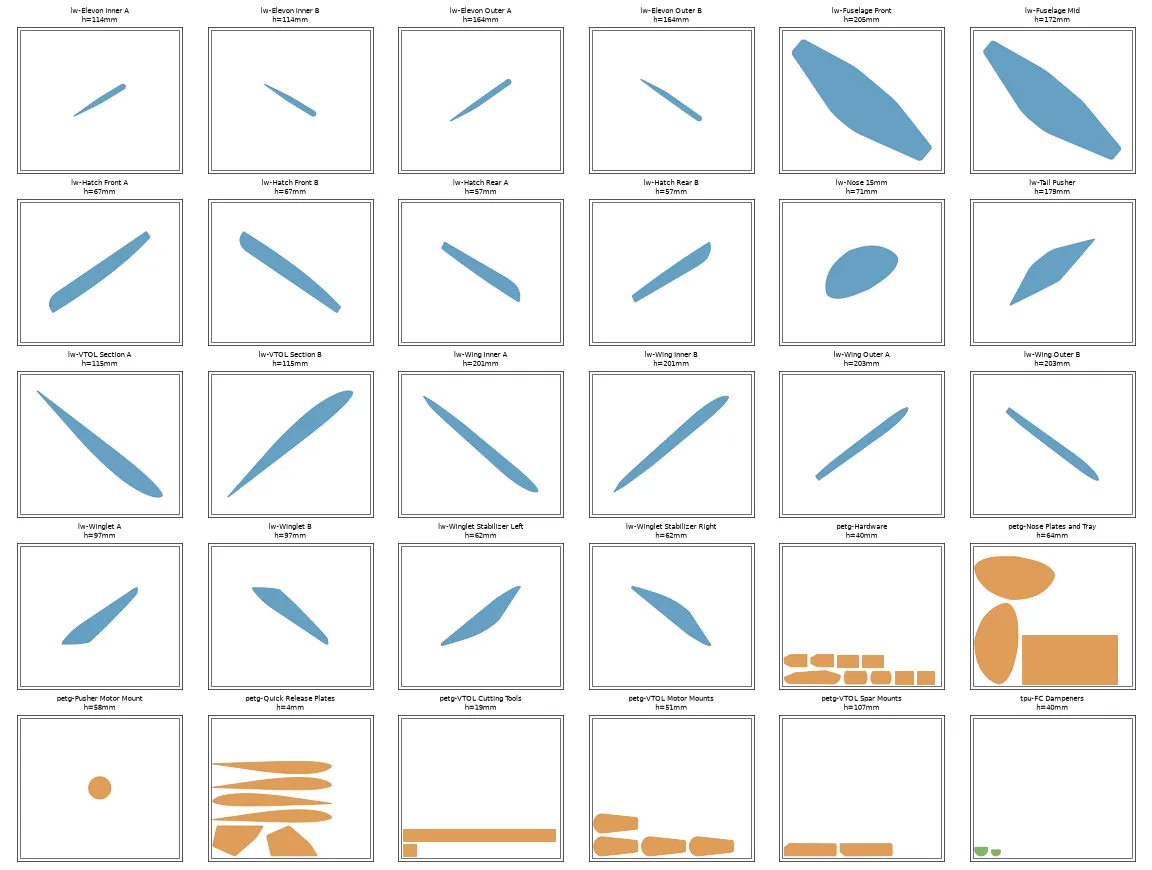
slicing/gcode/*.bgcode: the files that are ready to print. Copy them to USB, or upload them through PrusaLink.slicing/projects/*.3mf: the same plate with all of its settings in the file. To examine or adjust a plate, open it in PrusaSlicer. For example, add the support sphere on the elevon’s outer trailing edge.slicing/summary.txt: the time and the filament for each one-part plate, including parts that are not in the first build.slicing/plates-overview.png: a top view of each plate layout.
The first build’s grouped beds (slicing/summary-survey3.txt, the beds in docs/print-schedule.md):
| Material | Beds | Print time | Filament |
|---|---|---|---|
| PLA Aero | 11 | 79.4 h | 504 g |
| PETG | 7 | 27.0 h | 527 g |
| TPU | 1 | 1.0 h | 11 g |
| Total | 19 | 107.4 h | 1,041 g |
These files use these assumptions:
- HF0.4 nozzle. The Prusa profiles give this model the name “CORE One && CORE One+”.
By default, they set each material to the HF0.4 variant. If your printer has the
standard 0.4 nozzle, change the three
hf04preset files intools/slice_all.py. Then run the script again. The printer gives a warning if the nozzle is different. Thus an incorrect nozzle setting does not print without a warning. - Generic PLA as the base for PLA Aero, with the manual overrides: 220 °C, 0.60 flow, 30% fan, pressure advance off. Prusa does not supply an LW-PLA profile. The weight comes from the density of PLA. This value is correct for the filament that the printer uses, although the part foams.
- Generic PETG and Prusament TPU 95A for the other two materials.
You cannot do these from the command line. Do them in the GUI with the project file:
- The support-enforcer sphere on the outer trailing edge of each
Elevon (one piece). - Height range modifiers, if the tall wing tips are rough.
How the files were made: the PrusaSlicer CLI ignores --printer-profile and does not tell
you. It slices for a generic 200mm printer. It also segfaults when it arranges several
parts on one plate. Thus tools/flatten_preset.py resolves the Prusa presets into plain
files. The slicing script orients, mirrors and arranges the parts itself. Then it sends
them to the slicer.
Source: docs/print-plan.md in the repo. Edit it there; this page is generated.
Comments
Comment on the whole page here, or on one section or step with the button beside it.