Wire the LUX F765 flight controller
This procedure connects the Lumenier LUX F765 NDAA to the first build, Fuselage C v2.4B. It gives the order of the work and the checks. The pad names, port numbers and parameter values are in the LUX F765 tables. This page links to them.
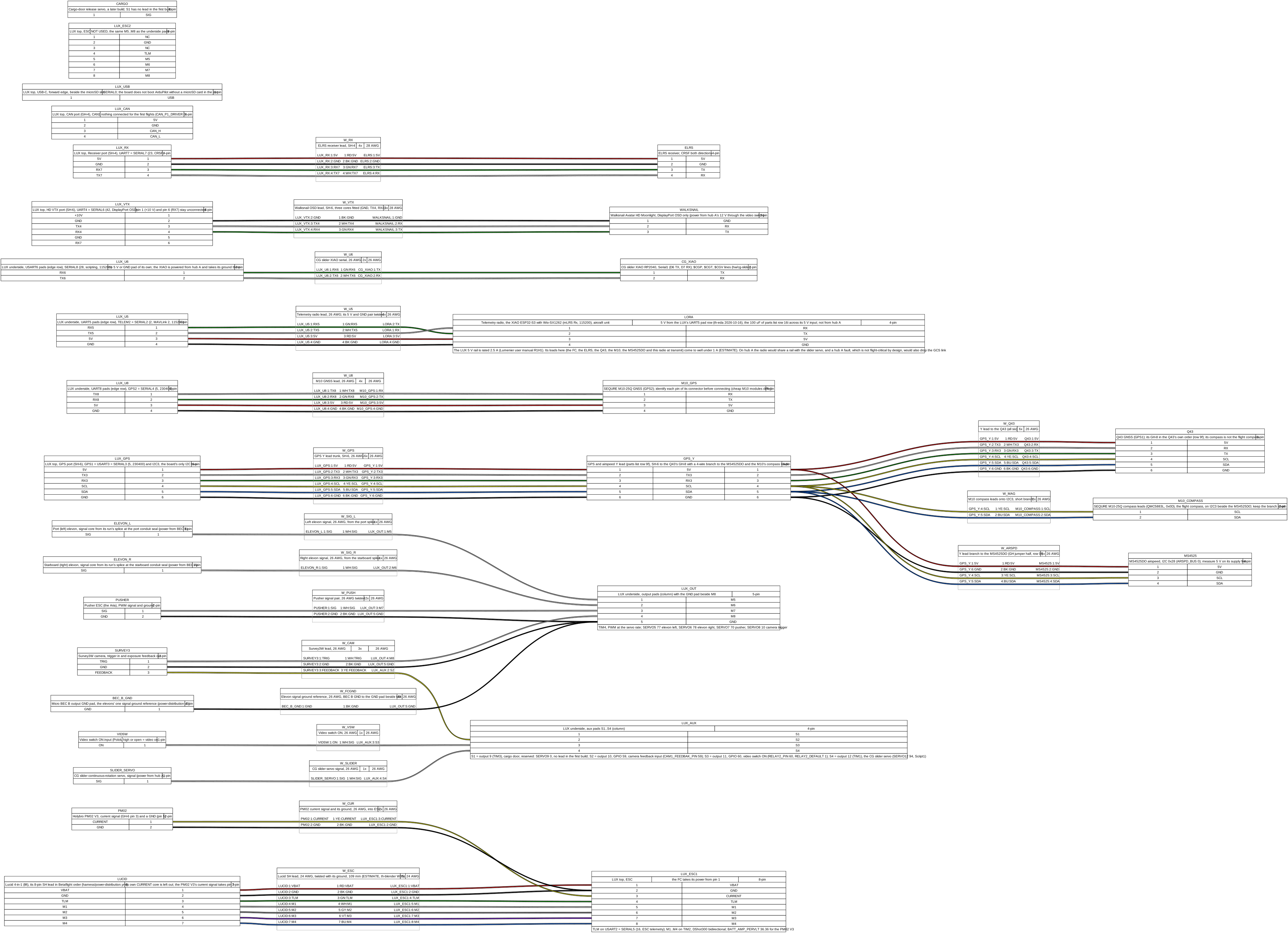
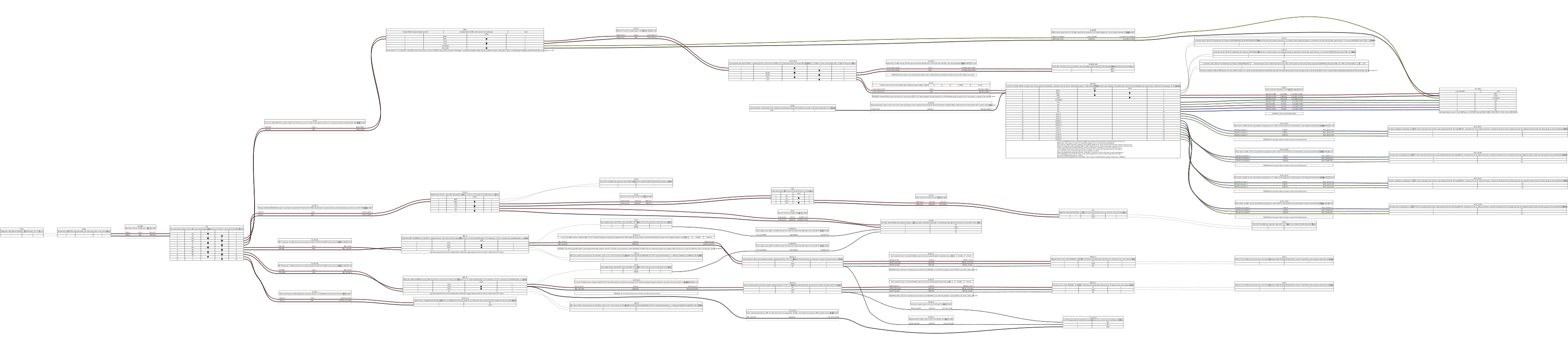
The pads are in th-eda’s drawing LUX F765 pads and ports. The power wiring is in th-eda’s drawing power distribution. Our own FC follows the LUX and gets its own page.
WARNING: Disconnect the pack and remove all props before you work on the harness. A wiring fault can start a motor.
CAUTION: Do not connect the pack until the harness checks before first power-up are complete. Use the XT90 smoke stopper for the first connection.
What you need
Section titled “What you need”- The LUX F765 on its Avionics Plate, with the side-angle USB-C pigtail (parts list row 18).
- A FAT32 microSD card.
- The GPS and airspeed Y lead (parts list row 9f).
- The PM02 V3 (parts list row 9e).
- The two Micro BECs (parts list row 9j).
- A meter with a continuity test.
- The parts list for the leads, connectors and capacitors.
Procedure
Section titled “Procedure”- Put the microSD card in the LUX before you load any firmware. The board does not boot ArduPilot without a card.
- Use FAT32. Format a card of 64 GB or more to FAT32 first.
- The card contents are in the first-flight card, before power-up.
- Install the LUX on the Avionics Plate with the USB-C and microSD edge forward.
- Use one soft stage only: the board’s own grommets.
- Connect the USB-C pigtail. It stays connected to the LUX.
- Make the lead from the Lucid 4-in-1 to the LUX’s ESC #1 connector.
- Read the Lucid’s pin order on its silkscreen. Read the LUX’s order in the ports table.
- Do not connect the Lucid’s own current pin. The PM02 V3 measures the current.
- Put the four motor signals in the middle of the lead, with GND, VBAT and current around them.
- Give the lead a loose twist. Keep it 20 mm or more from the phase leads and the pack feed.
- Do not add series resistors to the motor signals. The ESC sends RPM back on the same wire.
- Measure the ESC #1 lead with the meter before you connect it. Pin 1 must be the pack’s positive, VBAT.
- CAUTION: A reversed lead puts the pack voltage on a 3.3 V signal pin and damages the LUX.
- Connect the PM02 V3 current signal to pin 3 of the ESC #1 connector.
- The PM02 V3 is in the pack feed, before the splice to the Lucid and the pusher ESC. Refer to the power drawing.
- The LUX takes its power from VBAT on pin 1. It makes its own 5 V.
- Until this signal is connected, pin 3 is an open input and the LUX shows a steady current of about 5.5 A (0.152 V at the PM02’s 36.36 A/V; lux-765, 2026-10-22). At the first power-up with the pack, the current must show the avionics’ idle draw. Do the check in step 23 of the first-flight card.
- Connect the motor outputs. The Lucid’s channel order and the motor map are in the outputs table.
- Do not change the order of M1 to M4 in the lead. The motor map in the board file expects it.
- Connect the elevon signal wires to the underside pads: M5 to the port servo, M6 to the starboard servo.
- Do not use the top M5-8 port. It carries the same outputs.
- CAUTION: Do not connect a servo’s 5 V to the LUX. Each servo takes its 5 V from its own Micro BEC.
- Connect one 26 AWG ground reference from BEC B’s GND to the GND pad beside M8 on the underside.
- Make each servo supply run as the servo power rules tell.
- Connect the pusher ESC signal to the M7 pad on the underside, and its ground to the GND pad.
- Connect S3 to the video switch’s ON input, and S4 to the CG slider’s servo signal.
- Leave M8 and S2 unconnected. The Survey3W does not fly on the first flights.
- Leave S1 unconnected. The cargo door is not on the first build.
- Make the GPS and airspeed Y lead (parts list row 9f), and connect it to the GPS port.
- Splice by signal name, not by pin number. The three connectors number their pins differently.
- CAUTION: Measure the sensor board’s SDA and SCL to its 5 V pin before you connect it. Pull-ups to 5 V damage the LUX’s I2C pins.
- Do a continuity test of the finished lead, end to end, before you connect it to the board.
- Connect the M10-25Q GPS to the UART8 underside pads: TX8, RX8, 5V and GND.
- Connect TX8 to the module’s RX, and RX8 to its TX.
- CAUTION: Identify each pin of the module’s connector before you connect it. M10 modules have different pin orders.
- Connect the M10-25Q’s compass lines, SCL and SDA, to the I2C3 lines of the GPS port.
- Keep this branch short. The compass shares the bus with the MS4525DO, on a different address.
- This compass is the only flight compass. The Q43’s compass stays off.
- Connect the telemetry radio, the XIAO ESP32-S3 with its Wio-SX1262, to the TELEM2 underside pads.
- Connect TX5 to the radio’s RX, and RX5 to its TX.
- Connect the radio’s 5 V and GND to the 5V and GND pads of the same row. Twist this pair.
- Fit the 100 uF capacitor (parts list row 16i) across the radio’s 5 V input.
- Do not supply the radio from hub A. A hub A fault must not also stop the GCS link.
- Connect the ELRS receiver to the receiver port: 5 V, GND, RX7 and TX7.
- Connect the receiver’s TX to RX7 and its RX to TX7.
- Connect the video unit’s OSD lines to the HD VTX port: TX4, RX4 and GND only.
- CAUTION: Do not connect pin 1. That rail cannot supply the video unit. Hub A supplies it at 12 V.
- CAUTION: Do not connect the video unit’s SBUS wire to pin 6. Pin 6 is the receiver’s RX7.
- Connect the CG slider’s XIAO RP2040 to the USART6 underside pads, TX6 and RX6, and GND.
- Connect TX6 to the XIAO’s RX, and RX6 to its TX.
- The XIAO takes its 5 V from hub A. Do not take it from the LUX.
- Leave the CAN port unconnected for the first flights.
- The night build uses it for the lights node. Refer to the first-flight card, the night build.
- Do the harness checks before first power-up.
- Do the scripting memory check if the scripts or the board file changed since the last check.
- Continue with the first-flight card, bench checks, propellers off.
Related drawings
Section titled “Related drawings”- LUX F765 pads and ports by th-eda. It shows each pad and port that this page uses.
- Power distribution, version 5 by th-eda. It shows the power path from the pack to the Micro BECs, the Lucid and the LUX.
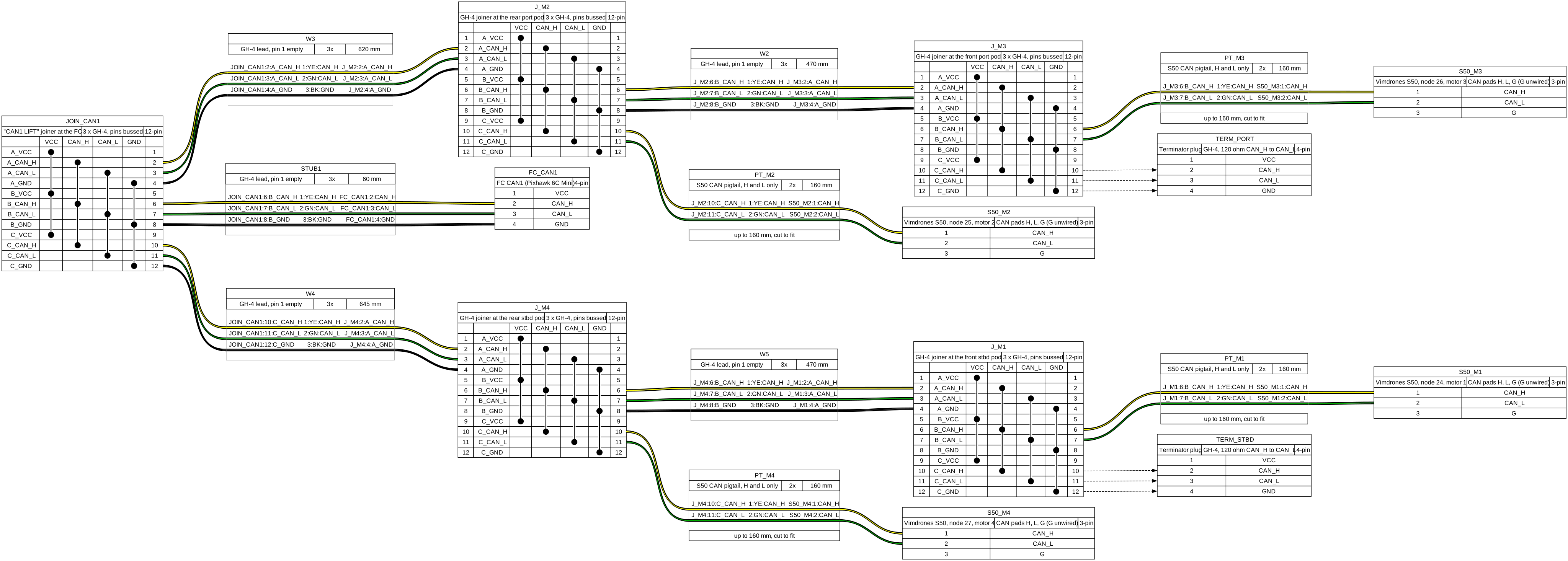
- CAN bus 1, lift, first phase, for a later build.
- CAN bus 1, lift, for a later build.
- CAN bus 2, for a later build. The first flights fly with CAN off.


Source: docs/wire-the-lux.md in the repo. Edit it there; this page is generated.
Comments
Comment on the whole page here, or on one section or step with the button beside it.